
Adobe Express Social Media Scheduler: Features, Pricing & Benefits
Adobe Express Social Media Scheduler offers powerful tools to plan, schedule, and manage posts efficiently across multiple platforms with flexible pricing op...


The Adobe Express social media scheduler is an integrated tool for creating, planning, previewing, and publishing social content from one workspace. It supports major networks, offers a visual content calendar, and connects publishing directly to Adobe Express’s design tools. The free plan is suitable for individual creators managing one account per network, while Premium and business plans expand account capacity, creative assets, brand controls, and collaboration features. This Adobe Express scheduler review explains what the platform does well, where it has limitations, how much it costs, and whether it fits your marketing workflow.
What Is the Adobe Express Social Media Scheduler? | Core Features and Day-to-Day Workflow | Design, Brand, and Content-Creation Benefits | Adobe Express Pricing and Plan Comparison | Supported Networks and Integration Possibilities | Advantages and Limitations: An Adobe Express Scheduler Review | How to Build an Effective Adobe Express Scheduling Workflow | Who Should Use Adobe Express Content Scheduler? | Frequently Asked Questions
What Is the Adobe Express Social Media Scheduler?
Adobe calls its scheduling feature Content Scheduler. It sits inside Adobe Express, the company’s browser-based and mobile content creation platform. Instead of designing a post in one application, exporting it, and uploading it to a separate publishing tool, marketers can move from creation to scheduling without leaving the Adobe Express environment.
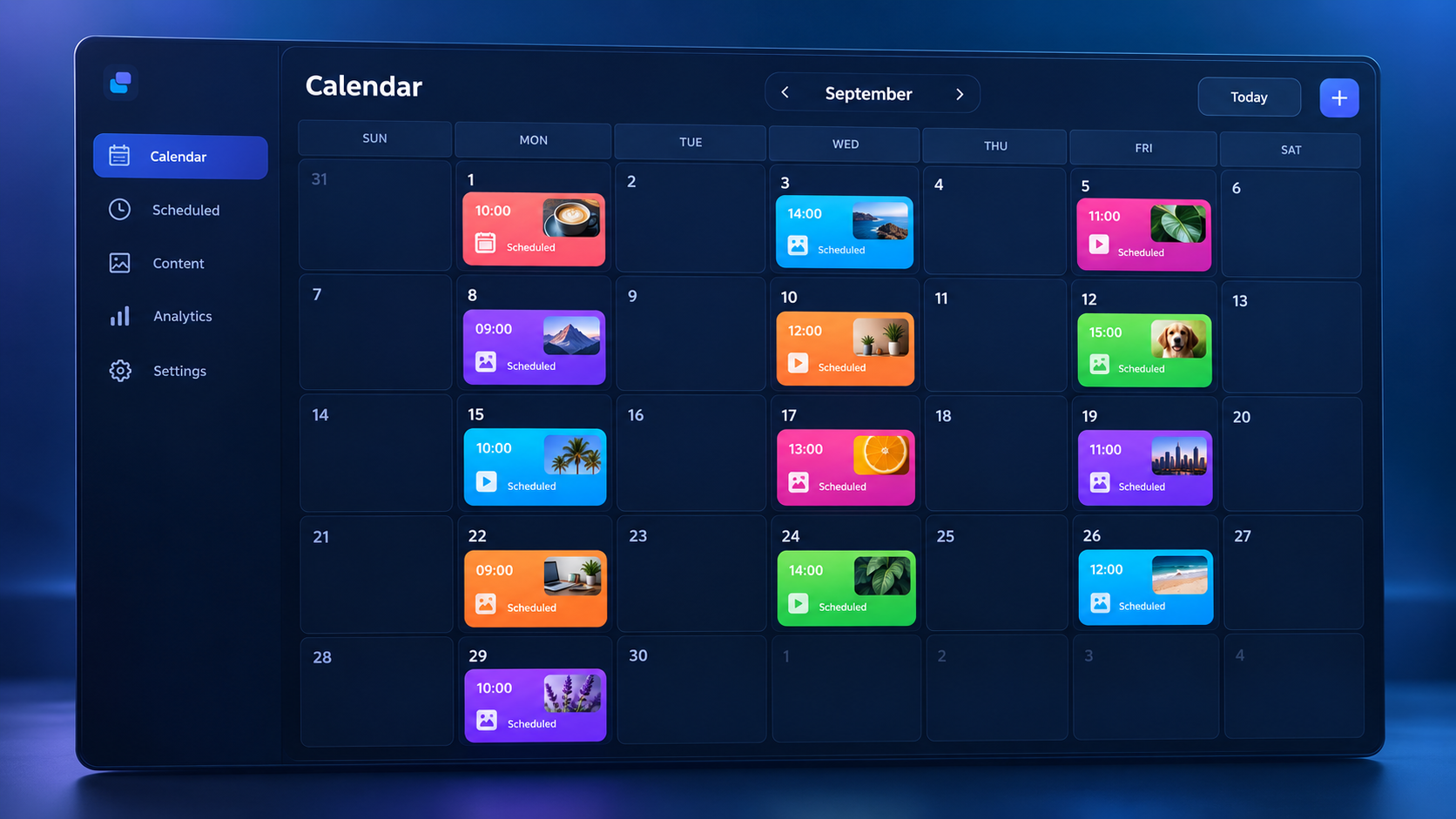
The scheduler provides a calendar where users can prepare drafts, review upcoming posts, select publishing dates, and see how a campaign is distributed over time. A post can be published immediately or scheduled for a future date and time. This combination makes the product particularly appealing to creators, freelancers, and small marketing teams that want a straightforward workflow rather than a complex enterprise social media management suite.
Adobe Express currently supports direct connections to Facebook, Instagram for business, LinkedIn, TikTok, Pinterest, YouTube, and X. Available formats and publishing options vary by network. For example, Instagram publishing requires a business account, while connecting a LinkedIn company page requires the user to have the appropriate administrative access.
The defining advantage is proximity to Adobe Express’s editor. Templates, stock media, animations, video tools, resizing, brand assets, and generative AI features are available close to the publishing workflow. That makes social media scheduling in Adobe Express less about managing conversations and more about efficiently producing and distributing visual content.

Core Features and Day-to-Day Workflow
The Content Scheduler uses a visual calendar to organize scheduled posts and drafts. Marketers can examine upcoming content by date, identify gaps, and spread campaign assets across the week or month. This is simpler than maintaining a disconnected spreadsheet because the calendar entries contain the actual creative files, captions, channels, and publishing settings.
A typical workflow begins in one of two places. You can open the scheduler, create a draft post, and attach media, or begin with a design in the Adobe Express editor and select the scheduling option from the sharing menu. You then choose connected channels, add a caption, attach or confirm the media, select a date and time, and schedule the post. Adobe Express also allows immediate publishing when no delay is required.
Useful scheduling and publishing capabilities include:
- Publishing to several selected social channels from one post workflow.
- Previewing content before it appears on a live profile.
- Saving incomplete posts as drafts for later editing or approval.
- Adding alt text to visual assets to improve accessibility.
- Adding supported social mentions directly within captions.
- Selecting or uploading a cover for an Instagram Reel.
- Using AI-assisted caption writing on eligible plans and experiences.
- Creating channel-specific versions by duplicating and adapting a post.
Cross-posting is convenient, but experienced marketers should avoid sending an identical message everywhere. Each network has different expectations for caption length, hashtags, calls to action, image dimensions, and tone. A better process is to create a master asset, resize or reformat it, duplicate the draft, and then tailor each version for its destination.
Technical limits also depend on the receiving network. Instagram, for instance, has its own attachment, aspect-ratio, and caption requirements, while Pinterest distinguishes between titles and descriptions. Adobe publishes a current media-specifications guide, which is worth checking before building a high-volume campaign. Designing to platform requirements early prevents failed posts and last-minute cropping problems.
Design, Brand, and Content-Creation Benefits
The strongest reason to choose the Adobe Express social media scheduler is not the calendar by itself. It is the connection between that calendar and a capable creative toolkit. Adobe Express includes templates for posts, Stories, Reels, short videos, advertisements, and other marketing formats. A user can customize a template, replace its imagery, animate elements, adjust copy, and send the finished asset into the scheduling workflow.
Premium users gain access to a much larger collection of Adobe Stock assets and Adobe Fonts, along with time-saving features such as one-click Resize. Resize is especially practical for campaigns that require a vertical Story, a square feed post, and a landscape LinkedIn graphic. Although automatic resizing still requires a visual quality check, it can eliminate much of the repetitive setup involved in rebuilding layouts.
Brand kits help creators keep colors, fonts, logos, and visual styles consistent. For an agency or in-house marketer, this reduces the risk of publishing off-brand content when deadlines are tight. Business-oriented plans extend that concept through shared assets, template controls, and administrative tools.
Adobe Express also incorporates Firefly-powered generative features. Depending on the plan and current product availability, marketers can generate or modify imagery, explore text effects, remove backgrounds, and draft captions. These tools work best as production accelerators rather than replacements for strategy. Every generated asset and caption should still be checked for factual accuracy, brand fit, visual anomalies, and appropriate usage rights.
The integrated process is most valuable when a small team spends more time making content than analyzing social conversations. A creator can move through ideation, design, adaptation, captioning, accessibility review, and scheduling in a relatively compact workflow. Fewer exports and application switches also mean fewer opportunities to upload an outdated file.

Adobe Express Pricing and Plan Comparison
Adobe Express offers Free, Premium, Teams, and enterprise-oriented options. Prices, promotions, taxes, and included features can vary by country and may change, so buyers should confirm current terms on the official Adobe Express pricing page. At the time of this review, the standard US individual pricing page lists Adobe Express Free at $0 and Adobe Express Premium at $9.99 per month with no annual commitment.
| Plan | Scheduler capacity | Best suited to | Notable benefits |
|---|---|---|---|
| Free | One account per social network | Solo creators and users testing the workflow | Basic scheduling, standard editing tools, limited templates and assets, 5GB storage |
| Premium | Three accounts per social network | Professional creators, freelancers, and small brands | Premium templates, larger stock and font libraries, brand kits, one-click Resize, 100GB storage |
| Teams | Three accounts per social network | Marketing teams and agencies needing governance | Shared creative resources, brand controls, administration, pooled organizational storage, longer version history |
| Enterprise | Plan-dependent business configuration | Large organizations with security and procurement requirements | Advanced identity, security, asset, support, and purchasing options |
The Free plan is unusually useful for evaluating the complete create-to-publish process. One account per network may cover a freelancer’s personal brand or a small company with a single profile on each platform. It is also sufficient for establishing templates, testing publication reliability, and deciding whether the calendar matches the team’s habits.
Premium becomes worthwhile when the creative features save more time than the subscription costs. Its three-account allowance per social network can accommodate several brands, regional profiles, or client accounts, although an agency with a large client roster will quickly exceed that capacity. Premium’s biggest gains are the expanded assets, fonts, storage, brand tools, generative credits, and resizing capabilities rather than scheduling alone.
Teams is a better fit when ownership, consistency, shared calendars, and employee transitions matter. Businesses should compare the number of seats, shared calendar limits, storage, brand-control requirements, and administrative capabilities before purchasing. Creative Cloud subscribers should also check their existing entitlement because some Creative Cloud plans include Adobe Express Premium features.

Supported Networks and Integration Possibilities
Adobe Express connects directly to leading social channels rather than relying only on file exports. Supported destinations include Facebook, Instagram for business, LinkedIn profiles and company pages, TikTok, Pinterest, YouTube, and X. Connecting an account requires signing in to the social network and granting Adobe Express the requested permissions.
Permissions deserve operational attention. Adobe notes that social connections can expire and may need to be reauthorized. A sensible campaign checklist therefore includes verifying connections several days before a major launch. The person connecting a page must also hold the necessary role, such as appropriate page administration rights or LinkedIn Super Admin access for a company page.
Integration with the wider Adobe ecosystem is another advantage. Express can complement workflows involving Photoshop, Illustrator, Lightroom, Premiere Pro, or Creative Cloud Libraries. A designer might prepare a source asset in a specialist application and then use Express for variations, brand-safe templates, quick resizing, and scheduling. This division of labor retains professional creative control without making every routine social post a full production project.
For reporting, Adobe Express should not automatically be treated as a complete social analytics platform. Adobe lists a Metricool add-on for expanded social metrics, competitive insights, and downloadable reports in relevant business offerings. Marketers should confirm availability and cost for their region and plan. Native network analytics or a dedicated social media intelligence platform may still be needed for detailed attribution, social listening, inbox management, competitor benchmarking, and campaign ROI analysis.
Advantages and Limitations: An Adobe Express Scheduler Review
The scheduler’s clearest advantage is efficiency. Marketers can create and distribute assets in the same environment, reducing downloads, duplicated files, and handoffs. The interface is approachable, and the free tier lowers the barrier to testing. Adobe’s templates and visual tools also make the product accessible to users who do not have extensive design training.
Other notable benefits include multi-channel publishing, a visual calendar, draft management, accessibility support through alt text, brand consistency tools, and convenient resizing. For creators whose workflow is primarily visual, these capabilities address a large portion of daily production needs.
There are important limitations. Account allowances are modest compared with agency-focused scheduling platforms. Advanced approval chains, social listening, unified inbox management, employee advocacy, deep analytics, and sophisticated evergreen queues are not the central strengths of Adobe Express. Platform-specific publishing restrictions still apply, and not every native social feature can necessarily be reproduced through a third-party scheduler.
Connection maintenance is another practical consideration. Authorization can expire, page roles may change, and social networks can revise their APIs. No scheduler should be treated as entirely “set and forget.” Teams should assign someone to review failed-post notifications, validate account connections, and confirm that priority campaign posts actually went live.
Overall, this Adobe Express scheduler review finds the product strongest for individuals and small teams that create visual assets frequently and want lightweight scheduling included with design software. Larger social operations may prefer to use Adobe Express as the creation layer and a specialist platform for approvals, engagement, analytics, and publishing at scale.
How to Build an Effective Adobe Express Scheduling Workflow
Begin with a simple content framework rather than immediately filling every calendar slot. Define three to five content pillars, such as education, product value, customer proof, community, and behind-the-scenes material. Assign each pillar a realistic frequency and match it to the networks where it is most relevant.
Next, create reusable templates for recurring formats. Establish locked or clearly documented positions for logos, headlines, calls to action, and photography. Prepare common output sizes, then use Resize as a starting point for channel adaptations. Always inspect the result: automatic resizing may move text, crop a subject, or weaken the composition.
For each scheduled post, use a quality-control checklist:
- Confirm that the creative matches the destination’s current media specifications.
- Rewrite the caption for the audience and conventions of that channel.
- Check links, dates, product claims, prices, names, and promotional conditions.
- Add meaningful alt text rather than repeating the caption.
- Review tags, mentions, hashtags, thumbnail frames, and Reel covers.
- Verify the publishing time zone and connected account.
- Preview the post before scheduling it.
- Check publication status after the scheduled time.
Plan content in batches, but preserve room for timely posts. A practical balance is to schedule evergreen and campaign material one or two weeks ahead while leaving open slots for product news, trends, community responses, or unexpected opportunities. Batch production creates efficiency; calendar flexibility keeps the brand relevant.
Finally, separate creation metrics from business results. The scheduler can reduce production time and improve consistency, but successful social media scheduling with Adobe still depends on measuring reach, watch time, saves, clicks, leads, and conversions in the appropriate analytics tools. Review results regularly and feed those insights back into the next batch of templates and topics.
Who Should Use Adobe Express Content Scheduler?
Adobe Express is a strong choice for solo creators, local businesses, consultants, nonprofit communicators, and lean marketing teams. It is especially compelling when one person is responsible for both design and publishing. These users benefit more from an integrated creative workflow than from enterprise-level listening or customer-service features.
Freelancers can also use it to maintain their own profiles or support a small number of client accounts. However, the three-account-per-network limit on Premium deserves careful consideration. If every client has profiles on the same networks, capacity can be consumed quickly.
Established Adobe users are another natural audience. If a Creative Cloud subscription already provides access to Premium capabilities, Adobe Express may replace a basic standalone scheduling subscription. Teams should test it with a representative campaign before migrating, paying particular attention to account limits, approvals, reporting, and platform-specific formats.
It is less suitable as the sole solution for large agencies, global brands, or support teams that need dozens of accounts, complex permission structures, comprehensive comment management, listening, crisis monitoring, or advanced reporting. In those environments, Adobe Express can still be valuable for content creation while a dedicated social suite manages operations.
Frequently Asked Questions
Is the Adobe Express social media scheduler free?
Yes. Adobe Express Free includes content scheduling for one account per supported social network. This is enough for many individual creators and small businesses. Premium increases the allowance to three accounts per social network and adds broader creative, brand, storage, and resizing capabilities. Always verify current plan details and regional pricing before subscribing.
Which social networks work with Adobe Express Content Scheduler?
Adobe lists support for Facebook, Instagram for business, LinkedIn, TikTok, Pinterest, YouTube, and X. Supported media formats and technical limits differ by platform. Account permissions also matter: for example, Instagram requires an eligible professional connection, and company-page connections may require administrator privileges.
Can Adobe Express replace a dedicated social media management platform?
It can replace a basic scheduler for creators and small teams focused on producing and publishing visual content. It is less likely to replace specialist software when a business needs advanced approvals, a unified engagement inbox, social listening, extensive account capacity, detailed competitor analysis, or complex performance reporting.
Can I schedule the same post to multiple platforms?
Yes, Adobe Express supports selecting multiple connected channels in the publishing workflow. However, marketers should customize captions, dimensions, tags, and calls to action for each network whenever possible. Duplicating a draft and adapting it usually produces better results than publishing an identical post everywhere.