
Best Practices and Tools for Uploading to All Social Media at Once
Efficiently upload content to all social media platforms simultaneously using top tools and best practices to save time and boost your online presence.


To upload to all social media at once, use a social media scheduler that connects your accounts, adapts content for each platform, and publishes or queues posts from one central dashboard. The right workflow can save hours every week while keeping campaigns consistent across Instagram, Facebook, LinkedIn, TikTok, Pinterest, and other channels. However, effective cross-platform publishing requires more than copying the same caption everywhere: marketers must account for platform-specific formats, audiences, features, and posting rules.
Why Publish to Multiple Social Networks from One Place? | How Social Media Scheduling Tools Work | How to Choose the Right Social Media Scheduler | Build a Reliable Cross-Platform Publishing Workflow | Adapt Content Instead of Posting Identical Copies | Schedule Posts at the Right Time | Prevent Common Multi-Platform Publishing Mistakes | Measure Results and Improve the Process | Frequently Asked Questions | Turn Cross-Platform Scheduling into a Competitive Advantage
Why Publish to Multiple Social Networks from One Place?
Managing social media manually becomes increasingly inefficient as a brand expands its channel mix. A marketer might need to upload a video to TikTok, publish a Reel on Instagram, create a Facebook post, adapt the message for LinkedIn, and schedule a shorter version for another network. Repeating these steps in separate apps creates unnecessary work and increases the risk of mistakes.
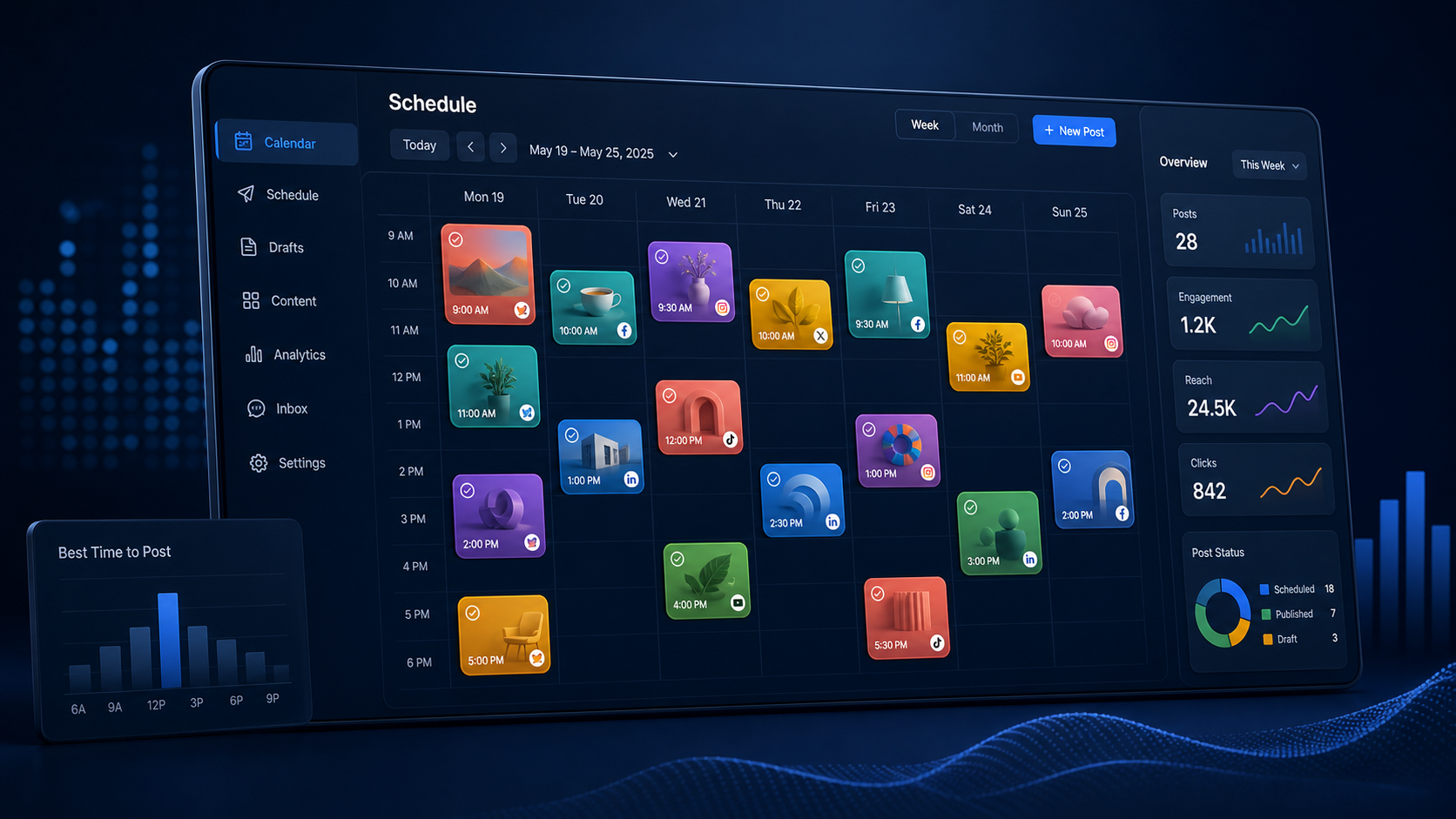
Centralized publishing replaces this fragmented process with a single content workflow. You prepare the core post once, select the relevant accounts, customize each version, and choose when it should appear. A post scheduling app can then publish automatically or send a reminder when a platform requires a final manual step.
This approach offers several practical advantages:
- Faster production: Teams spend less time switching between accounts, devices, and browser tabs.
- Consistent messaging: Campaign themes, offers, links, and visual assets remain aligned across channels.
- Better timing: Posts can be prepared in advance and released when each audience is most active.
- Fewer missed posts: A shared calendar makes publishing gaps and scheduling conflicts easier to identify.
- Simpler collaboration: Writers, designers, clients, and approvers can work from one content plan.
- More reliable tracking: Centralized records make it easier to review what was published and when.
The objective is not to make every account identical. It is to centralize production while preserving the native character of each network. Strong cross-platform publishing combines operational efficiency with thoughtful adaptation.

How Social Media Scheduling Tools Work
Social media scheduling tools connect to business pages, creator profiles, groups, channels, or other supported destinations through official platform integrations. Once an account is connected and authorized, the scheduler can prepare content for publication according to the permissions available for that network.
A typical workflow begins with a composer. The user uploads an image, video, carousel, or other asset; writes a caption; adds links or hashtags; selects several profiles; and chooses a publishing time. More advanced tools provide separate editing fields for each destination, allowing one campaign to produce multiple platform-ready versions without creating every post from scratch.
The content then enters a queue or calendar. At the scheduled time, the service either publishes automatically or sends a notification for manual completion. Automatic publishing is the most convenient option, but it is not available for every post type or account configuration. Certain interactive features, music options, stickers, product tags, collaboration settings, or newly released formats may still need to be added inside the native platform.
Account permissions also matter. A scheduler may require a professional or business profile, administrator access, or a connection between related platform accounts. Authentication tokens can expire when passwords change, permissions are revoked, or a social network updates its security requirements. For that reason, account connection status should be checked regularly, especially before major launches.
A useful social media scheduler should make these limitations visible. Clear warnings about unsupported formats, expired connections, file specifications, and failed posts help teams correct problems before they affect a campaign.
How to Choose the Right Social Media Scheduler
The best tool is not necessarily the one with the longest feature list. It is the one that supports your actual channels, content formats, publishing volume, and approval process. Start by documenting what your team needs to publish during a normal month.
Check platform coverage in detail rather than relying on a row of social network logos. A tool might support basic image posts on a network but not carousels, short-form videos, first comments, thumbnails, location tags, or other features essential to your strategy. Confirm whether publishing is automatic and whether the required account type is supported.
Evaluate the following capabilities before choosing a service:
- Multi-network customization: Can captions, links, media, times, and formats be adjusted separately?
- Visual calendar: Is it easy to see campaigns, gaps, recurring themes, and scheduling collisions?
- Bulk scheduling: Can multiple posts be imported or created efficiently for larger campaigns?
- Media handling: Does the tool check aspect ratios, file sizes, video duration, and resolution?
- Approval workflows: Can stakeholders review drafts without receiving full account access?
- Team permissions: Can administrators control who creates, edits, approves, and publishes content?
- Analytics: Are results available at the account, post, campaign, and channel levels?
- Reliability alerts: Will the system quickly report failed posts or disconnected profiles?
- Asset organization: Can reusable images, videos, captions, and campaign materials be stored clearly?
Pricing should be evaluated against the number of connected accounts, users, scheduled posts, approval seats, and reporting features. A low entry price may become less attractive if essential functions require multiple upgrades. Use a trial period to reproduce your real workflow instead of testing only a few simple posts.
SMMplanner and comparable social media scheduling tools are most valuable when they remove repetitive publishing work without forcing a team into a rigid process. Test the complete path from draft creation to publication and reporting before committing to a long-term plan.

Build a Reliable Cross-Platform Publishing Workflow
A tool can automate distribution, but it cannot replace a clear editorial process. Before you upload to all social media at once, define a repeatable workflow covering planning, production, adaptation, approval, scheduling, and quality control.
Begin with a master content brief. It should identify the campaign objective, audience, key message, offer, call to action, required links, visual direction, and success metric. This brief becomes the shared source of truth for every platform version.
Next, produce a strong core asset or idea. For example, a product demonstration might begin as a vertical video with clean footage, captions, and a concise narrative. The same concept can then support a shorter clip, a carousel, a professional text post, or a static image. Repurposing the idea is more effective than mechanically duplicating the same file everywhere.
Create a platform adaptation checklist for each channel. Record preferred aspect ratios, caption style, link placement, hashtag conventions, thumbnail requirements, and brand voice. This prevents team members from relying on memory and makes onboarding easier.
Use content pillars to maintain variety. A practical weekly mix might include educational content, customer proof, product information, behind-the-scenes material, community engagement, and promotional posts. Label these categories in the calendar so an overly promotional or repetitive schedule is visible immediately.
Finally, assign ownership. Every scheduled post should have a creator, reviewer, approval status, publication time, and campaign label. Ambiguous ownership is one of the most common reasons posts remain in draft form or go live with outdated information.
Adapt Content Instead of Posting Identical Copies
Uploading to several networks simultaneously does not mean every post should look and sound the same. Audiences use platforms with different expectations. A concise, entertaining caption may suit a short-form video network, while a professional network may reward context, analysis, or a practical lesson.
Start with the opening line. On fast-moving feeds, the first sentence or on-screen text must communicate immediate value. For a professional audience, a specific observation or result can establish credibility. On visually driven platforms, the image or video should carry the hook before the caption expands on it.
Adjust calls to action according to platform behavior. “Read the full guide through the link” may work where clickable links are supported, while “Save this checklist” or “Comment with your biggest challenge” may be more appropriate elsewhere. Avoid directing users to features that are unavailable on the network where they see the post.
Media should also be adapted. Cropping a landscape image into a vertical frame can hide important text or products. A horizontal video may technically upload but occupy too little screen space to perform well. Keep editable source files and create reusable export presets for the formats your team publishes most frequently.
Be selective about hashtags, mentions, and platform-specific language. An account handle may belong to a different person on another network, and excessive hashtags can make a carefully written post appear automated. Review each destination’s version before scheduling, even when the campaign originates from one master post.

Schedule Posts at the Right Time
There is no universal best time to publish across every social network. Audience location, industry, content type, time zone, and customer routine all influence performance. Generic benchmarks can provide a starting point, but your account data should guide long-term decisions.
Review when followers are active and compare that information with post-level results. Look for patterns across several weeks rather than drawing conclusions from one unusually successful post. Engagement rate, clicks, watch time, saves, leads, and conversions may peak at different times.
A good post scheduling app should allow each platform version to use a separate publishing time. This is important when the same campaign serves distinct audiences. A business audience may respond during working hours, while entertainment-focused content may perform better later in the day.
Avoid publishing every cross-platform post at precisely the same minute unless the campaign requires a coordinated launch. Staggering posts can help community managers respond to early comments, spot errors, and give each audience appropriate attention. It also reduces pressure if an account connection fails.
Leave room for real-time content. A calendar filled months in advance can become inflexible when industry news, customer questions, or cultural moments create better opportunities. A practical schedule balances evergreen posts with space for relevant, timely communication.
Prevent Common Multi-Platform Publishing Mistakes
Automation magnifies both good preparation and careless errors. A broken link, incorrect date, or misplaced tag can reach several audiences before anyone notices. Build a final quality-control step into every campaign.
Preview each version on both desktop and mobile when possible. Check that text is readable, important visual elements remain inside safe areas, captions are not truncated at an awkward point, and links lead to the intended page. Verify dates, prices, discount codes, legal language, and calls to action.
Watch for duplicated watermarks and recycled content indicators. A video exported directly from one platform may include interface elements or branding that looks out of place elsewhere. Store a clean master file and publish platform-specific exports from that source.
Do not ignore accessibility. Add accurate subtitles to videos, use legible color contrast, write descriptive alternative text where supported, and avoid placing essential information only inside a graphic. Accessible content improves usability for a wider audience and often makes the message clearer for everyone.
Set up failure notifications and assign someone to monitor them. A post marked as “scheduled” is not necessarily published. Account disconnections, processing errors, unsupported media, or platform outages can interrupt delivery. Review the publication log after important campaigns go live.
Security deserves equal attention. Give users only the permissions they need, remove former employees and contractors promptly, enable multi-factor authentication, and conduct periodic account-access reviews. Centralized scheduling should reduce credential sharing, not create another unsecured access point.
Measure Results and Improve the Process
Efficiency is only useful when the resulting content supports marketing goals. Track both publishing performance and workflow performance to understand whether your scheduling system is genuinely helping.
For content performance, measure metrics that align with the campaign objective. Awareness campaigns may prioritize reach, impressions, video completion, or profile visits. Engagement campaigns may focus on comments, shares, saves, and meaningful responses. Conversion campaigns should track qualified clicks, sign-ups, leads, purchases, or revenue.
Compare platforms carefully. A thousand views on one network may not represent the same level of attention or intent as a thousand views on another. Use channel-specific metrics for optimization, then connect them to shared business outcomes when evaluating the campaign as a whole.
For workflow performance, monitor production time, approval time, publishing failures, missed deadlines, and the percentage of content scheduled in advance. If a new social media scheduler reduces publishing time but creates frequent formatting problems, the apparent efficiency gain may not be real.
Hold a short monthly review. Identify which formats performed best, which posts required manual intervention, where approvals became delayed, and which repetitive tasks could be standardized. Update your checklists and templates based on these findings. Over time, the system should become easier to operate and more responsive to actual audience behavior.
Frequently Asked Questions
Can I upload to all social media at once?
Yes. A multi-platform social media scheduler can connect supported accounts and publish or schedule several versions of a post from one dashboard. Coverage varies by platform, account type, and content format, so some posts may require a notification and final manual publication.
Should I use the same caption on every social network?
Usually not. Keep the central message consistent, but adapt the hook, length, tone, hashtags, link placement, and call to action for each audience. Customizing captions makes the content feel native and prevents platform-specific instructions from appearing in the wrong place.
What is the most important feature in a post scheduling app?
Reliable support for your required platforms and formats is the priority. After that, look for per-network customization, calendar planning, previews, approval workflows, failure alerts, team permissions, and useful analytics. The best feature set is the one that matches your real publishing process.
How far in advance should social media posts be scheduled?
Many teams benefit from preparing evergreen and campaign content one to four weeks ahead while keeping part of the calendar open for timely posts. Review all scheduled material before publication to catch changes in offers, dates, links, inventory, or external context.
Turn Cross-Platform Scheduling into a Competitive Advantage
The ability to upload to all social media at once can transform an overloaded publishing routine into an organized marketing system. The greatest gains come from combining the right software with a disciplined workflow: plan centrally, adapt by platform, schedule strategically, verify every version, and learn from performance data.
Choose social media scheduling tools based on practical compatibility rather than feature count alone. A dependable social media scheduler should save production time, clarify ownership, protect brand consistency, and still give marketers enough flexibility to create native experiences for each audience.
Start with one campaign, document the steps that work, and convert them into reusable briefs, templates, presets, and checklists. Once the process is stable, scaling to more accounts and higher publishing volumes becomes far easier—and your team can spend less time copying posts and more time creating content people genuinely want to see.