
Best Ways to Schedule Social Media Posts: Strategies and Tools
Effective social media scheduling boosts engagement and saves time by using the right strategies and tools tailored for your content needs.


The best way to schedule social media posts is to combine a goal-driven content calendar, platform-specific publishing times, a reliable scheduling tool, and regular performance reviews. Instead of posting manually or filling a queue without a plan, organize content around audience needs, campaign objectives, and realistic production workflows. Effective social scheduling saves time, improves consistency, and gives every post a better chance of reaching the right people when they are ready to engage.
Build a Social Media Scheduling Strategy Before Choosing a Tool | Create a Content Calendar That Connects Planning and Production | Schedule Posts for the Right Times, Not Generic “Best Times” | Choose a Social Media Post Scheduler That Fits Your Workflow | Adapt Every Scheduled Post to Its Platform | Use Approval Workflows Without Slowing Down Publishing | Measure Performance and Improve the Schedule | Common Social Scheduling Mistakes to Avoid | Frequently Asked Questions
Build a Social Media Scheduling Strategy Before Choosing a Tool
A social media post scheduler can automate publishing, but it cannot decide what your audience needs or how each post supports your marketing goals. Begin by defining the purpose of your social presence. You may want to generate leads, increase brand awareness, build a community, drive website traffic, support product launches, or retain customers. Your objectives determine what you should publish, where you should publish it, and which metrics deserve attention.
Turn each objective into several content pillars. A software company, for example, might use educational tutorials, product demonstrations, customer stories, industry commentary, and behind-the-scenes culture as its main pillars. A creator could organize content around practical tips, personal experiences, community conversations, collaborations, and promotional offers. Four to six pillars are usually enough to provide variety without making the editorial process difficult to manage.
Next, assign an approximate percentage of your publishing capacity to each pillar. A practical starting point is to make most posts educational, entertaining, or community-focused, while reserving a smaller share for direct promotion. The exact balance depends on your business model and audience maturity. An established retail brand can publish offers more frequently than a consultant who must first earn trust through expertise.
Map these pillars to a weekly rhythm. You might publish an educational carousel on Monday, a short video on Wednesday, a customer story on Thursday, and an interactive question on Friday. This rhythm should guide production rather than become an inflexible rule. Leave room for timely conversations, industry developments, user-generated content, and creative ideas that emerge during the week.
Finally, set a sustainable posting frequency. Consistency matters more than an ambitious schedule that exhausts your team after one month. Start with the number of high-quality posts you can reliably create, approve, and respond to. Increase frequency only when your workflow and performance data justify it.

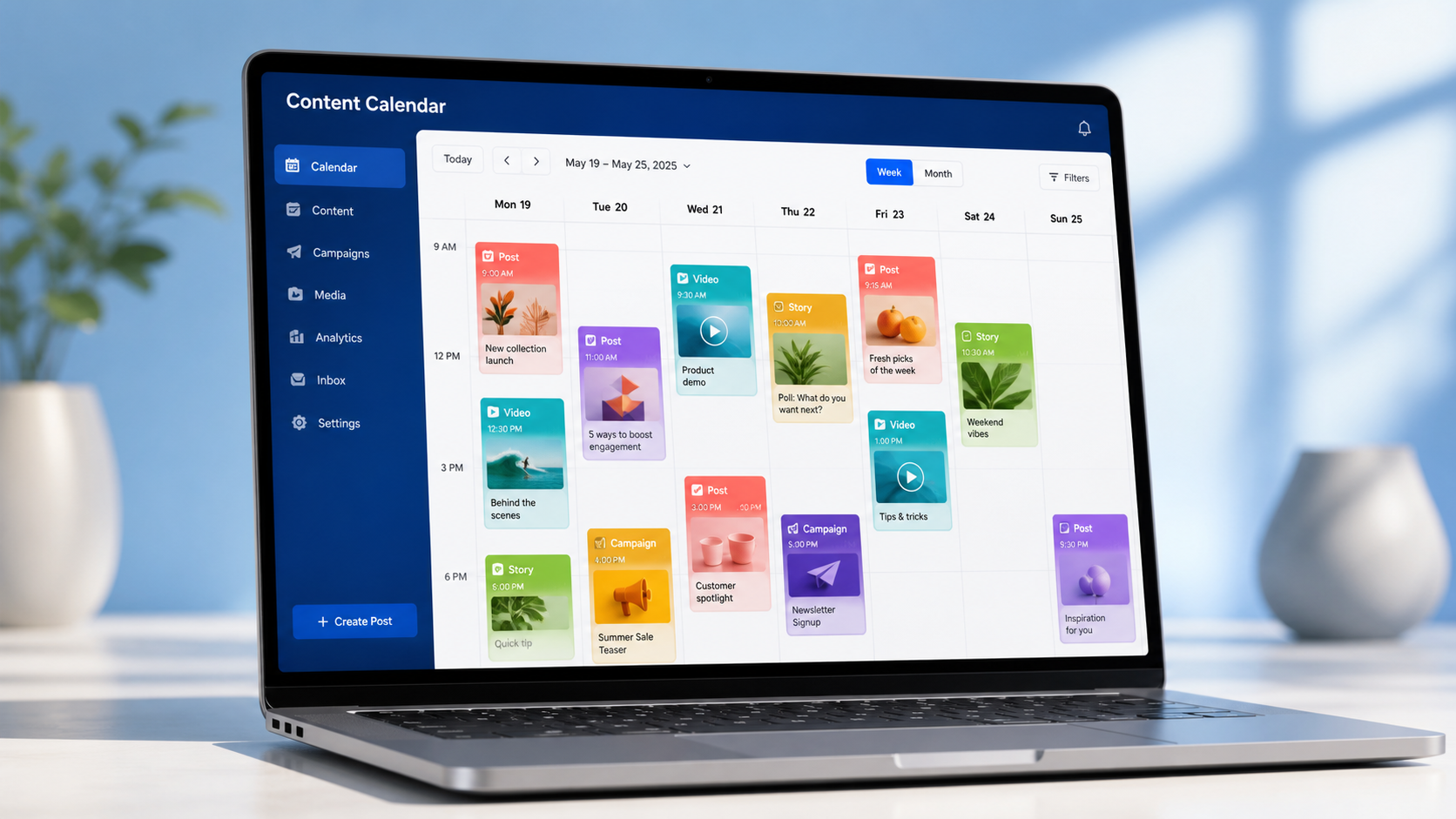
Create a Content Calendar That Connects Planning and Production
A useful content calendar is more than a list of publication dates. It should show how an idea moves from concept to published post. Include the platform, content pillar, format, campaign, target audience, objective, draft status, owner, approval deadline, publishing time, caption, creative asset, link, and tracking parameters. This information reduces uncertainty and makes responsibilities visible.
Plan at several levels. A quarterly view can contain launches, seasonal moments, major campaigns, events, and recurring themes. A monthly view translates those priorities into specific stories and formats. A weekly view manages captions, designs, videos, approvals, links, and scheduling. This layered approach provides strategic direction while keeping day-to-day execution practical.
Batching is one of the most efficient social scheduling techniques. Instead of switching repeatedly between brainstorming, writing, designing, filming, and uploading, group similar tasks together. Generate ideas in one session, write several captions in another, film multiple videos during one setup, and schedule approved posts in a dedicated block. Batching reduces context switching and helps creators maintain a consistent visual and editorial style.
Build production buffers into the calendar. Evergreen posts can be prepared two to four weeks ahead, while campaign content may require longer lead times for stakeholder review. Set internal deadlines before the actual publishing date so a delayed approval or last-minute revision does not disrupt the entire schedule.
Create a small evergreen library as well. Save durable tutorials, frequently asked questions, testimonials, checklists, case studies, and brand stories that can be refreshed and reused. Evergreen content is valuable when a planned asset is delayed or when you need to maintain consistency during a busy period. Review the library regularly to remove outdated claims, screenshots, prices, and links.
Do not fill every available slot. Reserve a portion of your calendar for responsive content, especially on fast-moving platforms. A completely rigid calendar can make a brand appear disconnected from its community. The best calendars provide structure while preserving enough flexibility to participate in relevant conversations.
Schedule Posts for the Right Times, Not Generic “Best Times”
Universal posting-time recommendations are useful only as starting hypotheses. Your ideal time depends on audience location, daily habits, platform behavior, industry, format, and account history. A business-to-business audience may engage during weekday working hours, while entertainment content may perform better during evenings or weekends. An international audience may require multiple publishing windows.
Use native platform analytics and scheduler reports to identify when followers are active and when previous posts produced meaningful results. Look beyond impressions. Compare reach, watch time, saves, shares, comments, link clicks, conversions, and engagement rate. The publishing time that creates the most views is not always the one that generates the most valuable actions.
Test timing systematically. Choose two or three plausible windows and publish comparable content across them for at least several weeks. Avoid comparing a major product announcement posted at noon with a routine quote posted in the evening; differences in topic and format can overwhelm the effect of timing. Use similar formats, goals, and content pillars whenever possible.
Account for time zones using audience data rather than your team’s location. If a substantial portion of followers lives in another region, schedule posts for their active hours. Brands with geographically distributed audiences can publish distinct posts for priority regions or repeat an important message with localized copy and creative. Avoid duplicating identical content too frequently, as repetition can frustrate followers who see both versions.
Timing also includes the period after publication. Schedule important posts when someone can monitor comments, answer questions, moderate discussions, and respond to early engagement. A post published at a statistically strong time may underperform if the brand remains silent while the audience starts a conversation.
Review timing every one to three months. Audience behavior changes as an account grows, seasons shift, platforms evolve, and content formats change. Treat the schedule as a living hypothesis rather than a permanent rule.

Choose a Social Media Post Scheduler That Fits Your Workflow
The best tool is not necessarily the one with the longest feature list. It is the tool that removes friction from your actual process. A solo creator may prioritize quick mobile scheduling, visual previews, reusable caption templates, and an affordable plan. An agency may need client workspaces, approval flows, user permissions, detailed reporting, and bulk scheduling. An in-house team may care most about collaboration, asset management, integrations, and governance.
SMMplanner is a practical option for preparing and publishing content across supported social channels from one workspace. Centralized scheduling helps marketers reduce manual posting, organize content in advance, and maintain a dependable publishing rhythm. When evaluating any scheduler, confirm that it supports the platforms and post formats central to your strategy, including videos, carousels, stories, first comments, tags, links, and platform-specific fields where applicable.
Native scheduling tools can also be effective, particularly for teams focused on one or two networks. Their advantages may include direct access to platform features and no additional subscription. However, managing several native tools can fragment the calendar, duplicate work, and make cross-channel reporting harder. A centralized social media post scheduler becomes more valuable as the number of accounts, platforms, contributors, and approval steps increases.
Evaluate prospective tools using a real publishing workflow rather than a feature checklist. Create several posts, adapt them for different channels, request approval, reschedule an item, preview the feeds, and examine the resulting analytics. This short trial will reveal whether the interface saves time or creates extra administrative work.
Important capabilities to assess include queue management, calendar views, bulk uploading, media storage, drafts, approval workflows, notifications, link tracking, analytics, mobile access, account permissions, and failed-post alerts. Security matters too. Use individual logins, appropriate roles, strong authentication, and a clear process for removing access when a contractor or employee leaves.

Adapt Every Scheduled Post to Its Platform
Cross-posting can save time, but copying the same caption, format, and creative everywhere usually sacrifices performance. Each network has different user expectations and distribution patterns. The core idea can remain consistent, but its presentation should feel native to the destination.
For example, one customer interview might become a concise professional insight for LinkedIn, a vertical highlight video for Instagram Reels, a fast opening hook for TikTok, a discussion prompt for Facebook, and several focused observations for a text-based network. This approach extends the value of the source material without making every channel look identical.
Customize opening lines because only part of a caption may appear before users must expand it. Adjust aspect ratios, video length, cover images, calls to action, tags, links, and caption density. Check that on-screen text remains readable and does not sit beneath interface elements. Always add subtitles or accurate captions to spoken video, and use descriptive alternative text when the platform supports it.
Be cautious with automated recycling. Repeating evergreen content can be useful on networks where posts have a short lifespan, but establish rules for frequency and expiration. Pause promotional queues during sensitive events, remove posts tied to expired offers, and review recurring content for outdated statistics or branding.
Before scheduling, preview the finished post for each platform. Check line breaks, cropped images, tagged accounts, thumbnail selection, links, tracking parameters, and publication time. A two-minute quality check can prevent errors from being distributed across several profiles.
Use Approval Workflows Without Slowing Down Publishing
Approvals protect brand quality, but excessive review layers can turn social media into a slow editorial process. Define which posts require approval and who has final authority. Routine evergreen content may need one reviewer, while legal claims, partnerships, contests, crisis communications, and major announcements may require specialized review.
Create a simple status system such as idea, drafting, design, review, approved, scheduled, and published. Every item should have one owner and a clear next action. Avoid collecting conflicting feedback through email, chat, documents, and design files simultaneously. Keep comments close to the scheduled post or link all feedback to one source of truth.
Develop reusable templates for common formats. Caption frameworks, design systems, video shot lists, disclosure language, calls to action, and response guidelines reduce review time because recurring decisions have already been made. A short brand checklist can cover tone, spelling, visual consistency, accessibility, claims, permissions, links, and tracking.
Set approval deadlines that reflect the publishing calendar. If a post must go live on Friday, requesting final review on Friday morning leaves no room for revision. Establish a cutoff and specify what happens when approval is late: the post moves, an alternative evergreen item fills the slot, or an authorized owner makes the final decision.
Measure Performance and Improve the Schedule
Social scheduling becomes more effective when every publishing cycle produces insights for the next one. Review results weekly for operational issues and monthly for strategic patterns. Weekly checks can identify failed posts, broken links, unanswered comments, or unexpectedly strong content. Monthly reviews provide enough data to compare pillars, formats, timing windows, campaigns, and platforms.
Match metrics to objectives. Awareness content may be evaluated through reach, impressions, video completion, and follower growth. Community content may prioritize comments, shares, replies, and returning participants. Consideration content can be judged by saves, profile visits, website sessions, or email sign-ups. Conversion content should use tracked links and clearly defined actions such as purchases, bookings, trials, or downloads.
Keep a testing log with the hypothesis, variable, date, content type, result, and next decision. Test one major element at a time when possible: opening hook, thumbnail, format, publishing window, caption length, or call to action. Without a record, teams often repeat tests or draw conclusions from isolated posts.
Use performance data to rebalance the calendar. Increase investment in repeatable formats that produce meaningful outcomes, but do not copy a successful post indefinitely. Identify why it worked: a specific problem, emotional angle, visual structure, useful example, or strong audience fit. Apply that principle to new ideas.
Remember that optimization is not simply publishing more. A stronger result may come from fewer, better posts supported by faster community responses and sharper creative. The best way to schedule social media posts is the one that consistently improves both operational efficiency and audience value.
Common Social Scheduling Mistakes to Avoid
One common mistake is scheduling too far ahead without reviewing the queue. A post written weeks earlier may become inaccurate, insensitive, or irrelevant. Conduct a weekly queue review and immediately pause automated publishing during a crisis or major event that changes the context of your message.
Another mistake is treating consistency as sameness. Repeating identical formats and promotional messages can create fatigue. Maintain a recognizable voice while varying topics, visuals, storytelling structures, and calls to action. Your content pillars should create coherence, not monotony.
Teams also overlook community management. Scheduling is a publishing solution, not a relationship strategy. Assign responsibility for monitoring mentions, responding to comments, escalating support issues, and participating in relevant conversations. Engagement should continue between scheduled posts.
Finally, avoid judging a strategy from a few isolated results. Social performance naturally fluctuates. Evaluate patterns across a useful sample, compare similar posts, and consider content quality, timing, distribution, and audience relevance together. Reliable decisions come from repeated evidence rather than one viral success or disappointing post.
Frequently Asked Questions
What is the best way to schedule social media posts?
The best way to schedule social media posts is to define content pillars, build a realistic calendar, batch production, customize posts for each platform, and use audience analytics to select publishing times. Schedule approved content in a reliable tool, leave space for timely posts, and review performance regularly.
How far in advance should social media posts be scheduled?
Most teams benefit from scheduling routine content one to four weeks in advance. Major campaigns may require longer preparation, while timely commentary should remain flexible. Review the queue at least weekly so scheduled posts remain accurate, relevant, and appropriate to current events.
How often should a brand post on social media?
There is no universal frequency. Choose a pace your team can sustain without lowering quality or neglecting community engagement. Begin with a consistent baseline, measure performance by platform, and increase or reduce frequency according to audience response, resources, and business goals.
Does using a social media post scheduler reduce reach?
Using a legitimate scheduler does not automatically reduce reach. Performance is more strongly influenced by audience relevance, creative quality, retention, engagement, and platform fit. Confirm that posts publish correctly, use supported formats, and receive active community management after they go live.