
Bulk Social Media Posting: How and Why to Use It
Bulk social media posting saves time by scheduling multiple posts at once, boosting efficiency and maintaining consistent online engagement.


Bulk social media posting is the process of preparing, uploading, and scheduling many social media posts in one structured workflow instead of publishing each post manually. It helps marketers manage multiple accounts, maintain a consistent content calendar, reduce repetitive work, and coordinate campaigns across platforms. With the right bulk post tools, a team can turn an approved content plan into days or weeks of scheduled posts while preserving platform-specific copy, media, links, and publishing times.
What Is Bulk Social Media Posting? | Why Marketers Use Mass Social Media Scheduling | How a Bulk Posting Workflow Works | Choosing Bulk Post Tools | Best Practices for High-Quality Bulk Publishing | Common Bulk Posting Mistakes to Avoid | A Practical Bulk Scheduling Checklist | Frequently Asked Questions | Conclusion
What Is Bulk Social Media Posting?
In a traditional publishing workflow, a marketer opens a social network, creates one post, uploads its media, chooses a time, and repeats the process for every account. That approach may be manageable for an occasional update, but it becomes inefficient when a brand publishes several times per week across multiple channels.
Bulk social media posting brings those repeated actions into a single process. A marketer usually prepares post data in a spreadsheet, CSV file, content table, or scheduling platform. Each row or entry represents a post and may contain the publication date, time, account, text, media attachment, link, campaign label, and internal notes. The posts are then imported, reviewed, and placed into a publishing queue.
Bulk posting does not necessarily mean sending identical content everywhere at the same moment. A well-designed bulk workflow can support different captions, formats, media files, and schedules for each platform. One campaign idea might become a concise post for X, a professional explanation for LinkedIn, a visual caption for Instagram, and a community-focused version for Facebook.
It is also useful to distinguish bulk uploading from mass social media scheduling. Bulk uploading moves many prepared posts into a tool at once. Mass scheduling assigns publication dates and times to those posts, whether during the upload or afterward. Most efficient workflows combine both: content is prepared in batches, imported together, and scheduled according to a planned calendar.
The method is valuable for agencies, distributed marketing teams, franchise businesses, ecommerce brands, media publishers, and creators with an active presence on several platforms. However, even a small company publishing three times a week can benefit by replacing scattered daily tasks with one focused production session.

Why Marketers Use Mass Social Media Scheduling
The most immediate advantage is time efficiency. Logging into accounts, copying captions, locating files, and setting publication times creates substantial administrative overhead. When posts are prepared and scheduled together, the marketer performs each type of task in a concentrated block. This reduces context switching and leaves more time for strategy, creative development, audience engagement, and analysis.
Bulk scheduling also improves consistency. Social media performance depends partly on maintaining a reliable presence, but manual publishing is vulnerable to meetings, holidays, competing priorities, and simple forgetfulness. A scheduled queue keeps the content calendar moving even when the team is occupied with other work.
Another benefit is better campaign visibility. Reviewing twenty posts in a calendar reveals patterns that are difficult to notice when posts are created individually. Marketers can identify repeated messages, weak topic coverage, excessive promotion, inconsistent calls to action, or long gaps between important campaign stages. They can then balance educational, entertaining, community, and commercial content before anything goes live.
Batching can improve creative quality as well. Writers often produce stronger work when they remain focused on one audience, campaign, or format for a sustained period. A team might write all captions for a product launch in one session, create the visual assets in another, and complete quality assurance in a third. This creates a clearer production rhythm than building every post from beginning to end in isolation.
Mass social media scheduling also makes collaboration more predictable. Contributors know when drafts are due, editors can review a complete content batch, and stakeholders can approve posts before the publishing window begins. The schedule becomes a shared operational plan rather than a collection of last-minute requests.
Finally, bulk posting reduces avoidable risk. A structured review can catch broken links, mismatched images, unsupported formats, missing disclosures, incorrect tags, and copy that has been assigned to the wrong account. Scheduling software cannot replace human judgment, but it can make the checking process repeatable.
How a Bulk Posting Workflow Works
A reliable workflow begins with a content calendar rather than an upload file. Define the campaign goals, target audiences, content pillars, platforms, publishing frequency, and key dates. Decide what each post should accomplish: generate awareness, educate followers, encourage conversation, drive traffic, collect leads, or support a conversion.
Next, prepare the post data in a consistent structure. Typical fields include account, network, publication date, local time, caption, first comment, link, media filename, alt text, campaign name, and approval status. Use one row per post and follow the scheduler’s required date, time, and account formats exactly. If the tool provides a CSV template, start with that template instead of inventing a new structure.
Store media files using clear, unique names. A filename such as spring-sale-instagram-carousel-02.jpg is safer than final-new-2.jpg. The name should make it easy to match the asset with its spreadsheet row. Confirm aspect ratios, video duration, file size, resolution, and other platform requirements before uploading the batch.
Once the content is imported, treat the result as a draft. Review the posts in both list and calendar views. Check that the correct account, caption, media, date, time zone, and link appear on every entry. Preview posts where possible, paying particular attention to truncated copy, line breaks, thumbnails, mentions, hashtags, and link cards.
Schedule a small test batch before processing a major campaign. Two or three representative posts can expose delimiter problems, incorrect date interpretation, encoding errors, or broken media references. This is especially important when a team introduces a new tool, spreadsheet template, automation, or social account.
After scheduling, monitor publication status. Failed posts should generate alerts and enter a clear recovery process. Assign someone to check the queue during important launches rather than assuming that every network will accept every post. APIs, permissions, account connections, and platform rules can change.
The workflow ends with measurement. Apply campaign labels or consistent tracking parameters so scheduled content can be evaluated as a group. Compare reach, engagement, clicks, conversions, and saves across topics, platforms, formats, and time slots. Use those findings to improve the next batch instead of merely repeating the previous calendar.
Choosing Bulk Post Tools
The best software is not necessarily the platform with the longest feature list. It is the one that matches the team’s publishing volume, account structure, approval process, and reporting needs. Begin by identifying the bottleneck. A solo creator may need fast CSV importing, while an agency may require client workspaces, permissions, approval stages, and audit history.
Strong bulk post tools should make importing straightforward and errors visible. Look for downloadable templates, field mapping, duplicate detection, clear validation messages, preview functions, and the ability to edit imported posts before scheduling them. If one invalid row causes an entire upload to fail without explanation, the supposed time-saving feature can become a source of frustration.
Platform coverage matters, but depth matters more than a logo on a feature page. Verify which post formats the scheduler supports for each network. Ask whether it can handle carousels, short-form video, stories, first comments, location data, alt text, thumbnails, mentions, and account-specific publishing options. Some formats may require a mobile notification rather than fully automatic publishing.
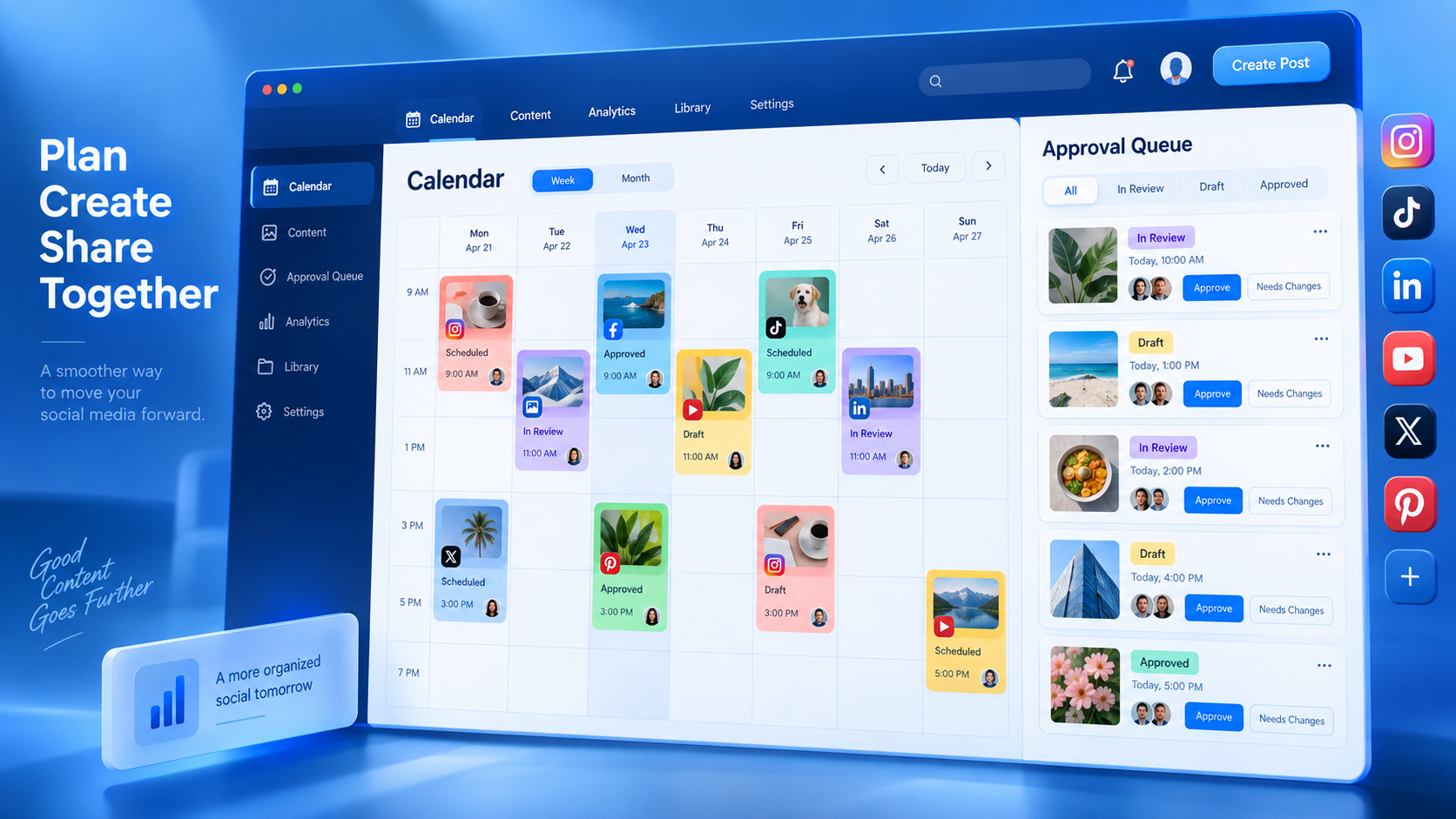
Calendar and queue controls are equally important. Marketers should be able to reschedule posts, pause a queue, fill recurring time slots, filter by campaign, and spot scheduling conflicts. Teams operating internationally also need dependable time-zone handling. A date that appears correct in a spreadsheet can publish at the wrong local hour if the account, workspace, and uploader use different settings.
Collaboration features become critical as the number of contributors grows. Useful capabilities include draft status, comments, role-based permissions, approval routing, version history, and activity logs. These controls prevent an unfinished draft from being scheduled and clarify who changed a post.
Reporting should connect publishing activity to meaningful outcomes. At minimum, a tool should help teams compare content performance across accounts and date ranges. Exportable reports, campaign tags, and URL tracking integrations make it easier to move beyond vanity metrics.
SMMplanner can support a structured scheduling workflow for marketers who want to prepare content in advance and manage publication from a centralized calendar. Before committing to any platform, run a realistic trial using your actual networks, media formats, approval process, and expected monthly volume. A test based on five simple text posts will not reveal how the tool performs during a complex, multi-format campaign.

Best Practices for High-Quality Bulk Publishing
Efficiency should not come at the expense of relevance. The most important practice is adapting content to each network. Audiences use platforms differently, and each channel has its own conventions. Rework the opening line, caption length, call to action, hashtags, visual dimensions, and posting time instead of automatically duplicating one universal message.
Create a clear content mix before filling the calendar. A practical model might combine educational posts, expert opinions, behind-the-scenes material, customer evidence, community prompts, and promotional offers. The exact ratio should follow the brand’s goals and audience behavior, but the calendar should not feel like an uninterrupted sales sequence.
Build quality assurance into the workflow. Use a checklist covering spelling, brand voice, factual accuracy, links, tags, media, accessibility, rights, disclosures, account selection, and timing. For sensitive industries or major announcements, assign a second reviewer. Approval should be recorded inside the system or content table rather than buried in chat messages.
Preserve room for timely content. Scheduling every available slot weeks ahead can make a brand appear detached from current conversations. Leave flexible spaces for news, trends, live events, community responses, and reactive posts. Evergreen material can often be moved without damaging the broader campaign.
Avoid scheduling content and disappearing. Publishing is only one part of social media management. Someone should monitor comments, questions, mentions, and direct responses after posts go live. If a scheduled post invites participation, the brand should be ready to participate as well.
Use automation carefully around breaking news, emergencies, and sensitive dates. Establish a pause procedure so the team can quickly stop queued content when its tone would be inappropriate. Assign responsibility for making that decision and ensure that the relevant people have access to the scheduling tool.
Finally, review performance at the batch level and the post level. Batch-level analysis reveals whether a campaign, content pillar, or scheduling period worked. Post-level analysis shows which hook, format, topic, or creative execution contributed to the result. Together, these views turn bulk publishing into a learning system rather than a simple distribution shortcut.

Common Bulk Posting Mistakes to Avoid
The most common mistake is treating bulk posting as bulk duplication. Repeating identical copy across every channel can lead to awkward formatting, irrelevant hashtags, broken mentions, or calls to action that do not fit the platform. Create a master message if it helps production, but develop channel-specific versions before upload.
Another mistake is preparing too much content too far in advance. Long scheduling horizons can be useful for evergreen education, but product details, prices, trends, team information, and external events may change. Add review checkpoints for batches scheduled several weeks or months ahead.
Spreadsheet errors also cause preventable problems. Inconsistent date formats, extra separators, missing required fields, smart quotes, hidden line breaks, and renamed media files can disrupt an import. Lock template columns, use data validation where possible, and keep a clean master version for reuse.
Marketers sometimes optimize the workflow for speed while ignoring governance. Shared passwords, unlimited permissions, and unrecorded approvals may feel convenient until the wrong content reaches a high-profile account. Use individual access, appropriate roles, two-factor authentication, and a clear publishing authority.
Overloading the schedule is another risk. The ability to upload hundreds of posts does not mean the audience wants to receive them. Frequency should reflect content quality, platform behavior, account maturity, and the team’s ability to respond. Watch for declining engagement, increased unfollows, or repetitive feedback.
Finally, do not “set and forget” the queue. Check failed publications, expired account connections, campaign changes, and audience reactions. A bulk schedule should reduce repetitive labor while keeping strategic oversight firmly in human hands.
A Practical Bulk Scheduling Checklist
Before importing a campaign, confirm that every post has a defined audience, objective, platform, owner, and status. Ensure captions are final, media files are approved, and dates reflect the correct time zone. Test destination links and add tracking parameters consistently.
- Use the scheduler’s current import template.
- Keep one post per row or structured content entry.
- Match every media filename to the correct post.
- Customize copy and formatting for each platform.
- Check dimensions, file sizes, video lengths, and thumbnail requirements.
- Add alt text and required advertising or partnership disclosures.
- Review mentions, hashtags, links, and calls to action.
- Import a small sample before uploading the full batch.
- Inspect the resulting calendar for gaps and collisions.
- Assign an owner to monitor publishing failures and audience responses.
- Keep a documented procedure for pausing scheduled content.
- Label campaigns so performance can be measured later.
After publication, compare the planned schedule with actual results. Record failed posts, editing delays, approval bottlenecks, and strong-performing themes. Update the template and checklist while the lessons are still fresh. Over time, this creates a dependable operating system that supports more content without proportionally increasing administrative work.
Frequently Asked Questions
What is the difference between bulk posting and cross-posting?
Bulk posting means creating, importing, or scheduling many posts in one workflow. Cross-posting means sharing the same or similar content on multiple platforms. A bulk upload may contain platform-specific posts, cross-posted content, or a combination of both. For stronger results, adapt cross-posted material to each network’s audience and format.
How far in advance should social media posts be scheduled?
For many brands, scheduling one to four weeks ahead provides a useful balance between consistency and flexibility. Evergreen campaigns can be prepared further in advance, while news-driven or trend-sensitive content needs a shorter horizon. Add regular review dates and keep open calendar space for timely posts.
Can bulk social media posting hurt engagement?
The workflow itself does not reduce engagement. Problems arise when marketers publish repetitive, poorly timed, or platform-inappropriate content and fail to respond to the audience. Bulk social media posting should improve operational efficiency while human marketers continue to guide creative decisions, monitor context, and participate in conversations.
What should I test when comparing bulk post tools?
Test CSV or spreadsheet importing, supported networks and formats, media handling, previews, time zones, approvals, permissions, error reporting, queue controls, analytics, and pricing at your expected volume. Use a realistic campaign with several content formats and accounts so the test reflects your day-to-day work.
Conclusion
Bulk social media posting is most effective when it combines efficient production with careful editorial control. It allows marketers to schedule content at scale, see campaigns as a complete system, coordinate approvals, and protect time for higher-value creative and strategic work.
Start with a modest batch, a clean template, and a repeatable review checklist. Customize each post for its platform, monitor the publishing queue, stay available for audience interaction, and use performance data to refine the next cycle. Done well, mass social media scheduling is not merely a faster way to publish—it is a more disciplined way to plan, distribute, and improve social content.