
Comprehensive Hootsuite Scheduling and Calendar Tools
Hootsuite scheduling and calendar tools streamline social media management, helping you plan, organize, and optimize your posts efficiently.


Hootsuite combines post scheduling, visual calendar management, multi-network publishing, team collaboration, and performance insights in one platform. Marketers can use the Hootsuite calendar to organize campaigns, schedule posts across multiple social accounts, identify content gaps, manage approvals, and adjust publishing plans without juggling separate spreadsheets and platform dashboards. This guide explains how Hootsuite’s scheduling capabilities work and how to turn them into a reliable, results-focused content planning system.
What Hootsuite’s Scheduling and Calendar Tools Can Do | How to Schedule Posts in Hootsuite Step by Step | How to Build a Social Media Calendar with Hootsuite | Using Hootsuite Planning Tools for Better Campaign Management | How to Choose Publishing Times and Posting Frequency | Optimizing Scheduled Content for Each Social Network | Monitoring, Rescheduling, and Troubleshooting Posts | Measuring Whether Your Hootsuite Calendar Is Working | Best Practices for a More Efficient Hootsuite Workflow | Frequently Asked Questions
What Hootsuite’s Scheduling and Calendar Tools Can Do
The Hootsuite social media scheduler is designed to centralize the publishing process. Instead of opening each social network separately, users can compose, customize, approve, and schedule content from one dashboard. This is particularly valuable for agencies, distributed marketing teams, and creators managing several profiles.
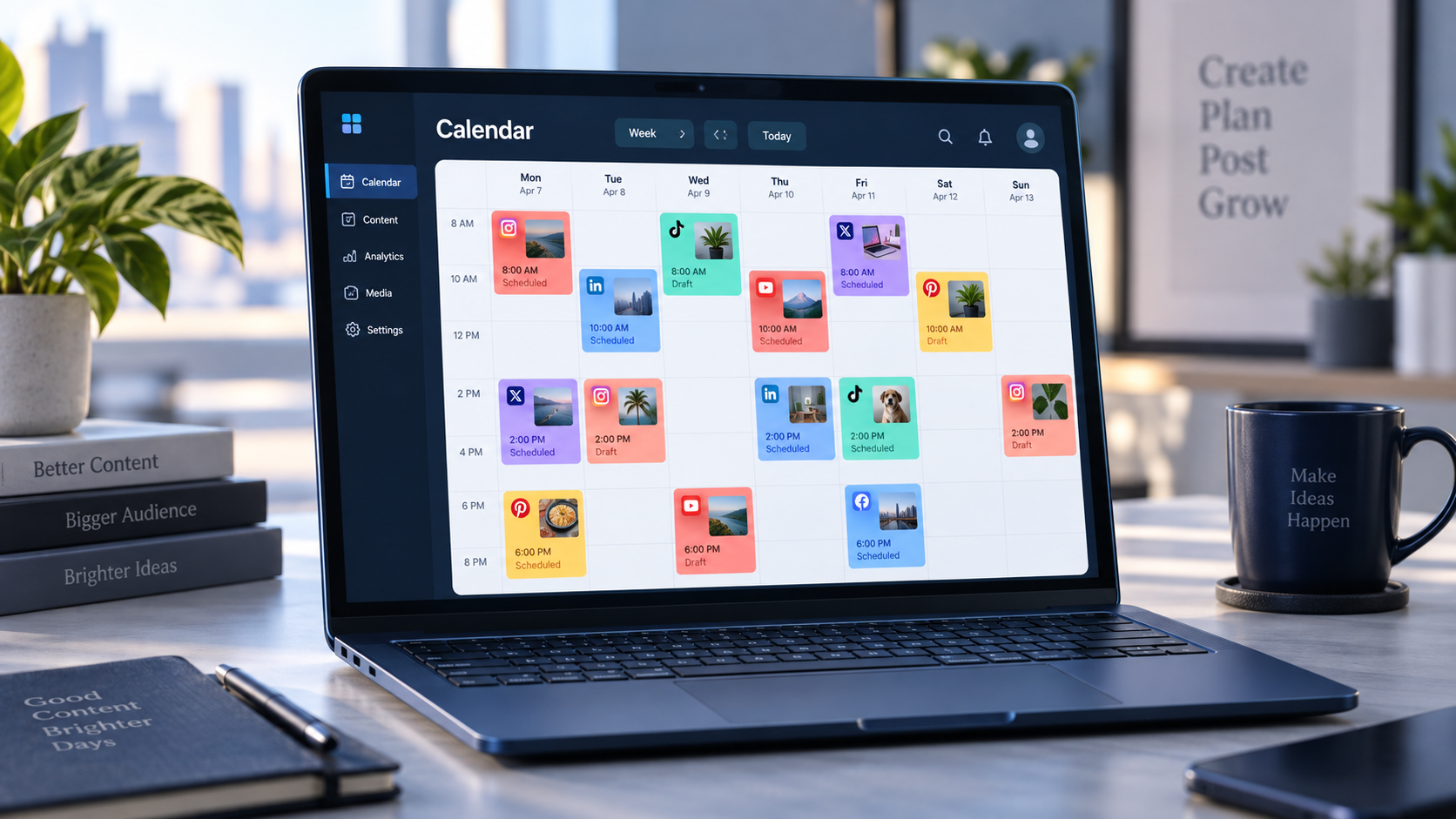
At the center of the workflow is the Hootsuite calendar, commonly accessed through the Planner area. It provides a chronological view of scheduled, published, draft, and approval-pending content. Depending on the available plan and current interface, users may be able to switch between different time ranges, filter content by social account, and open individual posts directly from the calendar.
The platform supports major social networks, although available publishing features vary by network and account type. A typical scheduling workflow can include Facebook Pages, Instagram professional accounts, LinkedIn Pages and profiles, TikTok accounts, Pinterest boards, YouTube channels, and other supported destinations. Before building a publishing system, confirm which formats and account permissions are supported for every channel you intend to manage.
Core capabilities generally include:
- Scheduling posts for future publication across multiple social accounts.
- Creating network-specific variations from a shared campaign concept.
- Viewing planned content in a unified visual calendar.
- Saving drafts before assigning final publishing dates.
- Sending posts through review and approval workflows.
- Duplicating or rescheduling existing content.
- Using recommended publishing times informed by performance data.
- Monitoring failed posts and resolving publishing errors.
These tools are most effective when the calendar is treated as more than a queue. A strong setup connects every scheduled post to a strategic purpose, such as generating awareness, educating prospects, supporting a product launch, nurturing a community, or driving conversions.

How to Schedule Posts in Hootsuite Step by Step
This Hootsuite scheduler tutorial begins with a simple principle: prepare the message, creative asset, destination, and tracking details before choosing a publishing time. Scheduling an incomplete post simply automates an avoidable mistake.
- Connect and verify your social accounts. Add the profiles, Pages, channels, or boards your team is authorized to manage. Check that each connection has the permissions required for publishing, analytics, and account management. Reconnect accounts promptly when permissions expire.
- Open the post composer. Start a new post and select the destination accounts. Selecting several networks can save time, but it should not mean publishing an identical message everywhere.
- Create the core content. Add the copy, link, image, video, or other supported media. Keep the campaign idea consistent while adapting length, tone, calls to action, hashtags, tagging conventions, and media dimensions to each network.
- Review network previews. Inspect how the post is expected to appear on each destination. Look for cropped images, truncated text, unsupported tags, missing alt text, incorrect thumbnails, and awkward line breaks.
- Choose a publishing option. You can typically publish immediately, save a draft, or schedule the post for a future date and time. When available, recommended-time features can help you select a slot based on goals such as engagement, reach, or link clicks.
- Apply governance checks. Confirm campaign naming, brand voice, legal language, links, tracking parameters, and the correct social accounts. Teams using approval workflows should assign the content to the appropriate reviewer.
- Schedule and verify. After scheduling, open the Planner and confirm that the post appears in the intended time slot with the correct status. This final check catches timezone errors and accidental account selections.
When using Hootsuite to schedule posts for several networks, create meaningful variations. A LinkedIn post may need professional context and a discussion prompt, while an Instagram post may depend on strong visual framing and a concise caption. TikTok and short-form video channels often require immediate hooks, native pacing, and format-specific creative.
Timezones deserve special attention. Establish whether the team schedules according to headquarters time, the audience’s local time, or separate regional calendars. Document that rule, especially when multiple people manage the same accounts. Around daylight-saving changes, launches, and live events, verify every critical post manually.
How to Build a Social Media Calendar with Hootsuite
A useful social media calendar with Hootsuite begins before posts enter the platform. Define the business priorities for the planning period, translate them into content themes, and then allocate publishing slots. This prevents the calendar from becoming a random collection of announcements.
Start with three to five content pillars. A software company might use product education, customer success, industry insight, company culture, and conversion-focused offers. A creator might use tutorials, behind-the-scenes stories, opinions, community conversations, and commercial partnerships. Each pillar should serve a recognizable audience need and support a measurable objective.
Next, assign a practical content mix. There is no universal ratio, but the calendar should avoid becoming relentlessly promotional. A balanced month might emphasize educational and community-building posts while reserving fewer slots for direct offers. Review actual performance rather than relying on a rigid formula indefinitely.
Build campaigns in layers:
- Anchor content: major videos, reports, webinars, product releases, or long-form articles.
- Supporting content: excerpts, carousels, short videos, statistics, quotations, and explainers derived from the anchor.
- Community content: questions, polls, replies, user-generated content, and topical conversations.
- Evergreen content: durable advice that can fill relevant gaps and be refreshed over time.
- Reactive space: intentionally unfilled slots for news, trends, customer moments, or urgent updates.
Enter confirmed posts into Hootsuite and use drafts for ideas that still need copy, creative, or approval. As the calendar fills, inspect it visually. Look for days with too many competing messages, long gaps on priority networks, repeated formats, and clusters of posts aimed at the same funnel stage.
A rolling planning model often works better than trying to finalize an entire quarter. Keep strategic campaigns mapped several months ahead, develop detailed content two to four weeks in advance, and leave room for timely material. Review the near-term schedule every week and conduct a deeper monthly review based on performance.

Using Hootsuite Planning Tools for Better Campaign Management
Hootsuite planning tools become substantially more valuable when teams establish a clear operating process. The technology can show what is scheduled, but the team must define who owns each decision and what “ready to publish” means.
Create a simple status system that everyone understands. For example, an idea begins in the backlog, moves to production, enters review, becomes approved, and is finally scheduled. Hootsuite drafts and approvals can support parts of this process, while a project-management system may still be useful for complex campaigns involving designers, editors, paid media specialists, and legal reviewers.
Assign responsibilities by role:
- The strategist defines objectives, audiences, themes, and channel priorities.
- The creator or copywriter produces the post and its supporting assets.
- The channel owner adapts content to network conventions.
- The reviewer checks brand, factual, legal, and campaign requirements.
- The publisher confirms scheduling details and monitors delivery.
- The analyst evaluates results and recommends changes.
Use approval workflows selectively. High-risk announcements, regulated claims, partnerships, executive statements, and paid campaign assets should receive formal review. Routine evergreen posts may need a faster process. Requiring the same approval path for every item can create bottlenecks without meaningfully reducing risk.
Campaign naming conventions also improve calendar clarity. Include elements such as the campaign, region, channel, format, and version in internal labels or tracking systems. Links should use consistent UTM parameters so analytics platforms can attribute traffic and conversions accurately.
For agencies, separate access by client and responsibility. Avoid giving every collaborator unrestricted control over every account. Regularly audit permissions, remove former contractors, and confirm that account ownership remains with the appropriate organization.

How to Choose Publishing Times and Posting Frequency
Recommended publishing times can provide a useful starting point, but they should not replace strategic judgment. The best time depends on audience behavior, geography, format, campaign objective, and how quickly your team can respond after publication.
If Hootsuite offers personalized timing recommendations for your setup, compare those suggestions with your own results. A time slot that generates reach may not produce link clicks or qualified leads. Similarly, a post published during a high-traffic period may face more competition in the feed.
Evaluate performance by network, content pillar, format, weekday, and time window. Use enough data to avoid overreacting to one exceptional post. When testing schedules, change one major variable at a time. For example, keep the topic and format reasonably consistent while comparing morning and afternoon publication.
Frequency should be based on your capacity to produce worthwhile content and engage with the resulting audience. Posting more often is not automatically better. An aggressive schedule that weakens creative quality, delays responses, or exhausts the team can damage performance.
Use the calendar to establish a sustainable minimum cadence for priority channels. Add extra content when campaigns or timely opportunities justify it. If a network repeatedly receives low-effort adaptations and produces little value, reconsider its role rather than filling slots out of habit.
Optimizing Scheduled Content for Each Social Network
Centralized scheduling creates efficiency, but excessive automation can make a brand sound detached. The best Hootsuite workflow combines a shared campaign message with platform-native execution.
For LinkedIn, lead with business relevance and give readers enough context to understand why the subject matters. Use readable paragraph breaks and a credible discussion prompt. For Instagram, prioritize the visual narrative, ensure important elements remain within safe areas, and make the opening caption lines compelling.
For short-form video networks, evaluate the opening seconds, on-screen text, sound choices, caption, and cover image. A clip repurposed from another channel may need substantial editing to feel native. For Facebook, consider whether the post is meant to inform an existing community, encourage conversation, promote an event, or drive traffic.
When links are involved, test the destination page on mobile. Add consistent tracking parameters and ensure previews display the expected title and image. For campaigns using landing pages that will expire, create a reminder to pause or replace scheduled posts before the destination becomes invalid.
Accessibility should be part of the workflow. Add meaningful alternative text where supported, include accurate captions on video, maintain readable contrast, avoid placing essential information only inside an image, and use clear language. Accessibility improves the experience for more users and often produces stronger creative discipline.
Monitoring, Rescheduling, and Troubleshooting Posts
Scheduling does not end when a post enters the calendar. A reliable publishing operation includes daily monitoring. Check for failed posts, account disconnections, rejected media, approval delays, and campaign changes.
Common publishing failures include expired account permissions, unsupported file formats, incorrect image or video specifications, network-level outages, and changes to platform APIs. When a post fails, read the error message, verify the account connection, review the media requirements, and publish manually only if that action fits the campaign’s urgency and governance rules.
Reschedule content when external circumstances make the original timing inappropriate. News events, public emergencies, major company announcements, or sudden changes in audience sentiment may require a temporary pause. Keep a documented escalation process so team members know who can stop scheduled content.
Evergreen posts can be reused, but repetition should be intentional. Refresh the opening hook, examples, creative, statistics, and call to action. Confirm that every claim and link remains accurate. Reposting the same asset too frequently can cause fatigue and make the calendar feel automated in the least helpful sense.
After major campaigns, compare the planned calendar with what actually happened. Record delayed assets, last-minute changes, failed posts, unexpected winners, and content that underperformed. These operational lessons are as important as engagement metrics because they help the next campaign run more smoothly.
Measuring Whether Your Hootsuite Calendar Is Working
A full calendar is not evidence of an effective strategy. Measurement should connect publishing activity to meaningful outcomes. Begin with the objective for each content category and choose metrics accordingly.
Awareness content may be evaluated through reach, impressions, video views, and audience growth. Engagement content may use comments, shares, saves, response quality, or engagement rate. Traffic campaigns should track link clicks, landing-page sessions, and subsequent behavior. Conversion campaigns require reliable tracking beyond the social platform, such as form completions, purchases, trials, or qualified leads.
Review both content performance and operational performance. Useful operational indicators include the percentage of posts approved on time, publishing failure rate, average revision count, asset delivery delays, and the proportion of reactive versus planned content.
Run a structured monthly review. Identify the strongest and weakest posts by objective, not just by raw engagement. Examine recurring patterns across topics, formats, timing, and networks. Then translate the findings into specific calendar decisions for the next period.
For example, replace “make more video” with “publish two concise tutorial videos each week because they generated more qualified site visits than promotional clips.” Actionable findings should change what the team creates, schedules, or stops doing.
Best Practices for a More Efficient Hootsuite Workflow
Batch work wherever it improves consistency. Teams can plan themes in one session, draft copy in another, produce creative assets together, and schedule approved content in a focused block. Batching reduces context switching while leaving room for real-time engagement.
Maintain a reusable pre-publication checklist covering account selection, spelling, links, tracking parameters, media specifications, accessibility, disclosure requirements, approval, date, time, and timezone. Use an additional checklist for major launches that includes landing-page readiness, customer-support coordination, and backup assets.
Keep the Hootsuite calendar readable. Filter it by channel or campaign when reviewing dense schedules. Avoid scheduling several posts merely because an empty day appears undesirable. Each item should have a reason to exist and a clear audience action.
Finally, separate publishing automation from community management. Scheduled posts create consistency, but people still expect timely, thoughtful interaction. Assign responsibility for replies and escalation after important content goes live. The strongest system automates distribution while preserving genuine human participation.
Frequently Asked Questions
Can Hootsuite schedule posts for multiple social networks?
Yes. Hootsuite can schedule content for multiple supported social networks from a centralized composer and calendar. Available formats and publishing options depend on the network, account type, permissions, Hootsuite plan, and current platform integrations. Customize each version before scheduling rather than publishing identical content everywhere.
How does the Hootsuite calendar help with content planning?
The Hootsuite calendar provides a visual overview of scheduled, drafted, published, and approval-pending content. It helps teams identify gaps, prevent overlapping messages, balance content pillars, inspect campaign cadence, and adjust publishing dates from a shared planning environment.
Can I edit a post after scheduling it in Hootsuite?
Scheduled posts can generally be opened from the Planner and edited before publication. Review the destination accounts, copy, media, date, and time after making changes. Some post types or network-specific features may have editing limitations, so check the preview and current platform requirements.
Should I rely on Hootsuite’s recommended posting times?
Use recommended times as informed suggestions, not absolute rules. Compare them with your audience data, campaign objectives, geographic coverage, and historical results. Continue testing because audience behavior, platform distribution, and content formats change over time.