
Content Planning and Scheduling with Social Media Calendars
Effective content planning and scheduling with social media calendars helps streamline posting, boost engagement, and maintain a consistent online presence.


A social media calendar turns scattered content ideas into a practical publishing plan. It shows what will be posted, where it will appear, when it will go live, who owns it, and which business goal it supports. Whether you manage one creator account or coordinate campaigns across several brands, a well-designed calendar helps you publish consistently, avoid last-minute production, and make smarter decisions about content.
What Is a Social Media Content Calendar? | Why a Content Calendar Improves Social Media Marketing | What to Include in a Social Media Calendar Template | Choosing the Right Calendar Format and Tool | How to Build a Practical Content Planning Workflow | Planning Content Across Multiple Social Platforms | How to Maintain and Optimize Your Calendar | Common Social Media Calendar Mistakes to Avoid | Frequently Asked Questions
What Is a Social Media Content Calendar?
A social media content calendar is a central schedule for planning, producing, approving, and publishing posts across social networks. It can be as simple as a spreadsheet with dates and captions or as advanced as a collaborative workspace connected to a scheduling platform. The format matters less than the clarity it gives your team.
At a minimum, each calendar entry should identify the publishing date, platform, content format, topic, status, and responsible person. More detailed calendars may also include campaign names, audience segments, objectives, creative briefs, asset links, tracking parameters, approval notes, and performance results.
The calendar acts as both a publishing schedule and a social media content organizer. Instead of keeping video concepts in a notes app, captions in chat messages, and design files in separate folders, marketers can connect every component to one planned post. This reduces duplicated work and makes it easier to see what is ready, what is delayed, and what needs review.
A calendar also creates a shared source of truth. A copywriter can see when captions are due, a designer can identify which assets have priority, and a manager can review the overall content mix before posts reach the audience. This visibility becomes especially valuable when several people contribute to the same channels.

Why a Content Calendar Improves Social Media Marketing
Consistency is one of the clearest benefits of calendar-based planning. When publishing depends on daily inspiration, busy periods often lead to silence or rushed posts. A social media content planning calendar creates a realistic rhythm that the team can sustain, including time for writing, design, filming, feedback, and scheduling.
Planning ahead also improves strategic balance. Looking at a full week or month makes it easier to detect when the schedule contains too many promotional posts, repetitive formats, or messages aimed at the same audience segment. Marketers can deliberately balance educational content, community conversations, product stories, customer proof, entertainment, and conversion-focused offers.
A strong calendar helps campaigns work across platforms without forcing teams to publish identical content everywhere. One campaign idea might become a LinkedIn document post, an Instagram Reel, a TikTok tutorial, a Pinterest graphic, and a short thread. The central message remains consistent, while the execution fits the expectations and features of each channel.
Calendars also protect important dates. Product launches, seasonal moments, live events, collaborations, and reporting deadlines can be entered early. This gives the team enough time to create higher-quality assets and prevents evergreen posts from accidentally competing with major announcements.
Finally, a calendar supports better measurement. When posts are tagged by goal, theme, format, or campaign, results can be compared systematically. Instead of asking only which individual post received the most likes, marketers can discover whether tutorials generate more saves, customer stories produce more clicks, or short videos attract more qualified followers.
What to Include in a Social Media Calendar Template
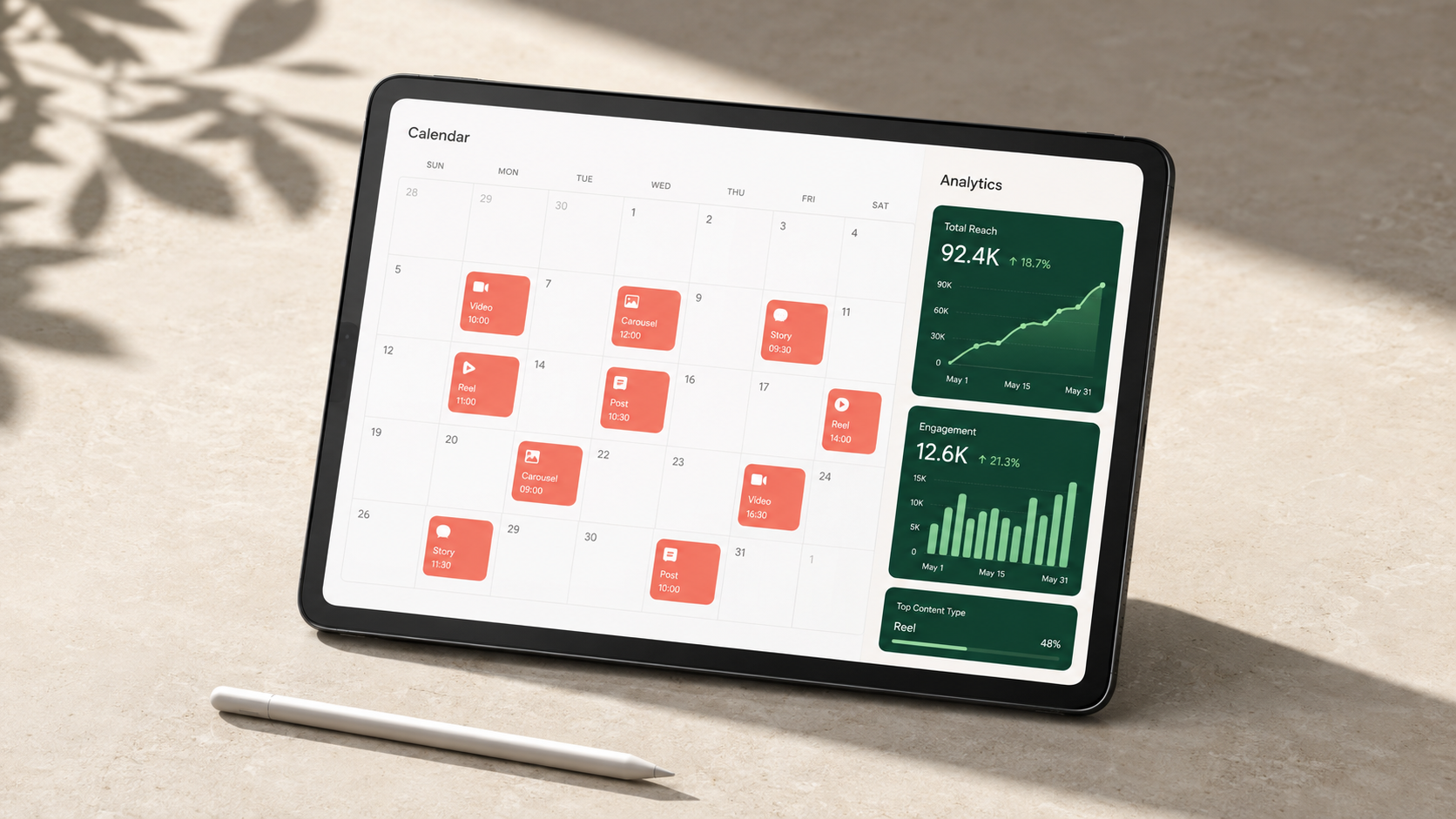
The best social media calendar template is not necessarily the one with the most fields. It is the one that gives your team enough information to act without turning routine updates into administrative work. Start with essential fields, then add complexity only when it solves a recurring problem.
Every post should have a publication date and time, platform, account, content type, working title, and production status. The status field might use stages such as idea, briefed, in production, ready for review, approved, scheduled, published, and repurpose. Clear stages allow anyone to understand progress without asking for an update.
Add a content pillar or topic category to maintain a healthy editorial mix. For example, a software brand might use education, product value, customer success, industry insight, and company culture. A creator might use tutorials, behind-the-scenes content, personal stories, trends, and partnerships. Reviewing these categories monthly reveals gaps and overused themes.
Include the objective for each post. Useful options include reach, engagement, community building, traffic, lead generation, sales, retention, and customer support. Objectives guide creative choices: a reach-focused video needs an immediate hook, while a conversion-focused post needs a specific offer and a clear next step.
Your template should also contain space for captions, calls to action, hashtags, mentions, links, tracking parameters, and accessibility notes. Add direct links to final images or videos rather than attaching multiple versions without labels. For video, fields for the hook, spoken script, on-screen text, shot list, and cover image can prevent costly omissions.
Teams with approval requirements should record the owner, reviewer, due date, and approval status. If legal or brand review is necessary, include it as a visible workflow stage rather than relying on memory. A notes field can capture requested changes, but final decisions should be reflected in the approved copy and asset.
After publication, record the live URL and selected metrics. You do not need every available number in the planning view. Choose measurements connected to the post’s objective, such as reach, watch time, saves, replies, link clicks, leads, or purchases. This turns the calendar into a lightweight learning system rather than a schedule that becomes irrelevant after posting.

Choosing the Right Calendar Format and Tool
Different social media calendar templates suit different workflows. A solo creator may need speed and simplicity, while an agency may need permissions, client approvals, version control, and a separate view for every account. Choose a format based on team size, publishing volume, review complexity, and reporting needs.
A spreadsheet is often the easiest starting point. A social media content calendar template Excel users can share provides familiar rows, filters, formulas, color coding, and separate sheets for campaigns or platforms. It is inexpensive and flexible, but it can become difficult to manage when conversations, assets, and approvals are spread across several tools.
Database-style workspaces are useful when the same information needs to appear in multiple views. A team can maintain one content database and display it as a monthly calendar, production board, campaign list, or platform-specific queue. This is particularly helpful for managers who need a strategic overview while creators need a focused list of upcoming tasks.
Project-management tools are a good fit when production has many dependencies. A video post might require a brief, script, shoot, edit, captions, thumbnail, review, and scheduling task. Templates and automations can assign each step, send reminders, and flag missed deadlines. The tradeoff is that these systems may feel heavy for small teams publishing only a few posts each week.
Dedicated social media scheduling tools bring planning closer to publication. They may offer visual calendars, previews, automatic posting, account permissions, approval flows, and performance analytics. This reduces manual handoffs because approved content can move directly from the calendar into the publishing queue.
Before committing to a tool, test it with one real campaign. Confirm that collaborators can find assets, understand statuses, leave useful feedback, and schedule content without copying information between systems. The best tool is the one the team will update consistently, not the one with the longest feature list.

How to Build a Practical Content Planning Workflow
Begin with goals rather than post ideas. Define what social media needs to accomplish during the next month or quarter, such as increasing awareness among a target audience, driving webinar registrations, supporting a launch, or improving customer retention. Translate each goal into content themes and measurable outcomes.
Next, audit your recent content. Identify formats and subjects that generated meaningful results, not just visible reactions. Look for patterns in retention, saves, shares, comments, profile visits, clicks, leads, and conversions. Note recurring audience questions because they are often stronger content opportunities than generic trend lists.
Create a backlog before filling dates. Store ideas with a working headline, target audience, problem addressed, likely format, and supporting evidence. Score ideas according to relevance, expected impact, production effort, and timeliness. This prevents the calendar from becoming a collection of whatever occurred to the team most recently.
Then establish publishing capacity. Count how many posts the team can produce at the required quality level, including time for revisions. A realistic schedule of four valuable posts per week is more effective than an ambitious daily plan that collapses after ten days. Reserve capacity for timely reactions, community responses, and unexpected business needs.
Plan campaigns and fixed dates first. Add launches, events, holidays that genuinely matter to the audience, recurring series, and contractual partnership posts. Fill the remaining spaces with evergreen content from the backlog. Check that the resulting content calendar for social media planning has a balanced mix of objectives, pillars, formats, and audience stages.
Batch similar production tasks whenever possible. Write several briefs in one session, film multiple short videos in the same setup, or design a group of related graphics together. Batching reduces context switching and makes it easier to maintain visual and editorial consistency.
Use deadlines that work backward from publication. If a post goes live on Friday, the final approval should not also be due on Friday. Build space for feedback, corrections, uploads, caption checks, and technical problems. Scheduling approved posts ahead of time creates a buffer while still allowing the team to pause or adjust content when circumstances change.
Planning Content Across Multiple Social Platforms
Multi-platform planning should begin with a shared idea, not identical files. Each network has different audience habits, discovery systems, creative conventions, and technical limits. A central calendar can coordinate the campaign while preserving platform-native execution.
Define the core message and desired action first. Then decide which channel is best suited to each part of the story. A detailed explanation may work well as a LinkedIn post or YouTube video, while a short demonstration can become a Reel or TikTok. A customer quote might become an Instagram graphic, and key takeaways could support a concise thread.
Add platform-specific fields where necessary. These might include aspect ratio, video duration, thumbnail, first comment, link destination, collaborator tag, sound choice, or posting time. Avoid putting every platform requirement into every calendar row; use filtered views or conditional fields to keep the workspace readable.
Repurposing should be planned, not improvised. Mark the original asset and list its derivatives in the calendar. A webinar can generate short clips, quotation graphics, an FAQ series, a behind-the-scenes post, and a summary carousel. Schedule these over time so the campaign builds recognition without overwhelming followers with repetition.
Leave room for channel-specific content as well. Community jokes, reactive posts, creator collaborations, and comment-led videos may not translate to every network. A useful calendar combines coordinated campaigns with enough flexibility for each account to develop a distinctive voice.
How to Maintain and Optimize Your Calendar
A calendar is only useful when it reflects reality. Assign one person to maintain its structure, but make every contributor responsible for updating their own work. Agree on what each status means, where final files belong, and when an item is considered approved. Simple operating rules prevent confusion as publishing volume grows.
Hold a brief weekly review to examine upcoming posts, blockers, approvals, and opportunities. This meeting should focus on decisions rather than reading every calendar entry aloud. Confirm that high-priority content has an owner and that scheduled posts remain appropriate in light of current events, customer feedback, and business changes.
Run a deeper monthly review that connects planning with performance. Compare results by pillar, format, platform, objective, and campaign. Ask what should be repeated, improved, stopped, or tested. Add these conclusions to future briefs so insights influence production rather than disappearing into a report.
Keep the system clean by archiving outdated ideas, resolving duplicate entries, and removing fields nobody uses. Review permissions when team members or clients change. If the calendar contains embargoed launches, customer information, or unreleased assets, limit access appropriately.
Do not let optimization eliminate experimentation. Reserve a portion of the schedule for new formats, creative angles, and platform features. Label tests clearly and define what would count as a useful result. Even an unsuccessful experiment can improve future planning when the hypothesis and outcome are documented.
Common Social Media Calendar Mistakes to Avoid
One common mistake is filling every available date before confirming production capacity. A crowded calendar can create the appearance of organization while hiding an impossible workload. Estimate effort by format and reduce volume when quality, approvals, or community management would otherwise suffer.
Another mistake is treating the calendar as a rigid contract. Planned content should provide direction, but teams need a process for responding to relevant trends, urgent updates, and changes in audience sentiment. Keep flexible slots and establish who can approve timely content quickly.
Teams also lose efficiency when the calendar does not link to final assets. Ambiguous filenames and attachments scattered across email or chat create version problems. Use consistent naming conventions and make the calendar entry the reliable route to the approved copy, creative, and destination URL.
Overcomplicated templates create their own problems. If contributors must complete dozens of fields for a routine post, updates will become inconsistent. Start with essential information, monitor where confusion occurs, and add fields only when they support a decision or prevent a repeated error.
Finally, avoid planning solely around brand priorities. Effective social content connects business goals with audience needs. Before approving a post, ask why someone would stop, watch, save, share, reply, or click. A perfectly organized calendar cannot compensate for content that offers no meaningful value.
Frequently Asked Questions
How far in advance should a social media calendar be planned?
Most teams benefit from planning themes and campaigns one to three months ahead while finalizing individual posts one to four weeks before publication. Keep some capacity open for timely content. Regulated industries, complex video production, and large approval groups may require longer lead times.
What is the best social media calendar template for a small business?
The best social media calendar template for a small business is usually a simple spreadsheet or visual calendar containing dates, platforms, topics, formats, captions, asset links, owners, and statuses. It should be easy to maintain and compatible with the scheduling process already used by the business.
Can one calendar manage content for every social platform?
Yes. One master calendar can manage all channels if it supports filtered views and platform-specific details. Maintain shared campaign information centrally, then customize formats, captions, creative specifications, and publishing times for each network.
How often should social media calendar templates be updated?
Contributors should update production statuses whenever work progresses, while the publishing plan should be reviewed at least weekly. Performance information can be added after posts have gathered enough data, and the overall template should be simplified or expanded during monthly or quarterly workflow reviews.