
How to Use Hootsuite Calendar for Social Media Planning
Master social media planning with Hootsuite Calendar to schedule posts efficiently and keep your content organized across multiple platforms.


The Hootsuite calendar helps you plan, schedule, review, and track social media posts from one visual workspace. By connecting your social accounts, organizing posts around campaign goals, selecting effective publishing times, and reviewing scheduled content before it goes live, you can turn the calendar into a practical control center for your social media strategy.
What Is the Hootsuite Calendar? | Set Up Your Calendar Before Scheduling Content | Create and Schedule a Post in Hootsuite | Build a Balanced Hootsuite Social Media Plan | Manage, Edit, and Review Scheduled Posts | Use Timing Recommendations and Bulk Scheduling Wisely | Track Performance and Improve Future Calendars | Common Hootsuite Calendar Mistakes to Avoid | Frequently Asked Questions
What Is the Hootsuite Calendar?
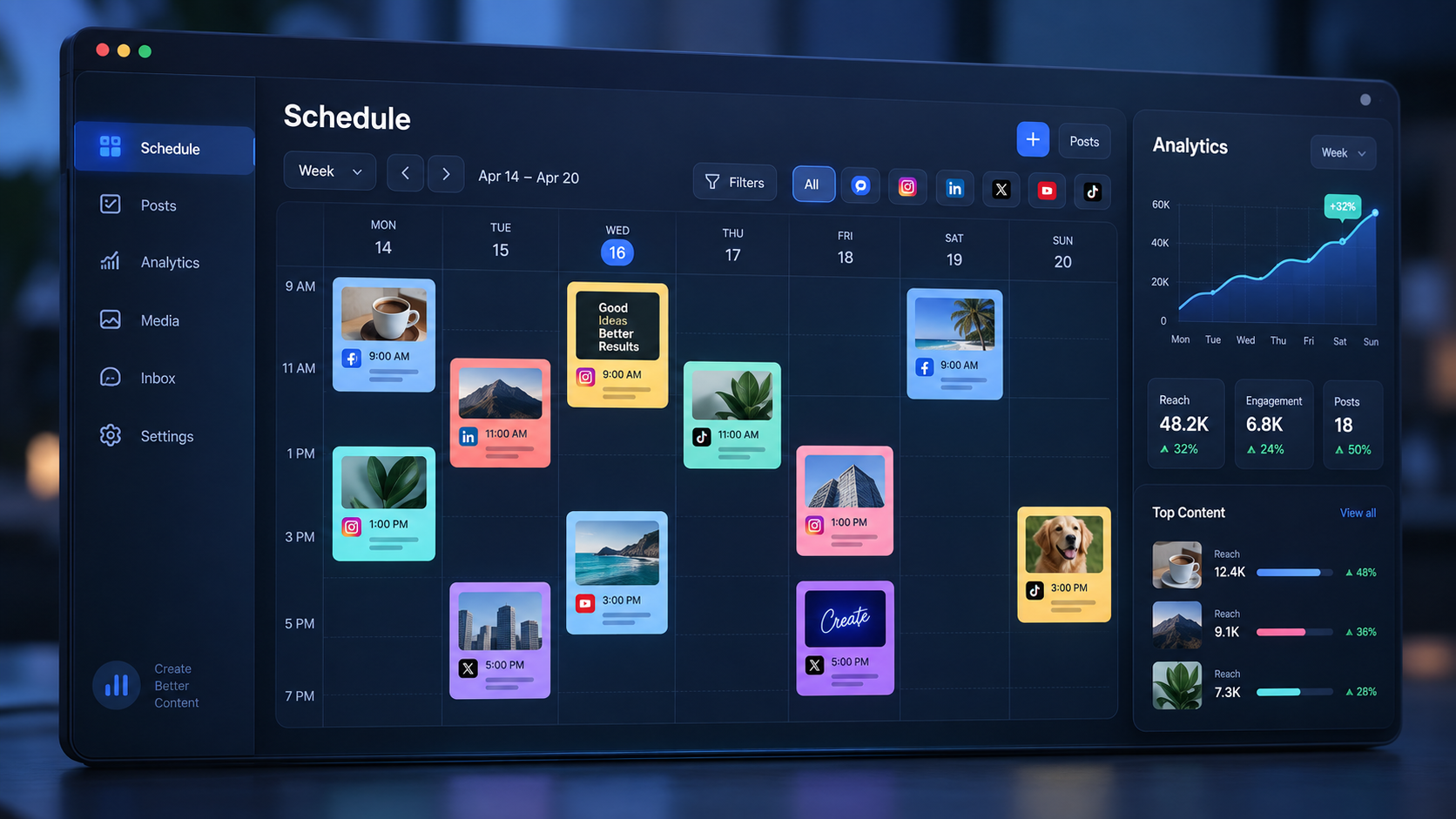
The Hootsuite calendar, also known as the content calendar or Planner in some versions of the platform, displays your social media content according to its scheduled publication date. Instead of managing captions, creative files, and deadlines across disconnected documents, you can see upcoming posts in a unified schedule.
This visual format makes it easier to answer important planning questions. Are you posting too frequently on one network? Has an important campaign been given enough support? Are several promotional messages scheduled back to back? The calendar reveals patterns and conflicts that are difficult to notice in a conventional spreadsheet.
Depending on your Hootsuite plan, permissions, and interface version, you may be able to view scheduled posts, published content, drafts, approval statuses, and paid content. You can also filter the calendar by social account or post status, helping large teams focus on the content relevant to them.
The calendar is most useful when it reflects a deliberate strategy. Scheduling random posts several weeks ahead may create activity, but it does not automatically create a strong social presence. A productive Hootsuite social media plan connects every post to an audience, objective, campaign, or repeatable content theme.
Set Up Your Calendar Before Scheduling Content
Begin by connecting the social accounts you are responsible for and confirming that each connection has the permissions required to publish. Remove obsolete profiles where appropriate, label accounts clearly, and verify that team members can access only the brands or regions they actually manage. Good account hygiene reduces the risk of publishing from the wrong profile.
Next, confirm your time zone. Scheduled times can become confusing when a brand, agency, and audience operate in different locations. Choose one planning time zone as the internal standard and document it for the team. If campaigns target several regions, state the audience time zone in campaign briefs so that nobody has to guess.
Open the planning area and explore the available calendar and content views. A calendar view is ideal for examining cadence and timing, while a list or tile-based view can be more efficient when filtering posts by status. Use filters to isolate a specific network, account, campaign, or workflow stage whenever the full calendar becomes crowded.
Before building your first Hootsuite schedule, define a small set of content pillars. A software company might use education, product use cases, customer proof, industry commentary, and company culture. Assigning every planned post to a pillar helps maintain variety and prevents the calendar from becoming a stream of repetitive promotions.
Finally, decide how far ahead to plan. Many teams benefit from planning themes four to six weeks ahead, drafting posts two to four weeks ahead, and completing final reviews several days before publication. Leave some open space for timely responses, trends, community conversations, and unexpected announcements.

Create and Schedule a Post in Hootsuite
To schedule a post, open the calendar and select an available date or time slot, or use the platform’s content creation option. Choose the correct social accounts before writing. This simple habit matters because network selection can affect character limits, media requirements, tagging options, and how the final post will appear.
Write the core message with a specific audience action in mind. A post should usually encourage one primary behavior, such as watching a video, saving a checklist, visiting a landing page, joining a conversation, or registering for an event. Avoid forcing several competing calls to action into one caption.
Add the appropriate image, video, link, or other supported media. Review the post preview for every selected network rather than assuming one asset will work everywhere. Cropping, thumbnail selection, caption length, link presentation, and account mentions can differ significantly between platforms.
For important content, create platform-specific versions. A concise observation may work well on X or Threads, while LinkedIn may benefit from additional context. Instagram often needs a strong visual opening and a caption designed for saves or comments. TikTok and short-form video platforms require particular attention to the opening seconds, on-screen text, and vertical framing.
Choose a publication date and time after reviewing the surrounding calendar. Hootsuite may provide recommended publishing times based on available account data and selected goals. Treat these recommendations as useful starting points, then compare them with your own results. Audience behavior, campaign urgency, content format, and time zone can all justify a different choice.
Before selecting the final scheduling command, check the account, caption, media, destination URL, tracking parameters, date, time, and approval status. This brief quality-control pass catches many of the errors that create unnecessary rework later.
Build a Balanced Hootsuite Social Media Plan
A reliable calendar should balance business priorities with audience value. Start by adding fixed events: launches, webinars, seasonal dates, promotions, partnerships, and reporting deadlines. Then add recurring editorial themes, educational content, community stories, and evergreen posts around those commitments.
Use a campaign-based approach rather than creating isolated updates. For example, a webinar campaign might include an early announcement, a speaker introduction, an educational clip, a reminder, live coverage, and a follow-up recording. Plotting the entire sequence in the Hootsuite calendar helps you see whether the narrative builds naturally.
Vary both format and purpose. Alternate short videos, carousels, static graphics, text-led posts, links, polls, and behind-the-scenes content where supported. At the same time, balance awareness, engagement, consideration, conversion, and retention goals. Format variety alone is not enough if every post is still asking people to buy.
Cadence should reflect the capacity of your team and the expectations of each audience. Publishing fewer strong posts consistently is usually more sustainable than filling every day with rushed material. Build enough lead time for design, legal review, stakeholder input, and platform-specific adaptation.
Reserve intentional gaps in the Hootsuite schedule. Open slots give you room to respond to news, feature user-generated content, join relevant trends, or extend a post that is performing unusually well. A calendar packed to maximum capacity can make a brand look inflexible and out of touch.
Use a simple naming system for campaigns and assets outside Hootsuite as well. Include the campaign, platform, format, and publication date in filenames. When a scheduled post needs a last-minute revision, clear naming makes it much easier to locate the correct source file.

Manage, Edit, and Review Scheduled Posts
Scheduling is not the end of the workflow. Review the calendar at least once a week to confirm that planned content still matches current priorities. Product changes, breaking news, inventory issues, public events, or a shift in brand messaging can make a previously appropriate post unsuitable.
Use calendar filters to inspect one account or status at a time. Look for missing days, accidental clusters, duplicated topics, unfinished drafts, and content awaiting approval. Then review the complete calendar to understand the audience experience across all campaigns.
When priorities change, open the relevant post and edit its copy, creative, network selection, or publishing time. Depending on the available interface and permissions, posts may also be movable within the calendar. After rescheduling, check for new conflicts rather than treating the post as an isolated item.
Drafts are useful for capturing ideas before every detail is ready. A scheduled draft can reserve a strategically important date while signaling that the copy or creative still needs work. Give every draft an owner and internal deadline; otherwise, placeholders can quietly remain unfinished until publication day.
Teams should establish a clear approval process. Define who checks brand voice, who validates links and claims, and who provides final authorization. Use the platform’s approval features when included in your plan, or record external approval according to your organization’s workflow. Avoid relying on informal chat messages that are difficult to audit later.
During a crisis or sensitive event, review all upcoming content immediately. Some organization plans provide controls for suspending scheduled publishing. Even when such a control is available, evaluate every affected post individually before rescheduling it. A message that was suitable yesterday may require more than a new publication time.

Use Timing Recommendations and Bulk Scheduling Wisely
Hootsuite’s timing recommendations can help identify promising publishing windows, but they should support—not replace—editorial judgment. A recommended time may be effective for routine content yet inappropriate for a live event, urgent announcement, or time-limited offer.
Test timing systematically. Choose a consistent format or content pillar, publish comparable posts at different times, and evaluate the results over several weeks. Avoid drawing conclusions from one unusually successful or unsuccessful post. Reach, engagement rate, clicks, watch time, and conversions may each point to different optimal windows.
For large campaigns or evergreen libraries, bulk scheduling can save substantial time. Prepare the required CSV carefully, use one accepted date format consistently, and ensure every scheduled time is valid and in the future. Review imported posts for errors before scheduling them.
Bulk uploading should not mean publishing identical copy everywhere. After importing, customize key posts with network-appropriate media, mentions, previews, and calls to action. Pay particular attention to duplicate-content restrictions and platform-specific settings that may need to be adjusted after the upload.
Use bulk scheduling for predictable content such as tips, quotes, event reminders, or recurring resources. Create high-priority launches, reactive posts, and complex multimedia campaigns individually so that they receive the attention they deserve.
Track Performance and Improve Future Calendars
A strong content calendar becomes more valuable when planning and measurement form a continuous loop. Add campaign tracking parameters to relevant links, keep naming conventions consistent, and decide which metric represents success before a post is published.
Review performance by content pillar, format, network, objective, and publication time. Do not focus only on total likes. A tutorial may generate fewer reactions but more saves; a customer story may produce qualified clicks; a short video may deliver strong awareness without immediate conversions.
Compare the planned calendar with actual results at the end of each month. Identify which themes deserve more space, which formats consume too many resources for their return, and where posting frequency may be causing fatigue. Convert these observations into concrete decisions for the next Hootsuite social media plan.
Create a short monthly planning note containing three categories: continue, test, and stop. Continue tactics supported by repeatable evidence. Test promising ideas with a clear hypothesis. Stop activities that consistently underperform or no longer support current goals.
Also review operational performance. Track missed deadlines, approval delays, failed posts, incorrect links, and last-minute creative changes. Improving the production process can have as much impact as changing the content itself.
Common Hootsuite Calendar Mistakes to Avoid
One common mistake is treating the calendar as a storage space rather than a strategic tool. Every post should have a reason to exist. If the team cannot identify the intended audience, objective, and next action, the post probably needs revision.
Another mistake is publishing the same message to every network without adaptation. Cross-platform scheduling is efficient, but audiences use each platform differently. Adjust the hook, caption length, creative crop, hashtags, mentions, and call to action as needed.
Teams also overlook routine quality assurance. Broken links, incorrect time zones, expired offers, and wrong-account publishing can damage trust. Use a repeatable pre-publication checklist and assign responsibility for the final review.
Finally, avoid planning so far ahead that the calendar becomes rigid. Long-range planning is useful for themes and campaigns, but detailed captions should remain flexible enough to reflect current conversations. The most effective calendar combines preparation with room for relevance.
Frequently Asked Questions
How do I schedule a post in the Hootsuite calendar?
Open the planning calendar, select an available date or time, choose the appropriate social account, create the post, add media, and set the publishing time. Review the platform preview and all post details before confirming the schedule.
Can I edit a post after it has been scheduled?
Yes. Open the scheduled item from the calendar and use the available editing options to update its copy, media, destination, or publication time. Recheck the preview after editing because changes may affect how the post appears on each network.
How far ahead should I build my Hootsuite schedule?
A practical starting point is to plan campaign themes four to six weeks ahead and finalize individual posts one to three weeks ahead. Keep some calendar space open for timely announcements, audience conversations, and reactive content.
Should I always use Hootsuite’s recommended publishing time?
No. Recommended times are useful inputs, but campaign context and your own performance data should guide the final decision. Test multiple time slots and compare results using metrics that match the purpose of each post.