
HubSpot Social Media Scheduling: Integration and Use Cases
HubSpot social media scheduling streamlines content planning and posting, enhancing marketing efficiency with seamless integration and practical use cases.


HubSpot social media scheduling lets marketing teams create, customize, schedule, monitor, and analyze social posts within the same CRM ecosystem they use for campaigns, contacts, leads, and revenue reporting. The HubSpot scheduler is particularly valuable when social media supports a wider inbound marketing or demand-generation strategy: instead of treating publishing as an isolated task, marketers can connect posts to campaigns, track traffic and contacts, coordinate team activity, and evaluate how social content contributes to business outcomes.
What HubSpot Social Media Scheduling Includes | Why CRM Integration Is the Main Advantage | How to Build an Effective Scheduling Workflow | High-Value Use Cases for Different Marketing Teams | Analytics, Attribution, and Optimization | Limitations and When Another Scheduler May Fit Better | Best Practices for Getting More Value from HubSpot Social Media Tools | Frequently Asked Questions
What HubSpot Social Media Scheduling Includes
HubSpot’s social publishing functionality is part of its broader social media management toolset in Marketing Hub. It provides a centralized composer where users can prepare content for connected social accounts, adapt the content for individual networks, and either publish immediately or select a future date and time. Teams can also create saved publishing schedules, making it faster to assign posts to recurring time slots.
The supported content options depend on the social network and the account permissions granted during connection. HubSpot supports publishing workflows for major platforms such as Facebook, Instagram, LinkedIn, X, TikTok, YouTube, and Reddit, although formats and network-specific settings vary. For example, one channel may support polls or document posts while another supports short-form video, stories, or first comments.
A useful feature of the HubSpot scheduler is the ability to begin with one campaign idea and create channel-specific versions from the same workspace. A marketer might use a concise, conversational caption for X, a detailed professional argument for LinkedIn, and a visually led version for Instagram. This preserves the central message without forcing every audience to receive identical copy.
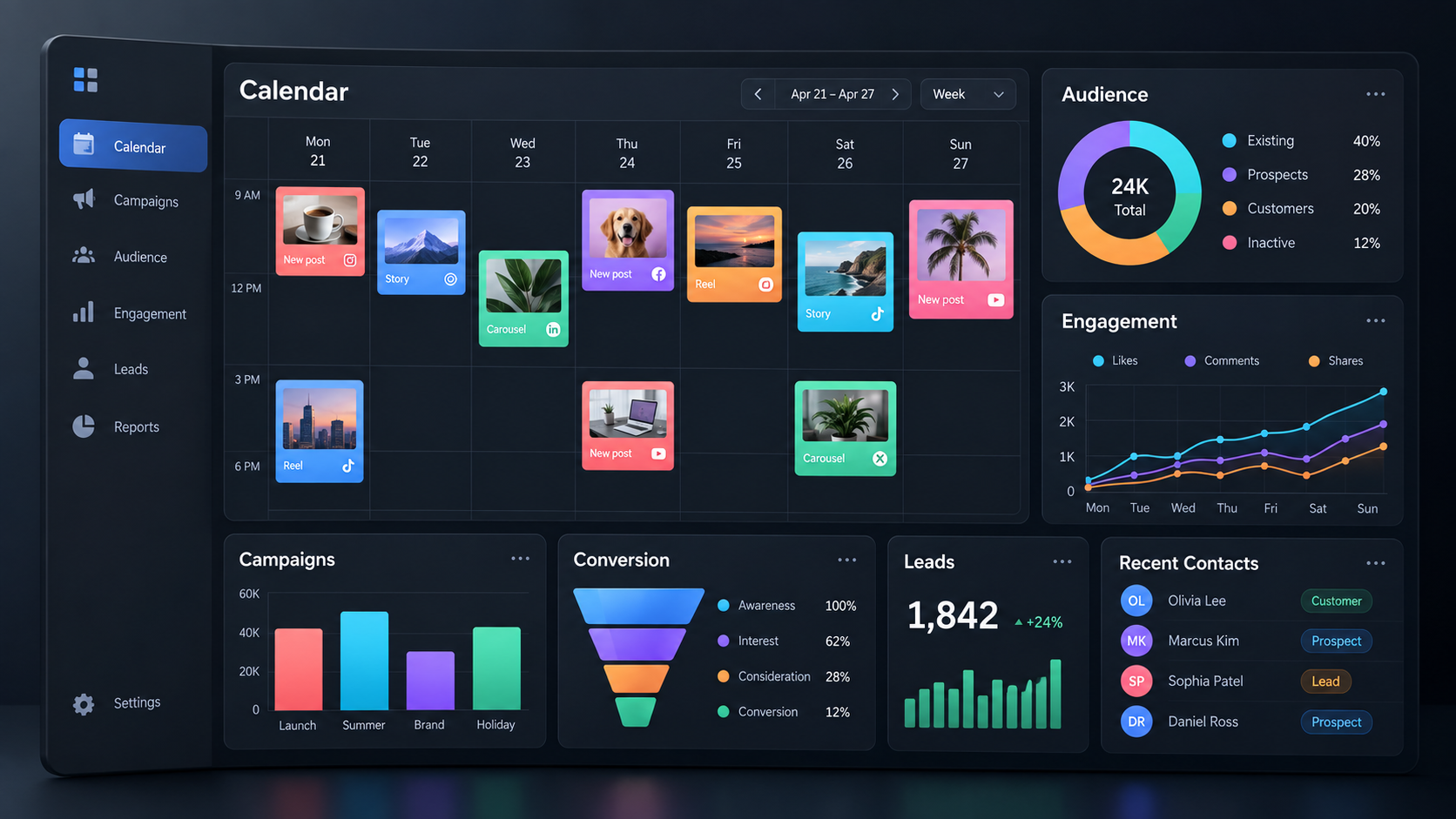
HubSpot also provides a calendar and publishing views that help teams see planned, drafted, scheduled, and published content. This makes it easier to identify empty periods, avoid accidental overlaps, and confirm that important launches have adequate support. For organizations with high publishing volumes, bulk scheduling can accelerate the process: eligible accounts can upload a spreadsheet containing post copy, accounts, dates, links, media URLs, and campaign associations.
Before choosing HubSpot specifically for publishing, verify the current subscription requirements and supported formats. Core social publishing and reporting capabilities are generally associated with Marketing Hub Professional and Enterprise, and individual networks can impose their own API limitations. A feature available in a social platform’s native app may not always be available through a third-party scheduler.

Why CRM Integration Is the Main Advantage
Many scheduling platforms can place a post on a calendar. The distinguishing value of HubSpot social media scheduling is what happens around the post. Social activity can sit alongside landing pages, forms, emails, calls to action, contacts, deals, and campaign records. This gives marketers a clearer path from publishing activity to measurable commercial impact.
Consider a software company promoting a webinar. The team can associate its social posts with the same HubSpot campaign as the registration page, invitation emails, paid ads, and follow-up workflow. Campaign reporting can then present those assets as parts of one coordinated initiative rather than as disconnected channel reports. This helps stakeholders evaluate the campaign as a system.
The integration is also valuable at the contact level. When social traffic leads visitors to tracked pages and those visitors later identify themselves through a form or another conversion, HubSpot can connect relevant website and campaign activity to CRM records. Sales and marketing teams gain more context about how demand was generated, while social specialists receive evidence that goes beyond reactions and follower counts.
That does not mean every like can be tied neatly to revenue. Privacy rules, browser behavior, network APIs, attribution settings, and cross-device journeys create unavoidable gaps. A person may discover a company through a social post, return through organic search, and convert days later. Attribution reports should therefore inform decisions rather than be treated as a perfect record of causation.
The strongest approach combines several levels of measurement. Use native engagement data to judge whether the creative resonated, HubSpot traffic and contact metrics to assess demand generation, and campaign or revenue attribution to understand business influence. Viewed together, these signals create a more useful picture than any single metric.
How to Build an Effective Scheduling Workflow
A reliable workflow starts before anyone opens the composer. Define the campaign objective, target audience, core message, destination, content formats, and measurement plan. Scheduling becomes much easier when every post has a clear job, such as generating awareness, earning engagement, driving registrations, supporting product education, or reactivating existing contacts.
Next, connect only the social accounts the team genuinely needs and review user access carefully. Confirm who can create drafts, approve content, connect accounts, publish, and analyze results. Social connections may depend on the permissions of the person who authorizes them, so document account ownership and establish a process for reconnecting channels when administrators or employees change.
Create a naming convention for campaigns and assets. A practical pattern could include the initiative, market, funnel stage, and quarter. Consistent naming prevents several near-identical campaigns from appearing in reports and helps users associate each social post with the correct record.
Build a weekly publishing schedule using evidence from previous performance. HubSpot allows users to save recurring publishing times, but those times should be treated as a tested hypothesis rather than a universal formula. Review the publishing times of posts with strong clicks, interactions, or conversion results. Then compare performance by network, audience, region, and content type. The best time for a LinkedIn case study may differ from the best time for an Instagram Reel.
When creating a post, follow a repeatable sequence:
- Choose the connected accounts and create a network-appropriate version for each one.
- Add the correct destination URL and verify that its page, form, and tracking work.
- Upload media that meets the current specifications of the selected network.
- Check the preview for cropped text, incorrect thumbnails, or awkward line breaks.
- Associate the post with the relevant HubSpot campaign.
- Select a saved publishing time or schedule a specific date and time.
- Review every version before scheduling, especially mentions, links, and calls to action.
For large launches, use bulk scheduling selectively. A spreadsheet upload is efficient for evergreen tips, event countdowns, distributed franchise content, or a planned campaign series. Leave enough time for processing and review rather than uploading posts immediately before they are due. Bulk workflows can introduce repeated errors at scale, so validate the first few rows, confirm time-zone formatting, and review uploaded drafts before final scheduling.
Finally, add a lightweight approval routine. One person can own messaging accuracy, another can check brand and legal requirements, and the channel owner can confirm formatting. HubSpot should serve as the operational source of truth, while the approval process should remain proportionate to the risk of the content.


High-Value Use Cases for Different Marketing Teams
Inbound and demand-generation campaigns
HubSpot is a natural fit when social posts drive visitors toward landing pages, gated resources, webinars, assessments, or demos. Each scheduled post can be associated with a campaign, giving the demand-generation team a shared reporting structure across social, email, forms, and web content.
For a research report launch, schedule an initial announcement, several insight-led posts, an author quotation, a short video, and a final reminder. Use different links or tracking parameters when the analysis requires granular comparisons. Review not just clicks but also sessions, new contacts, conversion rates, and influenced pipeline.
B2B thought leadership
A founder, consultant, or subject-matter expert may generate strong ideas but struggle to publish consistently. The content team can turn interviews, webinars, and sales conversations into a scheduled series of LinkedIn posts, short videos, and supporting articles. Drafting in batches reduces context switching, while CRM reporting helps reveal which subjects attract qualified visitors.
Maintain a human voice by adapting every post rather than mechanically distributing identical copy. Scheduling should create consistency without making the account feel automated. Leave room for timely commentary, direct replies, and spontaneous posts when industry news changes the conversation.
Events and webinars
Events have clear dates and multiple communication stages, making them ideal for structured scheduling. Plan announcements, speaker introductions, agenda previews, registration reminders, live-day posts, recordings, and post-event highlights. Associate the content with one campaign so the marketing team can compare social activity with registrations and subsequent sales actions.
Build contingency rules into the calendar. If registration closes early, a speaker cancels, or the event time changes, scheduled posts must be updated immediately. Assign a specific owner to perform a final calendar audit before every major event.
Multi-brand or regional teams
Organizations managing several regions or brands can use saved schedules and bulk preparation to coordinate campaigns without publishing everything at the same moment. Central teams can define approved messages and assets, while local teams adapt language, examples, offers, and timing.
Governance matters in this model. Establish account-level access, campaign naming rules, time-zone standards, escalation paths, and a clear distinction between content that must remain consistent and content that can be localized.
Lead nurturing and sales alignment
Social publishing is often viewed as a top-of-funnel activity, but it can also support leads already in the CRM. A product comparison, implementation guide, customer story, or objection-handling video may reinforce an active sales conversation. Sales teams can share campaign content directly, while marketers can see whether the topic generates traffic and conversions across the wider audience.
Use CRM context to improve the editorial plan without exposing personal information or targeting individuals inappropriately. Aggregate questions from sales calls, support tickets, and form submissions, then create useful public content that answers recurring concerns.
Analytics, Attribution, and Optimization
HubSpot social media tools report metrics such as audience growth, impressions, clicks, reactions, and interactions, subject to the data each network makes available. Reports can typically be filtered by account, network, date range, or associated campaign. These views help teams identify strong posts, compare channels, and decide what to repeat or retire.
Use a measurement hierarchy tied to the purpose of the post. Awareness content may be assessed through reach, impressions, video views, and audience growth. Consideration content should emphasize meaningful engagement, clicks, sessions, and content consumption. Conversion-oriented content should be evaluated through form submissions, new contacts, qualified leads, meetings, deals, or revenue where reliable attribution is available.
Be aware of reporting boundaries. HubSpot’s social reporting focuses primarily on organic activity, and boosted posts or advertising campaigns may not be reflected in the same way. Social networks also differ in how long they make data available, how quickly metrics arrive, and whether externally published posts can be imported. These limitations should be documented in the team’s reporting notes.
Run monthly optimization reviews rather than reacting to every post. Group results by content theme, format, funnel stage, campaign, and network. A single post can outperform because of timing or external events; repeated patterns are more actionable. Compare several posts before changing the strategy.
Turn findings into specific experiments. Instead of deciding to “make content more engaging,” test a concrete change: customer-led openings versus product-led openings, short captions versus detailed captions, static graphics versus short videos, or direct calls to action versus educational endings. Keep other variables reasonably consistent and define the success metric before publishing.
Limitations and When Another Scheduler May Fit Better
The HubSpot scheduler is strongest for organizations already using HubSpot as a central marketing and CRM platform. If the primary need is sophisticated social production rather than CRM integration, a specialized platform may offer deeper features for visual planning, creator collaboration, social listening, community management, approval routing, or network-specific analytics.
Teams should also inspect subscription cost and feature availability. Social tools may require a higher Marketing Hub tier than the company otherwise needs. The business case should include the value of consolidated reporting, saved manual work, improved campaign governance, and tighter sales alignment—not merely the number of posts scheduled.
Native platform tools still have an important role. New formats and publishing controls often appear in a network’s own application before third-party API access becomes available. Sensitive launches, complex tagging, trending audio, interactive stickers, or experimental formats may need to be published natively. A hybrid workflow is often more practical than forcing every post through one tool.
HubSpot is also not a substitute for community engagement. A full calendar can create the appearance of an active strategy, but meaningful social marketing requires replies, listening, relationship building, and timely participation. Assign daily ownership for comments and mentions, and define which conversations need support, sales, legal, or communications input.
Best Practices for Getting More Value from HubSpot Social Media Tools
Start with campaign architecture. Associate posts with campaigns consistently and agree on what qualifies as a campaign. If every minor post receives its own campaign, reporting becomes fragmented. If all social activity is placed in one annual campaign, the data becomes too broad to guide decisions.
Create modular content. A strong webinar, interview, guide, or customer story can generate multiple social assets, but each asset should deliver standalone value. Extract a useful argument, statistic, demonstration, checklist, or answer rather than repeatedly posting a link with slightly different introductory text.
Preserve channel context. Customize length, tone, media, hashtags, mentions, and calls to action for the norms of each network. The shared composer should improve operational efficiency without flattening every platform into the same experience.
Schedule evergreen content in batches while reserving calendar capacity for current events and live participation. A practical calendar might leave 20 to 30 percent of publishing space flexible. This prevents the brand from continuing with routine promotional content during a crisis, major industry announcement, or fast-moving cultural moment.
Audit the system quarterly. Review connected accounts, user permissions, campaign associations, saved publishing times, failed posts, tracking parameters, and reporting dashboards. Remove obsolete processes and reconnect accounts before credentials expire or employees leave.
Most importantly, optimize for outcomes rather than scheduling volume. Publishing more posts is useful only when those posts reach the right audience, communicate a valuable idea, and support an intentional customer journey. The best HubSpot setup makes that relationship visible.
Frequently Asked Questions
Can HubSpot schedule social media posts?
Yes. Eligible HubSpot Marketing Hub accounts can create posts in the social composer, publish them immediately, schedule them for a specific time, or use saved publishing times. Teams can also customize versions for different connected networks and, where available, schedule larger batches through spreadsheet uploads.
Which social networks work with the HubSpot scheduler?
HubSpot supports major networks including Facebook, Instagram, LinkedIn, X, TikTok, YouTube, and Reddit. Exact capabilities vary by network, content format, subscription, region, and API access. Check HubSpot’s current documentation before building a workflow around a specific feature such as stories, polls, first comments, document posts, or short-form video.
What is the main advantage of HubSpot social media scheduling?
The primary advantage is CRM and campaign integration. Social posts can be managed alongside landing pages, forms, emails, contacts, and other marketing assets. This allows teams to connect publishing activity with traffic, lead generation, campaign performance, and—in eligible reporting setups—deals or revenue attribution.
Is HubSpot a complete replacement for a dedicated social media platform?
Not for every organization. HubSpot is a strong choice for CRM-centered marketing teams that need integrated campaigns and business reporting. A specialist tool may be better for advanced social listening, high-volume community management, intricate creative approvals, or highly visual calendar planning. Many teams use HubSpot for campaign-connected publishing and analytics while retaining native network tools for emerging or platform-specific formats.