
In-Depth Look at Later as a Social Media Manager and Scheduler
Later offers powerful tools for social media managers to schedule posts, analyze performance, and streamline content planning across multiple platforms.


Later is a visual social media management platform that helps marketers, creators, and small teams plan content, schedule posts, manage media, review analytics, and coordinate publishing from one workspace. Best known for its visual calendar and Instagram-focused planning tools, the Later social media manager now supports broader multi-platform workflows. It is particularly useful for brands that want to replace scattered spreadsheets, reminders, and manual posting with a clear, repeatable content system.
What Is Later and Who Is It Best For? | Key Features of the Later Social Media Tool | How to Use the Later Social Media Scheduler | Benefits of Using Later for Social Media Management | Practical Workflow for Better Results | Limitations and Considerations Before Choosing Later | How Later Compares with Manual Scheduling and Other Tools | Frequently Asked Questions | Final Verdict: Is Later Worth Using?
What Is Later and Who Is It Best For?
Later began as an Instagram scheduling platform, and that visual-first heritage still shapes the product. Its core experience revolves around a content calendar where users can organize media, prepare captions, select publishing dates, and preview upcoming campaigns. This makes the Later social media tool especially approachable for people who think in terms of images, videos, campaigns, and content themes rather than complex project-management structures.
The platform is best suited to creators, social media managers, ecommerce brands, agencies, and marketing teams with a steady publishing schedule. A solo creator might use it to batch a month of Instagram posts and short-form videos. A retail brand could coordinate product launches across several networks. An agency may use separate social sets or workspaces to keep client assets and schedules organized.
Later is not simply a queue that sends posts at predetermined times. It combines planning, publishing, media organization, collaboration, analytics, and link-in-bio functionality. That combination reduces the need to move constantly between cloud storage, spreadsheets, social apps, and reporting documents.
Its strongest fit is a visually led content operation. Fashion, food, beauty, travel, fitness, lifestyle, hospitality, and direct-to-consumer brands can benefit from seeing planned posts arranged on a calendar or feed preview. Text-heavy B2B teams can use it as well, although they may place more value on approval workflows, reporting depth, and network-specific publishing controls than on visual feed design.

Key Features of the Later Social Media Tool
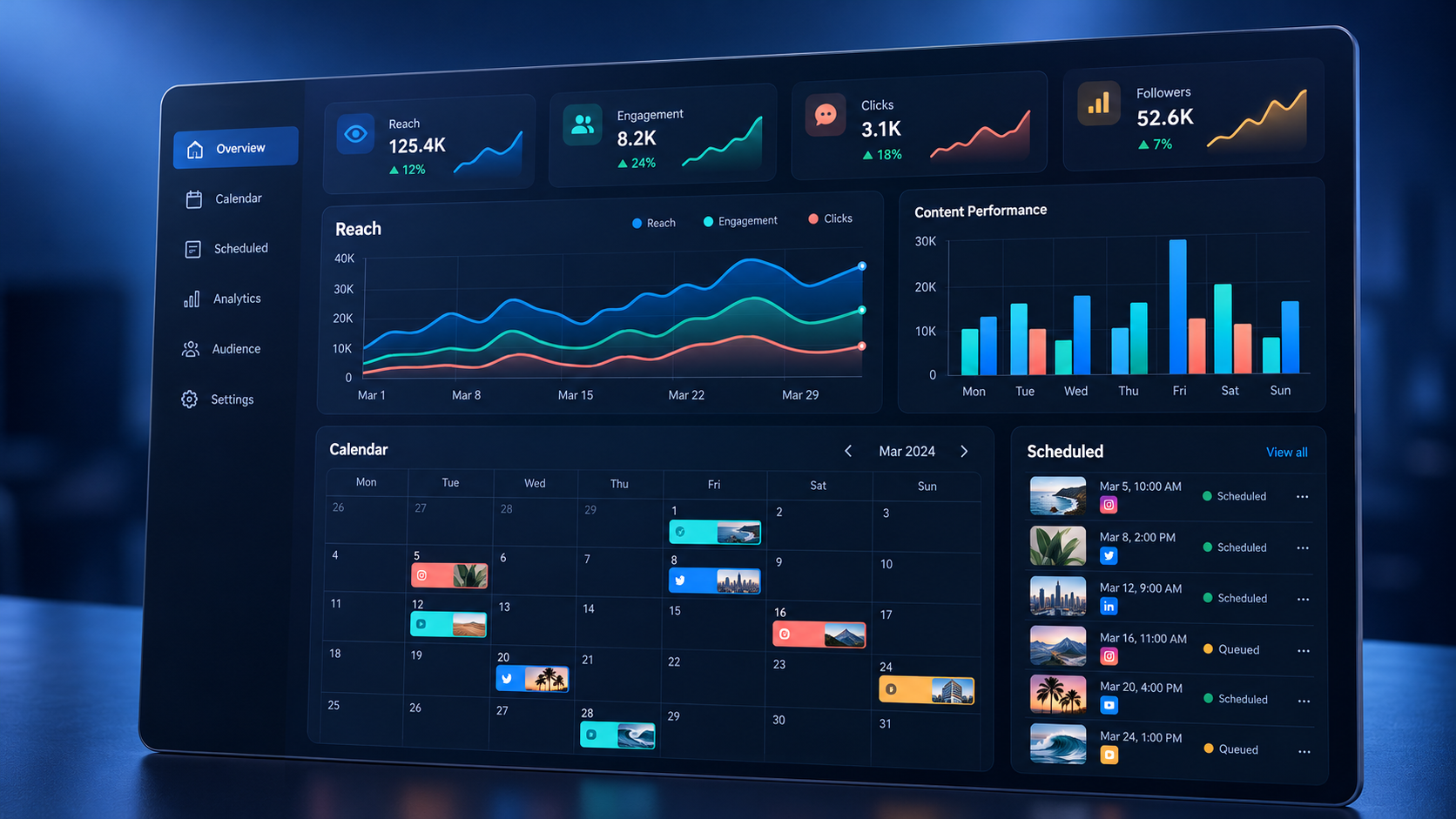
The visual content calendar is the center of the Later experience. Users can view scheduled content by day, week, or month, then move posts to new time slots through a straightforward planning interface. This makes campaign gaps, excessive posting, and poorly balanced content themes easier to identify than they would be in a spreadsheet.
Later also includes a media library for storing photos, graphics, and videos. A well-maintained library can become the operational source of truth for social assets. Marketers can upload media in batches, add labels, record notes, and distinguish between used and unused material. Depending on the account configuration and current platform capabilities, assets may also be imported from supported external services.
The publishing tools allow users to prepare captions, hashtags, mentions, links, and other network-relevant details before scheduling. Supported post formats and automatic publishing options vary by social network because each network provides different technical permissions. A reliable workflow therefore begins with checking whether a particular format can publish automatically or requires a mobile notification and final manual action.
Later’s conversation, collaboration, and approval capabilities help teams move content through review without relying entirely on long email threads. A marketer can draft a post, invite feedback, revise the creative or copy, and place the approved version on the calendar. The exact controls available may depend on the selected plan, so teams should evaluate permissions and approval requirements before subscribing.
Analytics connect publishing activity to performance. Rather than judging content only by appearance, marketers can study engagement, reach, audience behavior, post results, and other available metrics. Reports should be used to identify patterns, not merely to celebrate large totals. For example, compare educational videos with product demonstrations, assess performance by publishing time, and look for formats that consistently produce profile visits or clicks.
Later also offers link-in-bio functionality, commonly used to turn a social profile’s single link into a mobile landing destination. Creators and brands can direct visitors toward articles, product pages, campaigns, or other priority destinations. This is valuable when social content is intended to generate measurable traffic rather than engagement alone.
How to Use the Later Social Media Scheduler
Start by connecting only the social profiles that belong to the same brand or content operation. Confirm that each account has the correct permissions and business settings. If multiple employees or contractors will participate, assign individual access where possible instead of sharing a single password. This makes ownership clearer and reduces security risks.
Next, establish a simple content framework before filling the calendar. Define three to five recurring pillars, such as education, community, product value, customer proof, and brand personality. Give each pillar a purpose and an approximate publishing frequency. This prevents the calendar from becoming visually full but strategically unfocused.
Upload a batch of approved assets to the media library, then label them consistently. Useful labels might identify the campaign, product, format, audience segment, or production status. A naming convention such as “Campaign–Format–Topic–Version” makes assets easier to retrieve when the library grows. Archive outdated materials so team members do not accidentally publish an obsolete offer or an old product image.
Use the Later social media planner to map major launches, seasonal events, promotions, and evergreen campaigns first. Then fill the remaining calendar with supporting content. This top-down approach protects important dates and prevents routine posts from crowding out strategic campaigns.
When creating each post, adapt it for the destination rather than copying identical content everywhere. A short-form video may work across multiple channels, but its hook, caption length, hashtags, thumbnail, calls to action, and safe zones may need adjustment. Treat cross-platform scheduling as efficient adaptation, not blind duplication.
Before scheduling, run a quality check. Verify the creative format, spelling, mentions, link destination, disclosure language, time zone, publishing date, and account selection. Also confirm that the first frame or thumbnail communicates the idea clearly. For notification-based posts, assign responsibility for completing the final publishing step and make sure that person will be available.
Finally, review the calendar as a complete audience experience. Look for repetitive visuals, several promotional posts in a row, conflicting calls to action, or long gaps. A strong schedule should balance consistency with variety and give followers a reason to pay attention beyond discounts and announcements.

Benefits of Using Later for Social Media Management
The primary benefit of the Later social media scheduler is operational clarity. Everyone can see what is planned, when it will publish, and which asset belongs to each post. That visibility reduces duplicate work and makes it easier to coordinate copywriters, designers, video editors, community managers, and approvers.
Batching is another major advantage. Instead of switching into publishing mode every day, a marketer can prepare multiple posts during a focused session. Captions can be drafted together, assets can be checked in sequence, and scheduling decisions can be made with the whole campaign visible. This reduces context switching while preserving space for timely, reactive content.
A visual planning environment also supports brand consistency. Teams can check whether colors, subjects, formats, and campaign themes create a coherent presence. Consistency does not mean making every post look identical; it means ensuring that content feels recognizably connected to the brand.
Later can also improve accountability. Drafts, scheduled items, assets, and performance data are kept closer together, giving managers a clearer view of the workflow. If a campaign underperforms, the team can investigate its creative concept, format, timing, distribution, and call to action instead of relying on memory.
For creators and lean businesses, the most important benefit may be sustainability. A structured Later post scheduler makes it possible to maintain a dependable presence without interrupting every day to publish manually. Scheduling cannot replace active community engagement, but it can protect the time needed for content production, customer conversations, and strategic work.
Practical Workflow for Better Results
A useful Later workflow begins with a monthly planning session. Review business priorities, campaign dates, audience questions, and the previous month’s results. Decide which messages matter most, then translate those priorities into content briefs. Avoid starting with the question, “What should we post?” Start with, “What should the audience understand, feel, or do?”
Follow that session with a weekly production and scheduling block. Create or collect the required assets, write captions, and place drafts on the calendar. Leave some capacity open for trends, community moments, industry news, and real-time brand updates. A calendar filled to maximum capacity can become a liability if it leaves no room to respond.
Use approval deadlines that occur well before publication. Routine posts might require approval two or three business days in advance, while launches and regulated content may need a longer review period. Identify one final decision-maker so contradictory feedback does not trap posts in revision cycles.
After publishing, reserve time for community management. Scheduling solves distribution, not relationships. Reply to meaningful comments, answer questions, acknowledge user-generated content, and route customer concerns appropriately. These actions often influence trust more directly than publishing another polished graphic.
Run a structured performance review at least monthly. Group posts by pillar, format, campaign, and objective. Compare similar posts instead of treating every publication as equivalent. A conversion-focused offer should not be judged by the same standard as a reach-focused educational video. Record the findings and turn them into specific tests for the next cycle.
Limitations and Considerations Before Choosing Later
No social media management platform removes every manual task. Network APIs, account types, regional features, and post formats affect what the Later social media manager can publish automatically. New or specialized features introduced by social networks may take time to become available through third-party tools. Teams should test their essential formats during a trial or evaluation period.
Plan limits also deserve careful attention. The number of users, connected profiles, scheduled posts, workspaces, analytics features, and approval options can vary between subscriptions. Evaluate the platform against the team’s expected workload over the next year, not only its current size. A low-cost plan may become restrictive once additional brands, clients, or collaborators are added.
Analytics should be treated as decision support rather than perfect attribution. Social platforms define metrics differently, and privacy restrictions can limit the customer journey data available to third-party tools. For revenue-focused campaigns, combine Later’s reporting with web analytics, ecommerce data, campaign parameters, and customer relationship management records.
Teams with complex enterprise governance, advanced social listening requirements, or large customer-support operations may need capabilities beyond Later’s core strengths. In that situation, compare permission controls, audit trails, listening coverage, service-level requirements, data retention, and integrations with larger social suites.
Finally, automation introduces reputational risk when scheduled content is left unattended. News events, emergencies, product issues, or cultural moments can make an otherwise harmless post inappropriate. Assign someone to monitor context and pause the queue when necessary.
How Later Compares with Manual Scheduling and Other Tools
Manual publishing can be adequate for a single account with an occasional posting schedule. It provides direct access to every native feature, but it also creates repeated interruptions and limited visibility into future content. Once several platforms, campaigns, or contributors are involved, the administrative cost grows quickly.
Native scheduling features can be a strong free alternative for teams focused on one network ecosystem. Their main disadvantage is fragmentation: marketers may need to maintain separate calendars, asset stores, and reporting routines for each network. Later provides a more centralized view, which can be worth paying for when coordination is the primary challenge.
Compared with other third-party schedulers, Later stands out for visual organization, creator-friendly workflows, media planning, and its roots in Instagram marketing. Other platforms may emphasize deep social listening, inbox management, employee advocacy, or enterprise reporting. The right choice depends less on the longest feature list and more on the bottleneck the team needs to remove.
During evaluation, build the same sample campaign in two or three shortlisted tools. Include a video, carousel, link post, approval request, and performance report. Measure how long the process takes, note which steps remain manual, and ask actual users to score the interface. A realistic workflow test is more revealing than a feature comparison table.
Frequently Asked Questions
Is Later a social media management tool or only a scheduler?
Later is both a scheduler and a broader social media management tool. Scheduling is a central capability, but the platform also provides visual planning, media organization, collaboration, analytics, and link-in-bio features. Available functions depend on the selected plan and connected social networks.
Can Later automatically publish every type of social media post?
No third-party scheduler can automatically publish every format on every network. Automatic publishing depends on the permissions provided by each social platform, the account type, and the post format. Some content may require a mobile notification and a final manual step, so test your priority formats before building the workflow around them.
Is the Later social media planner suitable for teams and agencies?
Yes, it can suit small teams and agencies that need shared calendars, organized asset libraries, review processes, and separate brand workflows. Agencies should compare plan limits, user permissions, client separation, approval options, and reporting requirements before choosing a subscription.
How far in advance should content be scheduled in Later?
For most brands, schedule core evergreen and campaign content two to four weeks ahead while leaving room for timely posts. Review the calendar weekly and monitor scheduled content daily during sensitive periods. The goal is dependable preparation without becoming so rigid that the brand cannot respond to its audience or current events.
Final Verdict: Is Later Worth Using?
Later is a strong choice for marketers and creators who want a visual, structured way to run a consistent social media program. Its calendar, media library, publishing features, analytics, and link-in-bio tools address the practical work surrounding content distribution—not just the moment when a post goes live.
The platform delivers the greatest value when teams use it as a shared operating system. Establish content pillars, organize assets, define approvals, tailor posts by network, and review results regularly. Simply loading a queue will save time, but connecting scheduling to strategy and measurement produces a much larger return.
Before committing, verify support for your required networks and formats, calculate the appropriate plan for all users and profiles, and run a real campaign through the full workflow. If visual planning, efficient batching, and reliable coordination are priorities, the Later social media scheduler deserves a place on your shortlist.