
Metricool Social Media Scheduler: Features and Benefits
Metricool Social Media Scheduler streamlines content planning and posting, helping you manage multiple accounts efficiently with powerful analytics and autom...


The Metricool social media scheduler is an all-in-one planning, publishing, analytics, and reporting platform for creators, marketers, agencies, and growing brands. It lets you organize multiple social networks in one visual calendar, customize posts by platform, publish automatically, identify stronger posting times, coordinate approvals, and measure the results. This guide reviews the most useful Metricool features, explains the current pricing structure, and shows how to build an efficient scheduling workflow.
What Is the Metricool Social Media Scheduler? | Core Metricool Features for Planning and Publishing | How to Schedule a Post in Metricool | Analytics, Reporting, and Workflow Benefits | Metricool Pricing and Plan Comparison | Usability: Strengths, Limitations, and Who Should Use It | A Practical Workflow for Better Results | Frequently Asked Questions
What Is the Metricool Social Media Scheduler?
Metricool combines content planning with social media management and performance analysis. Instead of switching among native publishing tools, spreadsheets, messaging apps, and reporting dashboards, users can manage much of the workflow from one workspace. This makes it particularly useful for people responsible for several channels or client accounts.
The platform supports major networks including Facebook, Instagram, Threads, Bluesky, Pinterest, TikTok, YouTube, Twitch, LinkedIn, Google Business Profile, and, through a paid add-on, X. Available formats and publishing options vary by network because each platform provides different API capabilities.
Accounts are organized into “brands.” A brand is a workspace containing the social profiles, website, and advertising connections associated with one business, creator, client, or location. This structure keeps calendars and analytics separate. Agencies can therefore manage multiple clients without mixing their content or performance data.
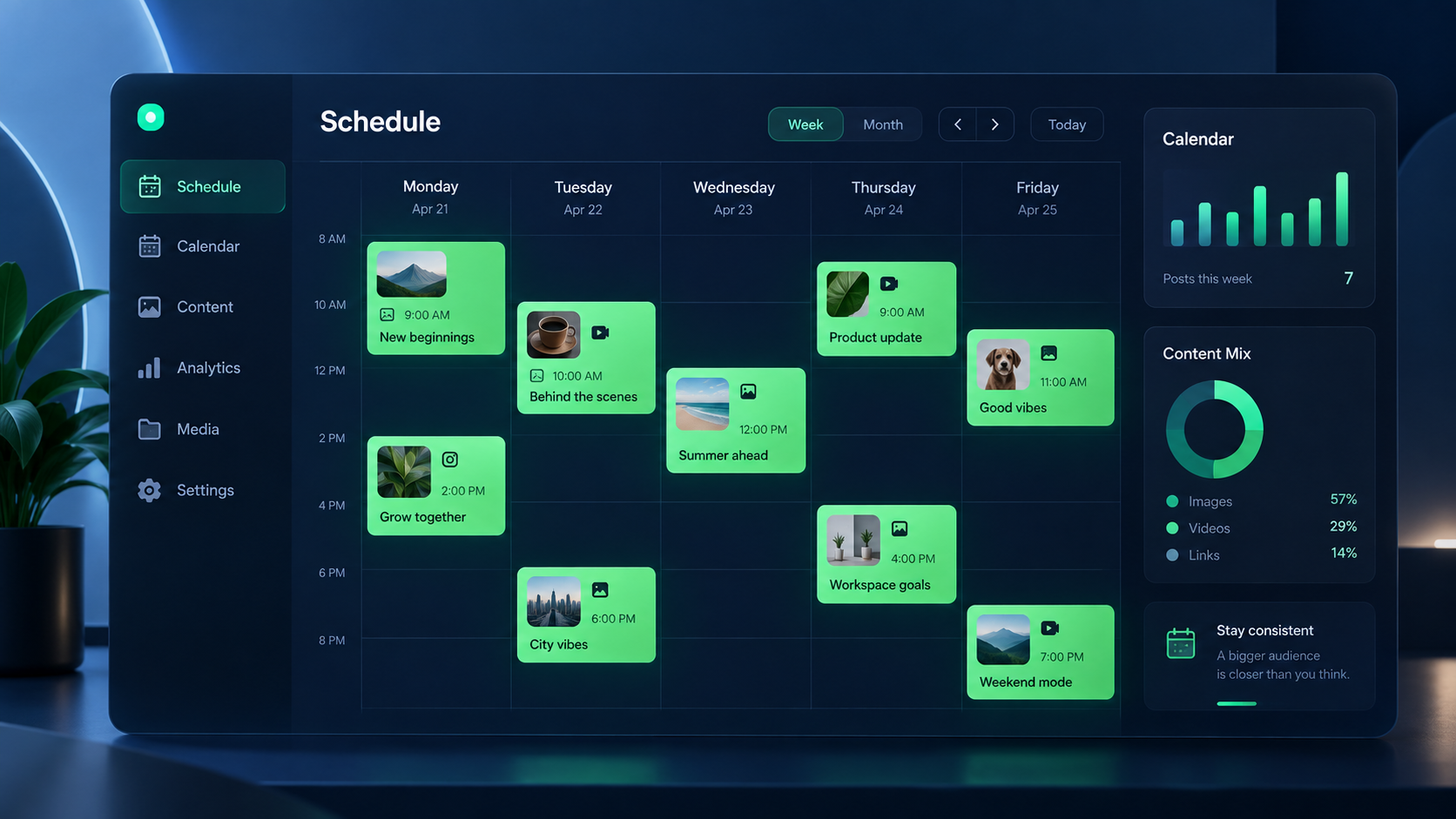
The central Planner presents scheduled and published content in a calendar. Users can view their workload, drag posts to new dates, create drafts, preview platform-specific versions, and check recommended publishing periods. This visual approach makes gaps, overloaded days, and campaign sequences easier to spot than they would be in a spreadsheet.
Metricool is more than a queue for finished posts. It also includes a media library, image and video editing tools, an AI writing assistant, hashtag tools, recurring content options, analytics, competitor tracking, an inbox, campaign dashboards, and downloadable reports. The exact combination depends on the selected plan.

Core Metricool Features for Planning and Publishing
The strongest Metricool features focus on turning a content plan into a dependable publishing system. The calendar supports individual posts, coordinated campaigns, drafts, and content for several networks. Color-coded entries and filters help users focus on a particular brand, channel, or status when the complete calendar becomes busy.
Multi-network scheduling
A single post can be assigned to several networks, which is helpful when the core campaign message is shared. However, marketers should avoid sending an identical post everywhere. Metricool allows the content to be adapted for each channel, so you can shorten copy for one network, change hashtags for another, choose a different visual, or modify the call to action.
This customization matters because successful repurposing preserves the idea while respecting the platform. A LinkedIn post may need a professional opening and additional context, while its Instagram version needs a concise caption and visually strong first frame. TikTok and Reels may use the same source video but require different captions, covers, or publishing settings.
Best-time recommendations
The calendar can display recommended posting times based on audience activity. These suggestions provide a practical starting point, especially for a new account manager who does not yet know a brand’s historical patterns. Treat them as evidence, not an absolute rule: compare recommended slots with actual reach, engagement, watch time, clicks, and conversions.
Automatic and manual publishing
Many supported post types can publish automatically. Some formats or native features may require a mobile notification and final manual action because of limitations imposed by the social network. Review the publishing method before scheduling a campaign, particularly when it relies on interactive stickers, trending audio, collaborators, product tags, or other native-only options.
Bulk scheduling, autolists, and recurring content
Bulk planning is valuable for evergreen tips, event reminders, franchise locations, and campaigns with many prepared assets. Autolists create reusable queues of content that can publish according to defined schedules. Advanced plans also include recurring scheduling, reducing the work involved in maintaining repeatable formats.
Automation needs editorial supervision. Recheck recurring posts after price changes, product updates, seasonal events, or breaking news. Evergreen content stops being useful when a link expires, an offer ends, or the language no longer reflects the brand.
Creative and copy tools
The Planner includes an image and video bank, basic editing capabilities, and integrations with creative tools. Paid accounts can connect Google Drive and Canva, while Adobe Express integration is listed across plans. The AI Social Media Assistant can help generate or revise captions, and an AI alt-text generator supports more accessible publishing. AI credit allowances differ by plan.
These tools are best used for acceleration rather than unsupervised production. Give the assistant a clear audience, goal, voice, format, and call to action. Then edit the result for accuracy, specificity, and brand character. Generic prompts usually produce generic content.
How to Schedule a Post in Metricool
A reliable workflow begins before opening the composer. Define the post’s objective, target audience, primary channel, creative assets, destination link, and success metric. This prevents the calendar from becoming a storage area for content without a strategic purpose.
- Connect the required profiles. Open the connection settings for the relevant brand and authorize each social account. Confirm that the profile permissions allow publishing and analytics access.
- Open the Planner. Select a calendar date or use the option to create a new post. Check that you are working inside the correct brand before uploading client material.
- Select the destinations. Choose the networks and profiles where the content should appear. Start with the primary platform rather than selecting every available channel automatically.
- Add the content. Write the caption, upload images or video, add a link when appropriate, and complete any available format-specific settings. Use the preview to check line breaks, cropping, and visual hierarchy.
- Customize each network version. Adjust character length, hashtags, mentions, asset dimensions, calls to action, and tone. Verify that tagged accounts use the correct handle on every platform.
- Choose the date and time. Use audience activity recommendations as a baseline, then consider time zones, campaign timing, customer service coverage, and previous performance.
- Review the publishing method. Confirm whether the post will publish automatically or generate a notification for manual completion. Assign an owner for any required mobile action.
- Save, send for approval, or schedule. Teams on eligible plans can route posts through approval. Solo users can schedule immediately after completing their checks.
Before approving a post, use a short quality-control checklist: confirm the destination URL, spelling, format, crop, subtitles, alt text, disclosure language, publishing time, and account selection. Open tracked links in a private browser window to make sure they resolve correctly and do not depend on your login.
After publication, check whether the post appeared correctly. Then evaluate it at intervals appropriate to its format: fast-moving posts may need a first review after 24 hours, while search-oriented videos and evergreen content deserve a longer measurement window.


Analytics, Reporting, and Workflow Benefits
The main advantage of scheduling and analytics in one platform is continuity. A marketer can plan a post, publish it, evaluate the result, and apply the lesson to the next calendar without rebuilding the data trail manually.
Metricool analytics cover account growth and content performance, while competitor analysis provides broader context. Depending on the network, users can examine measures such as reach, impressions, engagement, follower development, clicks, views, and post-level performance. Paid plans retain unlimited analytics history; the Free plan provides a 30-day history.
Reports can reduce client-service work. Starter includes PDF and PowerPoint reports, while Advanced adds customizable report templates and a Looker Studio connector. Metricool Studio and Campaign Dashboards have limited availability in paid base plans, with expanded functionality offered through the Advanced Analytics add-on.
Reporting should lead to decisions rather than simply displaying numbers. A useful monthly review should answer:
- Which topics and formats generated meaningful reach or retention?
- Which posts produced clicks, leads, inquiries, or sales?
- Which opening hooks and creative treatments underperformed?
- Did posting time materially affect results?
- What should the team stop, continue, and test next month?
For teams, the Advanced plan’s roles, client access, and post approval system address an important operational problem: publishing accountability. Writers can prepare drafts, reviewers can request corrections, and authorized users can approve content without giving every participant unrestricted access to all brands.
Centralization also improves workload visibility. A content lead can identify empty campaign periods, publishing collisions, missing assets, and bottlenecks before they affect a launch. The benefit is not merely “saving time”; it is reducing avoidable errors and making the content operation easier to supervise.
Metricool Pricing and Plan Comparison
Metricool offers Free, Starter, Advanced, and Custom plans. Pricing varies by currency, billing cycle, number of brands, taxes, and add-ons. The figures below reflect the provider’s published annual-billing rates at the time of writing; confirm the latest totals on the official Metricool pricing page before purchasing.
| Plan | Published starting price | Best suited to | Notable limits or additions |
|---|---|---|---|
| Free | €0 or $0 per month | Solo users testing the workflow | One brand, 20 scheduled posts per month, 30 days of analytics, no LinkedIn or X connection |
| Starter | From €16 or $20 per month with annual billing | Creators, freelancers, and small businesses | Up to 5 or 10 brands, publishing subject to fair use, LinkedIn, reports, unlimited analytics history, Canva and Google Drive integrations |
| Advanced | From €43 or $53 per month with annual billing | Agencies and collaborative marketing teams | Starts at 15 brands; adds approvals, roles, client management, custom report templates, Looker Studio, and API access |
| Custom | Quote required | Larger organizations managing more than 50 brands | Custom brand capacity, white labeling, dedicated account manager, and business integration options |
Monthly billing costs more than the annual equivalent. Metricool states that annual subscriptions can save up to 24%. Starter and Advanced prices rise as brand capacity increases, so agencies should calculate the cost using their actual client count rather than relying only on the headline price.
X access is a separate add-on for paid plans and is charged per connected X account. Metricool’s help center currently lists it at €10 or $10 per month per account. Advanced Analytics is another paid add-on: published starting rates are €10 or $12 monthly on Starter and €30 or $36 monthly on Advanced. Taxes may be added.
The Free plan is a meaningful trial for one small brand, but its 20-post monthly limit can disappear quickly when several networks are active. Starter is the practical entry point for frequent publishing. Advanced becomes worthwhile when approvals, team permissions, API automation, or consolidated client reporting would otherwise require manual work.
Usability: Strengths, Limitations, and Who Should Use It
From a usability perspective, Metricool’s calendar is approachable. The workflow follows a familiar sequence—choose channels, prepare content, select a time, review, and schedule—so an experienced social media manager can become productive quickly. The visual calendar and drag-and-drop rescheduling are especially useful during campaign changes.
The platform’s breadth is both a strength and a source of complexity. New users may initially overlook analytics filters, autolists, media tools, inbox features, or network-specific controls. Introduce the system in stages: connect one brand, schedule a week, verify publishing, study the results, and only then add automation or more clients.
No third-party scheduler can reproduce every native publishing feature. Network APIs change, and some music, tagging, collaboration, commerce, or interactive options may require native completion. Keep the platform’s mobile app installed and maintain a documented fallback process for notification-based publishing.
Another consideration is cost structure. A solo creator may find excellent value in Free or Starter, while an agency must account for brand tiers and add-ons. X-heavy teams should include the per-account connection cost in their comparison. Teams seeking advanced reporting should also price the analytics add-on rather than assuming every reporting feature is included in the base subscription.
Overall, this Metricool scheduler review finds the platform particularly suitable for:
- Freelancers managing recurring content for several small clients;
- Creators who want scheduling and performance data in one place;
- Small marketing teams replacing spreadsheets and manual posting;
- Agencies that need approvals, client access, and reusable reports;
- Multi-location businesses using a separate brand workspace for each location.
It may be less suitable for users who only publish occasionally to one platform, need every native creative feature, or want advanced team permissions at the lowest price tier.
A Practical Workflow for Better Results
Begin with content pillars tied to business outcomes. For example, a software brand might use education, product proof, customer stories, and industry commentary. Assign each post a pillar and funnel role before placing it on the calendar. This makes the schedule easier to balance and the reporting easier to interpret.
Batch production by task rather than completing one post at a time. Research several ideas together, write a group of captions, record multiple videos in one session, and then upload the assets. Use Metricool to distribute and adapt the finished material across relevant channels.
Create naming conventions for campaign assets and tracked links. A simple structure containing the month, campaign, platform, and format makes files searchable. Apply consistent UTM parameters so website analytics can distinguish traffic by network, campaign, and content.
Reserve calendar space for reactive posts. Scheduling every slot weeks ahead can make a brand feel disconnected from current conversations. A useful operating model is to pre-plan dependable evergreen and campaign content while retaining capacity for timely insights, community questions, and relevant trends.
Finally, conduct a recurring performance review. Compare results by format, topic, objective, and publishing time. Record one or two clear hypotheses for the next cycle, such as testing a stronger first-frame promise or moving educational carousels to a different weekday. The scheduler becomes more valuable when the calendar reflects what analytics have taught you.
Frequently Asked Questions
Is Metricool free to use?
Yes. The Free plan supports one brand, up to 20 scheduled posts per month, basic planning tools, five fixed competitor profiles, and 30 days of analytics. It does not include LinkedIn or X connections. It is most useful for testing the interface or managing a small publishing schedule.
Which social networks can Metricool schedule?
Metricool supports publishing and management capabilities across Facebook, Instagram, Threads, Bluesky, Pinterest, TikTok, YouTube, Twitch, LinkedIn, Google Business Profile, and X through an add-on. Exact post formats and automatic-publishing options depend on each network’s API.
Can Metricool schedule Instagram Reels and TikTok videos?
Yes, Metricool can schedule short-form video for supported accounts. However, posts using certain native-only features may require notification-based completion. Always check whether music, effects, tags, covers, and other format settings will transfer automatically before relying on unattended publishing.
Is Metricool worth it for agencies?
Metricool can offer strong value for agencies that need multi-brand calendars, analytics, client reports, approvals, roles, and integrations in one system. The Advanced plan is the relevant comparison point because it includes team and client management. Calculate the total using your number of brands and any X or Advanced Analytics add-ons before deciding.