
Social Media Manager Calendars: Essential Planning for Managers
Effective social media manager calendars streamline content planning and scheduling, helping managers stay organized and boost engagement consistently.


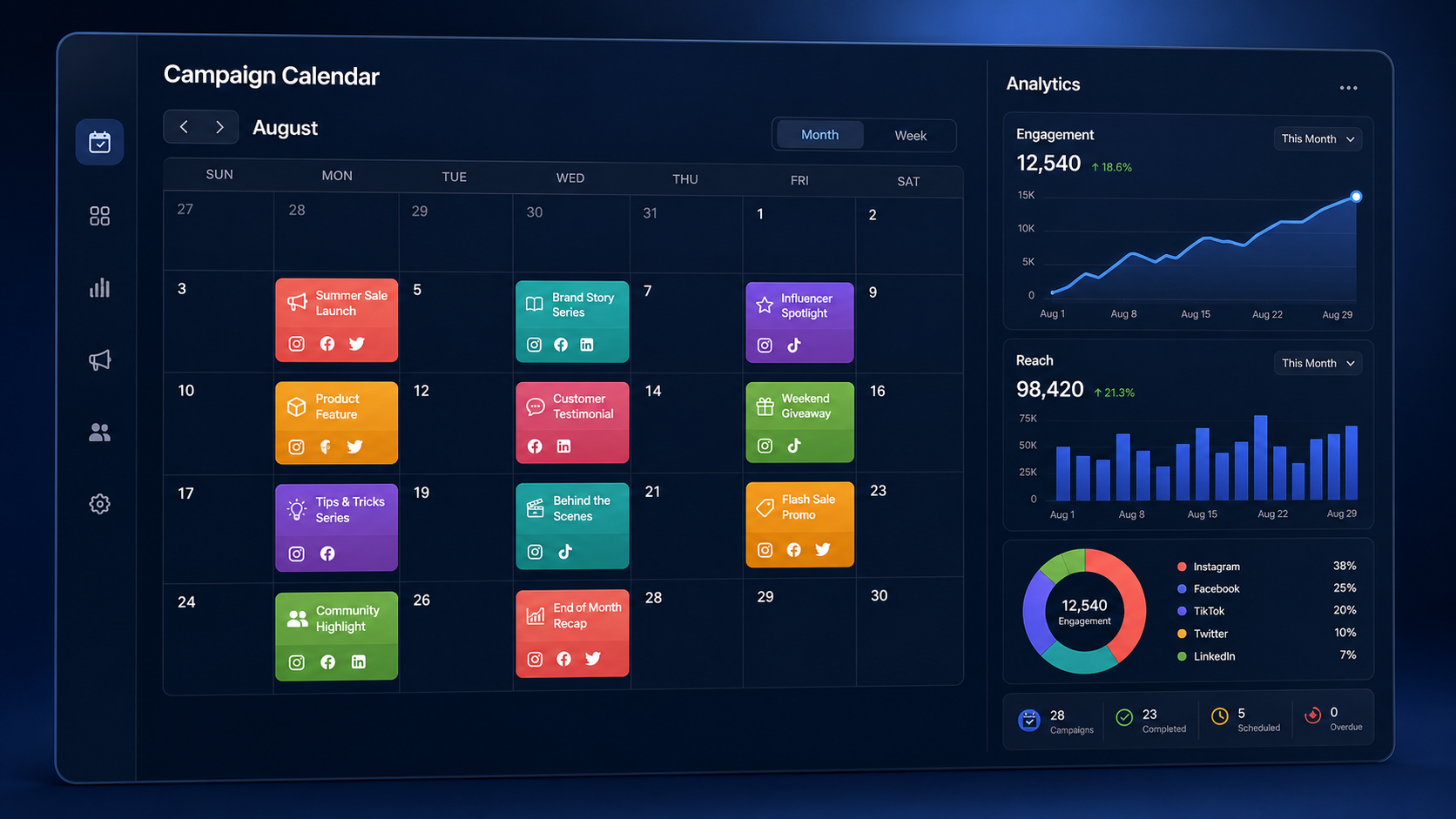
A social media manager calendar is the operational system that turns marketing goals into coordinated, publishable content. It helps managers decide what to post, assign responsibilities, schedule campaigns, track approvals, and maintain a consistent presence across platforms. When built around clear objectives and a realistic workflow, the calendar becomes more than a list of dates: it becomes a shared source of truth for the entire social media operation.
Why Social Media Managers Need a Purpose-Built Calendar | What to Include in a Social Media Manager Calendar | How to Build a Calendar That Supports Real Workflows | Choosing Content Calendar Platforms and Scheduling Tools | Planning Multi-Platform Content Without Copying Everything | Managing Approvals, Collaboration, and Last-Minute Changes | Measuring Performance and Improving the Calendar | Common Calendar Mistakes and How to Avoid Them | Frequently Asked Questions
Why Social Media Managers Need a Purpose-Built Calendar
Managing social media without a calendar encourages reactive work. Teams rush to fill empty publishing slots, stakeholders submit last-minute requests, and important campaigns compete for attention. A calendar replaces that uncertainty with an organized view of upcoming content, deadlines, dependencies, and business priorities.
The most useful calendars connect individual posts to broader goals. A product video might support an upcoming launch, while a customer story may contribute to a brand-trust campaign. Recording these relationships helps managers explain why each post exists and evaluate whether the content mix supports the marketing strategy. It also prevents the feed from becoming an assortment of disconnected ideas.
A calendar is especially valuable when several people participate in content production. Copywriters, designers, video editors, community managers, legal reviewers, and clients may all need to contribute before publication. By showing ownership and status, the calendar reduces repetitive messages and makes bottlenecks visible. Team members can see what is waiting for review, what requires an asset, and what is ready to schedule.
Consistency is another major benefit. Consistency does not mean publishing the same format every day. It means maintaining a dependable rhythm, recognizable brand voice, and balanced range of topics. A well-designed social media schedule planner gives managers enough visibility to spot gaps, repeated messages, or periods when the audience may receive too many promotional posts.

What to Include in a Social Media Manager Calendar
A basic calendar can contain a publication date, platform, caption, and asset link. A professional social media manager calendar should provide more context while remaining easy to scan. The objective is not to document every thought; it is to capture the information required to move a content item from idea to publication without confusion.
Start with scheduling fields: publication date, time, time zone, platform, account, and content format. Platform-specific format matters because a vertical short-form video, a carousel, a text post, and a long-form video have different production requirements. If content will be adapted for multiple networks, create separate entries or clearly define the version required for each channel.
Add strategic fields such as campaign, content pillar, audience segment, funnel stage, and objective. These categories make it possible to audit the plan. For example, a manager can filter the calendar to determine whether educational content is reaching prospective customers or whether a campaign relies too heavily on conversion-focused posts.
Each item should also have a responsible owner and a clear workflow status. Practical statuses include idea, brief ready, in production, awaiting review, approved, scheduled, published, and repurposing. Avoid vague labels such as “working on it.” A status should tell the next person whether action is needed.
Include working copy, asset links, calls to action, landing-page URLs, tracking parameters, hashtags, accessibility notes, and approval comments where appropriate. For video, add the hook, script, shot list, thumbnail, subtitles, and audio requirements. For image-based posts, identify dimensions and provide alt text. Keeping these elements together reduces the risk of publishing the wrong version.
Finally, reserve fields for post-publication data. Record the live URL, reach, engagement, clicks, conversions, watch time, saves, or another metric tied to the post’s objective. This creates a direct connection between planning and performance rather than treating analytics as a separate activity.
How to Build a Calendar That Supports Real Workflows
Begin with goals, not posting frequency. Identify what the business needs social media to accomplish during the next month or quarter. Priorities may include launching a product, generating qualified traffic, increasing brand awareness, nurturing a community, or improving customer retention. Translate each priority into campaigns and measurable outcomes.
Next, define a small set of content pillars. These are repeatable subject areas that connect audience interests with brand expertise. A software company might use education, customer success, product workflows, industry commentary, and company culture. Assigning every planned post to a pillar reveals whether the schedule is balanced and makes ideation easier.
Establish a sustainable publishing cadence using available production capacity. A brand that can create three strong posts per week should not plan seven daily posts merely because a template contains empty spaces. Account for research, design, recording, editing, review, and community management. Sustainable consistency generally produces better results than ambitious bursts followed by silence.
Work backward from publication dates. If a campaign begins on the 20th, determine when the brief, first draft, creative assets, review, revisions, approval, and scheduling must be completed. Build buffer time around major launches and regulated or reputation-sensitive content. This protects the campaign when feedback arrives late or an asset needs correction.
Use recurring planning cycles. A practical monthly cycle might include a strategy session during the final week of the previous month, weekly production reviews, and short daily checks for scheduled content and audience context. The monthly view keeps campaigns aligned, while the weekly view guides execution.
Create rules for urgent and reactive content as well. Trends, breaking news, customer questions, and live events cannot always be planned in advance. Reserve some capacity for these opportunities and define who can approve them quickly. A flexible calendar leaves room for relevance without allowing every spontaneous request to disrupt planned work.
Before scheduling, review the calendar from the audience’s perspective. Look for repetitive calls to action, consecutive posts with similar visuals, conflicting messages, and promotions that arrive without enough educational or trust-building content. This editorial check improves the experience of the feed as a whole.

Choosing Content Calendar Platforms and Scheduling Tools
The right tool depends on workflow complexity, team size, channel mix, and approval requirements. Some managers can operate effectively with a spreadsheet. Others need dedicated content calendar platforms that combine asset management, collaboration, scheduling, and analytics. A larger feature list is not automatically better; the best system is the one the team will maintain consistently.
For an individual creator or small business, a spreadsheet or database may provide enough structure. It is flexible, inexpensive, and easy to customize. However, manual systems become fragile when several stakeholders edit the calendar, assets are stored in different locations, or posts must be copied into individual platform interfaces.
Project-management platforms are useful for complex production. They can support assignments, dependencies, due dates, checklists, and approval stages. Their weakness is that they may not offer native publishing or accurate previews. If the team chooses this route, integrate it with social media content scheduling tools or document a reliable handoff process.
Dedicated social media tools usually provide a visual calendar, multi-account publishing, platform previews, approval workflows, and performance reporting. When evaluating them, test the everyday workflow rather than relying only on feature comparison pages. Ask whether a manager can duplicate posts, adapt copy by network, reschedule content, find the current asset, and identify failed publications quickly.
Check platform coverage carefully. A tool may support publishing to a network but not every format or feature available within that network. Confirm support for short-form video, first comments, location tags, thumbnails, collaboration posts, link previews, and other functions your strategy uses regularly.
Permissions matter for agencies and larger teams. Look for account-level access, approval controls, activity logs, and client-friendly review options. External reviewers should be able to approve content without gaining unnecessary access to internal conversations or other clients’ accounts.
Also assess reliability, security, analytics, integrations, and export options. A useful social media schedule planner should save time without locking important planning data into an inaccessible format. Trial the tool with one campaign, document friction points, and collect feedback from the people who will use it daily before committing to a wider rollout.

Planning Multi-Platform Content Without Copying Everything
Cross-platform planning should preserve a campaign’s central idea while adapting its execution. Posting identical content everywhere can ignore audience expectations, technical formats, and the reason people use each network. The calendar should show both the shared campaign and each platform-specific version.
Start with a core message or source asset. A webinar, interview, product demonstration, customer case study, or research report can become several content pieces. Extract a short video hook, a carousel, a founder’s perspective, an instructional thread, a behind-the-scenes clip, and a community question. This approach makes production more efficient without making every post feel duplicated.
Adjust the opening, length, creative treatment, and call to action for each platform. A professional-network audience may respond to a detailed lesson, while a short-form video audience may need an immediate visual demonstration. The underlying insight can remain consistent even when the presentation changes.
Stagger publication times when appropriate. Releasing every variation simultaneously can overwhelm followers who use several networks and limits opportunities to learn. Publishing an initial version, reviewing early comments, and refining later versions can improve clarity and relevance.
Use parent and child entries in the calendar when a campaign produces multiple deliverables. The parent entry can hold the campaign objective, key message, source files, and overall deadline. Child entries can contain channel-specific copy, formats, owners, and publication dates. This structure keeps the campaign connected while preserving execution detail.
Managing Approvals, Collaboration, and Last-Minute Changes
Approval delays are often workflow problems rather than individual performance problems. If reviewers receive incomplete drafts, unclear deadlines, or content without strategic context, feedback becomes slower and more subjective. A calendar can prevent this by establishing what must be reviewed, by whom, and at which stage.
Define approval levels based on risk. Evergreen educational content may need one marketing reviewer, while product claims, partnerships, competitions, or crisis communications may require legal or executive approval. Requiring every stakeholder to approve every post creates unnecessary congestion.
Set deadlines for feedback and identify what happens when a reviewer misses them. The process might move to a backup reviewer, delay publication, or proceed after a predefined approval window, depending on organizational policy. Record decisions in the content entry so the team does not need to reconstruct them from scattered messages.
Maintain one authoritative version of copy and creative. File names such as “final-final-v4” signal that the workflow lacks version control. Link the calendar to the approved asset, restrict editing where necessary, and archive outdated versions. For sensitive campaigns, retain an activity history showing who approved each element.
When circumstances change, evaluate scheduled posts before automatically publishing them. News events, brand incidents, supply problems, or changes in public sentiment can make planned content inappropriate. Give one person clear authority to pause the queue, and maintain a checklist for reviewing affected channels, advertisements, automated replies, and pinned posts.
Measuring Performance and Improving the Calendar
A calendar should support learning, not merely publication. After content goes live, compare performance with the objective recorded during planning. An awareness post may be judged by qualified reach and video retention, while a conversion post may be judged by landing-page visits, leads, or revenue. Applying one metric to every post produces misleading conclusions.
Review results at three levels: individual post, content pattern, and campaign. Individual results reveal execution details such as a weak hook or effective thumbnail. Pattern analysis identifies stronger topics, formats, publishing windows, or calls to action. Campaign analysis shows whether the combined sequence moved the intended audience toward a business outcome.
Add concise learning notes to the calendar. Instead of writing “performed well,” record an actionable observation such as “step-by-step carousel generated twice the usual saves” or “video lost most viewers before the product demonstration.” These notes improve future briefs and make institutional knowledge accessible.
Run a monthly content audit using filters or tags. Compare content pillars, formats, platforms, audience segments, and funnel stages. Look for both performance and coverage gaps. A high-performing category may deserve more investment, but excessive repetition can cause fatigue. Balance proven ideas with controlled experiments.
Use the findings to adjust the next planning cycle. Change one or two variables deliberately rather than overhauling the strategy after every fluctuation. Social performance is affected by creative quality, timing, distribution, audience relevance, seasonality, and platform changes. A disciplined calendar makes experimentation easier because managers can see exactly what changed.
Common Calendar Mistakes and How to Avoid Them
One common mistake is overplanning. Filling every slot months in advance may create a comforting sense of control, but it reduces responsiveness and can lock the team into outdated assumptions. Plan major campaigns and evergreen themes early, then finalize individual posts closer to publication.
Another mistake is treating the calendar as a storage area rather than a decision-making tool. Hundreds of fields, tags, and views do not help if the team cannot identify the next action. Keep mandatory fields limited to information that supports strategy, production, approval, publication, or analysis.
Managers also underestimate production lead time. A single short video may require scripting, talent coordination, filming, editing, subtitles, review, and revisions. Base deadlines on actual workflow data. After several cycles, compare planned and actual completion dates to improve estimates.
Ignoring community management is equally risky. The job does not end when a post is published. Add responsibility for monitoring comments, answering questions, escalating issues, and capturing audience insights. For launches or live events, define coverage windows so the audience receives timely responses.
Finally, avoid measuring success by calendar completion alone. Publishing every planned post is an operational achievement, not necessarily a marketing outcome. The strongest calendar combines dependable execution with ongoing decisions about what deserves to be produced, changed, repeated, or stopped.
Frequently Asked Questions
What is a social media manager calendar?
A social media manager calendar is a shared planning system that organizes social posts, campaigns, production deadlines, owners, approvals, assets, publication details, and performance data. It gives managers a complete view of what is being created, why it matters, and what must happen next.
How far in advance should social media content be planned?
Most teams benefit from planning campaign themes four to twelve weeks ahead and finalizing specific posts two to four weeks ahead. High-production campaigns may require more time, while trends and timely conversations require flexible capacity. The ideal horizon depends on production complexity and approval speed.
Which features matter most in content calendar platforms?
Prioritize a clear calendar view, platform-specific post versions, assignments, approval workflows, asset links, permissions, reliable publishing, and useful analytics. Agencies may also need client workspaces and account-level access. Test the complete daily workflow before selecting a platform.
How often should a social media calendar be reviewed?
Check publication readiness daily, review production progress weekly, and evaluate strategy and performance monthly. Major campaigns should also have dedicated pre-launch and post-campaign reviews. This rhythm keeps execution on track while creating regular opportunities to improve the plan.