
Social Media Manager Content Calendar: Planning and Scheduling Tips
Effective social media management relies on a well-structured content calendar to plan and schedule posts, ensuring consistent engagement and growth.


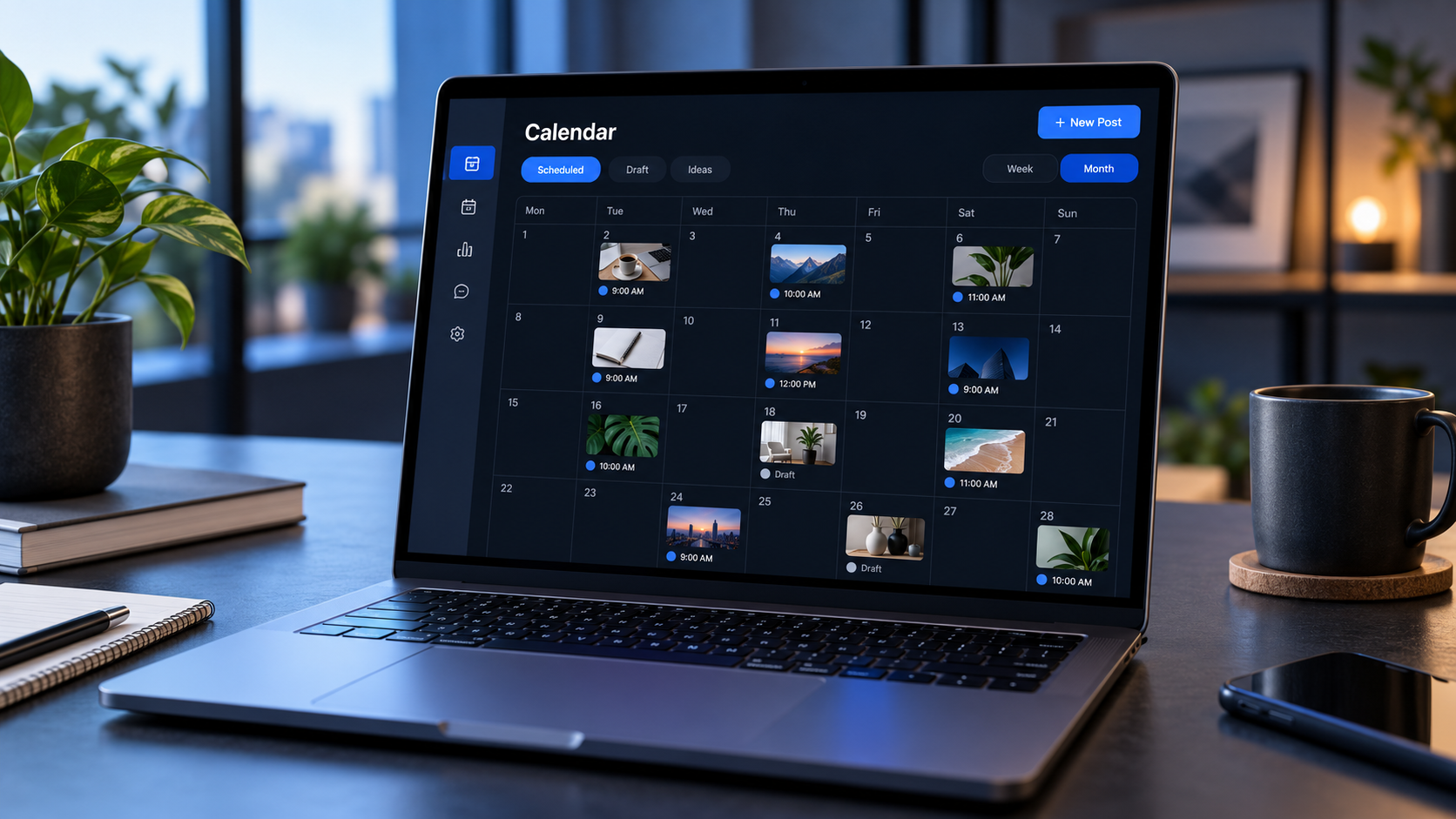
A social media manager content calendar is a central plan for deciding what to publish, where to publish it, and when each post should go live. Used effectively, it turns social media management from a stream of urgent requests into a strategic workflow. The best calendars connect every post to a goal, balance planned campaigns with timely content, clarify team responsibilities, and make scheduling easier without sacrificing creativity.
Why Social Media Managers Need a Content Calendar | What to Include in a Social Media Content Calendar | Build the Calendar Around Goals and Content Pillars | Create a Repeatable Planning Workflow | Schedule Posts Strategically Across Platforms | Balance Automation With Real-Time Community Management | Measure Performance and Improve the Next Calendar | Common Content Calendar Mistakes to Avoid | Frequently Asked Questions | Turn Your Calendar Into a Strategic Advantage
Why Social Media Managers Need a Content Calendar
Social media moves quickly, but effective social media management should not depend on last-minute decisions. Without a calendar, teams often publish inconsistently, repeat the same themes, overlook important dates, or rush assets through approval. A structured calendar gives managers enough visibility to coordinate campaigns while still leaving room for real-time conversations.
A social media content calendar for managers is more than a list of captions and publication dates. It is an operational view of the entire content program. It can show which business objective a post supports, who owns the creative work, what stage the post has reached, and how content is distributed across platforms. This makes it easier to spot gaps before they become problems.
The calendar also helps social media managers protect the quality of their work. When content is planned early, there is more time to check claims, confirm links, resize visuals, add subtitles, review accessibility, and adapt the idea for each channel. These details can directly affect reach, engagement, and brand trust.
Most importantly, a calendar connects daily publishing with a broader strategy. Instead of asking, “What should we post today?” a manager can ask, “What does our audience need at this stage of the campaign?” That shift produces more intentional content and clearer performance insights.

What to Include in a Social Media Content Calendar
A useful calendar should contain enough information to support execution without becoming difficult to maintain. The right level of detail depends on the size of the team, approval process, and number of channels. A solo creator may need a compact spreadsheet, while an agency or in-house department may require a detailed workflow with permissions and status tracking.
At minimum, include the publication date, publication time, platform, content format, topic, caption or copy link, asset link, and status. Add the responsible team member whenever several people contribute to writing, design, video, approval, or community management.
For more strategic planning, include these fields:
- Campaign or content pillar: Identifies the theme the post supports.
- Marketing objective: Clarifies whether the post is intended to build awareness, educate, generate leads, increase sales, or retain customers.
- Audience segment: Records the specific customer group addressed by the message.
- Call to action: Defines the next step you want the audience to take.
- Destination URL: Keeps landing pages and tracking links accessible.
- Approval status: Shows whether the post is being drafted, reviewed, revised, approved, scheduled, or published.
- Tracking details: Stores campaign tags or UTM parameters for measurement.
- Performance notes: Captures results and lessons after publication.
A content calendar for social media managers should also distinguish between the content idea and its platform-specific executions. One product announcement might become a short video for TikTok, a carousel for Instagram, a discussion post for LinkedIn, and a concise update for X. Recording these as related but separate deliverables prevents teams from copying identical content across networks.
Avoid filling the calendar with fields nobody uses. Every column should help someone make a decision, complete a task, or evaluate a result. If updating the calendar takes longer than planning the content, simplify it.
Build the Calendar Around Goals and Content Pillars
Before assigning publication dates, define what the content should achieve. Typical objectives include increasing brand recognition, growing an engaged community, generating qualified traffic, supporting a product launch, collecting leads, or encouraging repeat purchases. Each objective requires a different mix of content and a different definition of success.
Next, establish three to six content pillars: recurring themes that reflect audience interests and business priorities. For example, a marketing software company might use education, product workflows, customer success, industry insights, and company culture. A fitness creator might focus on workouts, nutrition, motivation, personal stories, and community results.
Content pillars prevent a feed from becoming overly promotional or unfocused. They also make brainstorming faster because the team starts with an established strategic category rather than a blank page. When reviewing the calendar, managers can quickly see whether one pillar dominates and whether an important topic has been neglected.
Assign a purpose to each planned post. Educational content might answer a recurring customer question. Community content might invite followers to share experiences. Conversion content might demonstrate a product benefit and lead to a targeted landing page. Even entertaining posts should serve a role, such as improving brand recall or increasing shares.
A practical monthly balance might allocate 40% of posts to education, 25% to engagement and community, 20% to brand or product consideration, and 15% to direct conversion. This is a starting point, not a universal formula. Adjust the mix using audience behavior, campaign priorities, and past results.
Create a Repeatable Planning Workflow
A strong calendar is supported by a repeatable process. Begin with a monthly planning session that reviews business priorities, campaign milestones, seasonal opportunities, and recent social performance. Decide which major stories need to be told, then distribute them across the month before adding smaller posts.
Work backward from fixed dates. If a campaign launches on the 20th, schedule final approval several days earlier, allow time for revisions, and set separate deadlines for copy, design, video editing, and localization. Reverse planning exposes unrealistic timelines before they create emergencies.
Use weekly planning to refine the monthly framework. Confirm upcoming assets, check platform developments, review trending conversations, and decide whether scheduled posts remain appropriate. A monthly calendar provides direction; a weekly review keeps it relevant.
Batch similar work whenever possible. Write several captions in one session, record multiple short videos during one shoot, or design a group of templates together. Batching reduces context switching and helps maintain a consistent style. It is especially valuable for small teams managing several accounts.
Establish a clear approval path as well. Every post should have an owner, a reviewer, and an approval deadline. Define which content requires legal, product, or executive review. Routine community posts should not follow the same complex process as regulated claims or major announcements.
Finally, maintain a backlog of evergreen ideas. Organize it by content pillar, format, audience problem, or campaign stage. When a planned post is delayed, the manager can replace it with a relevant, pre-approved idea instead of publishing filler or leaving an unexplained gap.
Schedule Posts Strategically Across Platforms
Scheduling tools reduce repetitive publishing work, but automation should support strategy rather than dictate it. Start by choosing a sustainable cadence for every platform. Three strong weekly posts are usually more valuable than seven rushed ones. Consider production capacity, audience expectations, and the useful lifespan of each format.
Do not assume that one universal “best time to post” applies to every account. Use platform analytics to identify when your own followers are active, then compare that information with performance by day, time, and format. Test several time windows over a meaningful period before drawing conclusions.
Account for time zones when managing regional or global audiences. A post scheduled for mid-morning at headquarters might reach another major market late at night. If the audience is widely distributed, test separate publication times or create region-specific variations for important campaigns.
Customize content for each platform’s behavior and conventions. Adjust opening lines, aspect ratios, video length, calls to action, hashtags, links, and posting times. A calendar makes these adaptations manageable because every version can be prepared and approved before scheduling.
Review every scheduled item in context. Posts that look reasonable individually can feel repetitive when viewed together. Check that consecutive posts do not use nearly identical visuals, calls to action, or subjects. Also confirm that promotions, holidays, and sensitive messages are properly spaced.
Leave open slots for reactive content. Depending on the brand, reserving 10% to 20% of capacity may be appropriate. This gives the team room to respond to relevant trends, customer discussions, cultural moments, and unexpected company news without disrupting the entire schedule.


Balance Automation With Real-Time Community Management
Scheduling improves consistency, but social media is not a one-way distribution channel. A post going live should trigger a community-management task: monitor early reactions, answer useful questions, acknowledge comments, and escalate potential issues. Fast, thoughtful responses can extend a post’s momentum and strengthen audience relationships.
Never place the calendar on autopilot for long periods. News events, emergencies, public criticism, or changes inside the company can make previously approved content inappropriate. Create a pause protocol that specifies who can stop scheduled posts, how stakeholders are notified, and when publishing can resume.
Label time-sensitive and evergreen posts differently. Evergreen content can often move to another date without losing relevance. Campaign announcements, event promotions, and seasonal posts usually have narrower windows. This distinction helps managers reorganize the schedule quickly when priorities change.
Prepare response guidance alongside major posts. For a launch, record likely questions, approved answers, support links, and escalation contacts. This turns the calendar into a coordination tool for both publishing and conversation management.
Automation should handle predictable actions such as publication timing, link organization, and recurring reminders. Human judgment remains essential for tone, cultural context, audience interaction, and crisis response. The strongest systems combine operational efficiency with active editorial oversight.
Measure Performance and Improve the Next Calendar
A calendar becomes more valuable when it records what happened after publication. Schedule a short weekly review for immediate observations and a deeper monthly analysis for patterns. Compare performance with the goal assigned to each post rather than judging every item by likes alone.
For awareness content, review reach, impressions, video views, watch time, and follower growth. For engagement, examine meaningful comments, shares, saves, replies, and engagement rate. For traffic or conversion, track link clicks, landing-page behavior, leads, assisted conversions, and revenue where attribution is available.
Compare similar content rather than unrelated posts. A tutorial video and a promotional image serve different purposes, so a direct comparison may produce misleading conclusions. Group results by platform, format, pillar, campaign, audience segment, and objective.
Add concise learning notes to the calendar. Examples might include “strong retention after a direct opening,” “carousel saves exceeded average,” or “late approval reduced distribution time.” These observations make future planning more evidence-based and help other team members understand why the strategy changes.
Look for repeatable patterns, but avoid reacting to one unusually successful or unsuccessful post. Test an insight several times. If customer-story videos consistently generate qualified comments, increase their frequency. If a posting window repeatedly underperforms, move it. If a format receives high reach but no useful downstream action, reconsider its role.
One of the most important social media calendar tips is to conduct a quarterly cleanup. Archive outdated campaigns, remove unused fields, refresh content pillars, update approval rules, and review platform priorities. The calendar should evolve with the audience, team, and business rather than becoming a static administrative document.
Common Content Calendar Mistakes to Avoid
Overplanning is a frequent mistake. Filling every slot months in advance may create an impressive-looking calendar, but it leaves little room for learning or timely participation. Plan major campaigns early while keeping shorter-term content flexible.
Another mistake is treating frequency as the primary goal. Publishing more often does not automatically improve results. Excessive volume can strain production, reduce quality, and overwhelm followers. Choose a cadence the team can maintain while meeting its creative and community-management standards.
Managers should also avoid building one post and distributing it unchanged everywhere. Cross-platform consistency is useful, but identical execution ignores differences in audience expectations and product features. Repurpose the central idea while adapting the delivery.
Unclear ownership creates another predictable failure point. If everyone can edit a post but nobody is accountable for completing it, deadlines will slip. Assign one directly responsible owner to every deliverable, even when several specialists contribute.
Finally, do not separate planning from measurement. A calendar that only records future posts cannot teach the team which decisions worked. Closing the loop with performance data transforms scheduling from an administrative exercise into an ongoing optimization system.
Frequently Asked Questions
How far in advance should a social media manager plan content?
Plan major campaigns, launches, and resource-intensive productions four to twelve weeks ahead. Build detailed platform schedules two to four weeks ahead, then review them weekly. Maintain flexible space for current events, trends, customer conversations, and new performance insights.
What is the best tool for a social media manager content calendar?
The best tool is one the entire team can update consistently. A spreadsheet may be enough for a small operation, while larger teams may benefit from a collaborative planning and scheduling platform with approvals, asset storage, permissions, and analytics. Choose based on workflow needs rather than the longest feature list.
How often should a content calendar be updated?
Update statuses whenever work progresses, review scheduled posts at least weekly, and analyze the overall plan monthly. Time-sensitive campaigns may require daily checks. A calendar is a working system, so accuracy matters more than creating a perfect plan once and leaving it unchanged.
How can managers keep scheduled content from feeling repetitive?
Rotate content pillars, formats, visual styles, audience segments, and calls to action. Review the calendar as a sequence rather than as isolated posts. Use performance data to repeat successful principles while changing the examples, creative treatment, and platform-specific execution.
Turn Your Calendar Into a Strategic Advantage
An effective content calendar for social media managers brings strategy, production, publishing, and measurement into one connected workflow. It provides structure without eliminating flexibility and helps teams create content that is timely, purposeful, and realistic to produce.
Start with clear goals, a small set of audience-relevant pillars, and essential workflow fields. Plan major moments first, batch production where possible, tailor posts to each channel, and protect space for real-time opportunities. Then use performance notes to improve the next planning cycle.
The result is not simply a more organized posting schedule. It is a repeatable operating system that gives social media managers greater control over quality, timing, collaboration, and results.