
Social Media Scheduling Calendars: Plan Your Posts Efficiently
Effective social media scheduling calendars help you organize and plan posts efficiently, boosting engagement and saving valuable time for your brand.


A social media scheduling calendar helps you decide what to publish, where to publish it, and when each post should go live. By combining content planning, production deadlines, approvals, and automated publishing in one system, marketers and creators can maintain a consistent presence without managing every post in real time. The most effective calendar is not simply a list of dates: it is a practical workflow that connects business goals with audience needs, creative assets, and measurable results.
What Is a Social Media Scheduling Calendar? | Why a Calendar Makes Social Media Marketing More Effective | How to Build a Social Media Schedule Planner | Choosing Social Media Content Scheduling Tools | Creating a Practical Weekly and Monthly Workflow | Best Practices for a Consistent Posting Schedule | Measuring Results and Improving the Calendar | Common Calendar Mistakes to Avoid | Frequently Asked Questions
What Is a Social Media Scheduling Calendar?
A social media scheduling calendar is a centralized plan for organizing upcoming posts across social networks. It usually records the publication date, time, platform, format, topic, caption, creative asset, campaign, owner, and production status of each post. More advanced calendars may also include approval steps, tracking links, audience segments, paid promotion details, and performance data.
The calendar gives a marketing team a complete view of its publishing activity. Instead of storing ideas in chat messages, captions in separate documents, and assets in unstructured folders, everyone works from the same schedule. A writer can see when copy is due, a designer can identify which graphics are needed, and an approver can quickly find content awaiting review.
A calendar for social media posts is useful even for a solo creator. It reduces the daily pressure to invent something new, makes batching easier, and prevents promising ideas from being forgotten. For agencies and larger teams, it also establishes accountability by showing who owns each task and whether a delay could affect a campaign.
It is helpful to distinguish a calendar from a basic publishing queue. A queue answers, “What will be posted next?” A strategic calendar answers broader questions: “Why are we publishing this, which audience does it serve, how does it support the campaign, and what needs to happen before it goes live?”

Why a Calendar Makes Social Media Marketing More Effective
Consistency is one of the clearest benefits of using a social media schedule planner. Consistency does not mean publishing constantly or repeating the same format. It means establishing a sustainable rhythm that gives your audience regular opportunities to discover, recognize, and engage with your brand.
A well-maintained calendar also improves content quality. When posts are planned before the publication deadline, teams have time to research claims, refine hooks, create stronger visuals, add subtitles, check links, and adapt ideas for each platform. Last-minute production often produces generic content; advance planning creates room for originality.
Calendars make it easier to balance content. Without a visual overview, a brand may accidentally publish five promotional posts in a row, ignore an important product category, or overuse one format. A monthly view reveals these imbalances immediately. You can then distribute educational, entertaining, community-focused, and commercial posts more deliberately.
Planning also supports timely marketing. Product launches, seasonal moments, events, promotions, and industry dates can be added months in advance. Production deadlines can then be calculated backward from publication dates. At the same time, open slots can be preserved for reactive posts, trends, customer stories, or relevant breaking news.
Finally, a shared calendar reduces operational friction. Stakeholders know when feedback is required, community managers know which conversations a campaign may generate, and paid media specialists can coordinate organic and promoted content. The result is fewer duplicated tasks, missed approvals, broken links, and rushed revisions.
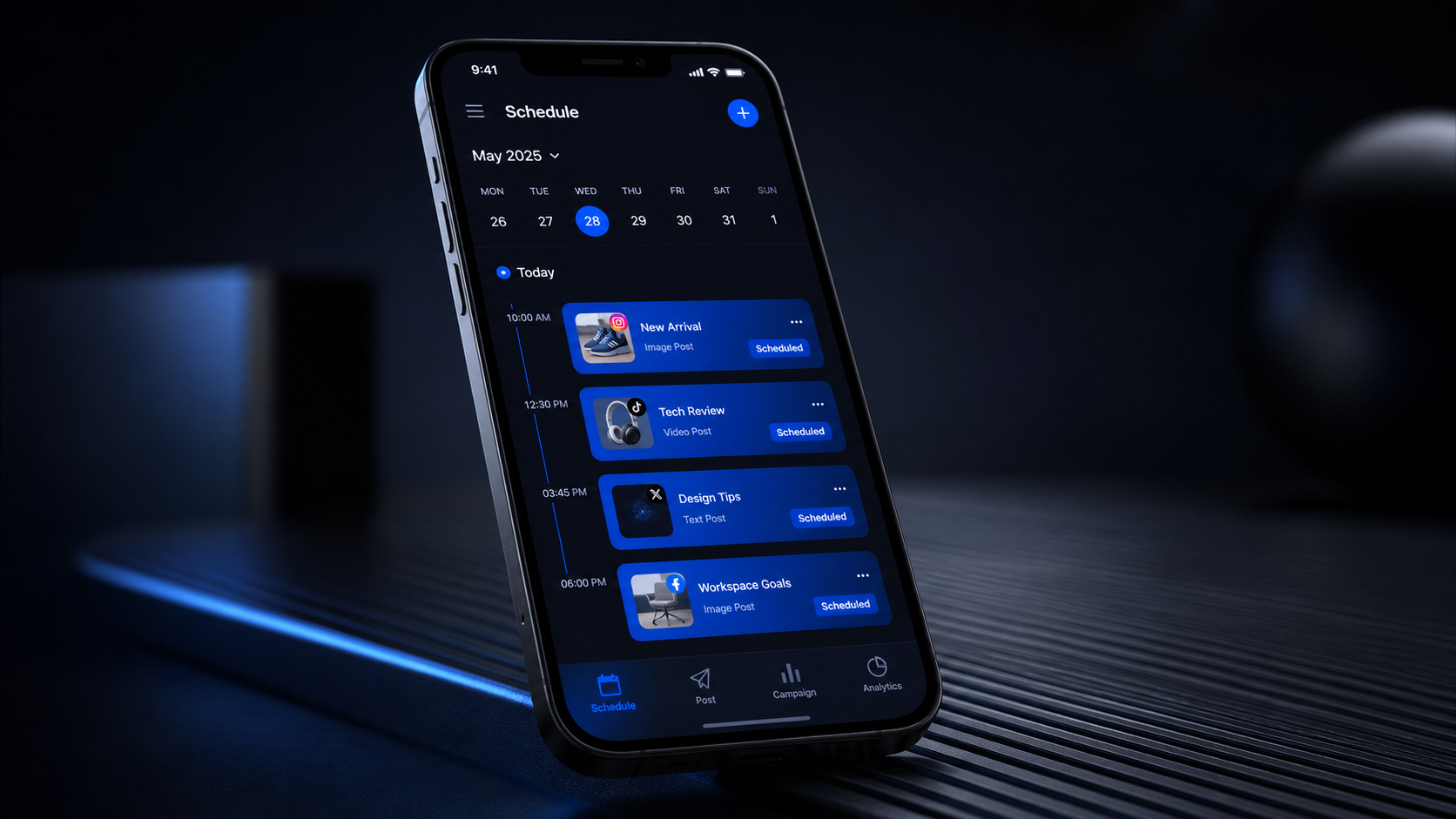
How to Build a Social Media Schedule Planner
Start by defining the purpose of your social media presence. Choose a small number of goals such as increasing qualified reach, generating leads, strengthening customer retention, building authority, or supporting sales. Every planned post does not need to sell something, but every recurring content stream should contribute to a meaningful marketing objective.
Next, audit your current channels and content. Record which platforms are active, who manages them, how often you publish, and which formats perform best. Review at least the previous two or three months of results. Look beyond raw likes: examine reach, saves, shares, meaningful comments, profile visits, link clicks, leads, and conversions where those metrics are available.
Use the audit to define three to six content pillars. These are repeatable subject areas that reflect both audience interests and brand expertise. A software company, for example, might use practical tutorials, customer workflows, product education, industry analysis, team stories, and conversion-focused offers. Pillars make ideation faster while preventing the feed from becoming monotonous.
Decide on a realistic publishing cadence for each platform. Base it on production capacity, audience behavior, content lifespan, and the formats you can execute well. A sustainable plan of four strong weekly posts is more valuable than a daily schedule that collapses after one month. Treat the first version of your cadence as a hypothesis to test rather than a permanent rule.
Create standard fields for every calendar entry. At minimum, include the working title, content pillar, objective, platform, format, publication date, publication time, caption, call to action, asset link, owner, and status. Useful statuses include Idea, Briefed, In Production, Ready for Review, Approved, Scheduled, Published, and Repurpose.
Then populate the calendar in layers. Add fixed dates first, including launches, events, holidays, webinars, and partnership commitments. Add recurring series and evergreen topics next. Fill the remaining spaces with experiments, community content, and responsive opportunities. This approach protects important campaigns without making the calendar too rigid.
Finish by assigning deadlines backward from each publication date. A video scheduled for Friday might require a brief on the previous Monday, filming on Tuesday, editing on Wednesday, and approval on Thursday. Publication dates alone do not prevent bottlenecks; production milestones do.

Choosing Social Media Content Scheduling Tools
The right tool depends on the complexity of your workflow. A solo creator may only need a simple visual calendar and reliable automatic publishing. A global marketing team may require multiple workspaces, granular permissions, approval chains, asset libraries, link tracking, social listening, and consolidated analytics.
When comparing social media content scheduling tools, evaluate platform coverage first. Confirm that the tool supports the networks and formats you actually use, including short-form video, carousels, stories, first comments, location tags, thumbnails, and platform-specific previews. Support can vary by content type, even when a network appears on the product’s integration list.
Examine the planning experience as well. A good social media calendar scheduler should provide weekly and monthly views, drag-and-drop rescheduling, filters, drafts, duplication, and clear post statuses. Teams should also look for comments, approval history, role-based access, notifications, and an easy way to locate the latest asset version.
Reliable publishing is essential, but flexibility matters too. Some posts can be published automatically, while others may require a mobile reminder because of network limitations or final creative choices. Choose a system that clearly distinguishes between these workflows so that manual posts are not mistaken for scheduled ones.
Analytics should help you make decisions rather than merely display numbers. Useful reporting includes performance by platform, format, topic, content pillar, campaign, and publishing time. Export options and consistent tracking parameters are particularly important when social results must be connected to website traffic or revenue.
Popular categories of content calendar platforms include dedicated social publishing services, project management tools, spreadsheets, database-style workspaces, and all-in-one marketing suites. A dedicated scheduler is usually best for direct publishing and network previews. Project management software is stronger for complex production workflows. Many teams combine the two, using one source of truth for planning and a connected scheduler for publication.
Before committing, run a realistic trial. Add actual users, build two weeks of content, test approvals, schedule several formats, and review the resulting analytics. A long feature list is less important than whether the tool removes friction from your everyday process.

Creating a Practical Weekly and Monthly Workflow
A dependable calendar needs a recurring operating rhythm. Begin each month with a planning session focused on campaigns, priorities, major dates, audience needs, and lessons from recent results. Map the month at a high level rather than attempting to finalize every caption immediately.
Turn monthly themes into weekly production batches. One session might be dedicated to research and ideation, another to writing, and another to recording videos or designing graphics. Batching reduces context switching and helps creators produce related assets efficiently. A single interview, for example, can generate a long video, several short clips, a quote graphic, a carousel, and a text post.
Schedule a short weekly review to confirm that assets, links, tags, and approvals are complete. Check whether external circumstances have made any posts inaccurate or inappropriate. Evergreen posts can usually move to a later date, so maintain a reserve of approved content that can fill unexpected gaps.
Daily management should remain light. Review scheduled posts, respond to comments, monitor relevant conversations, and capture audience questions for future content. Scheduling should free time for real interaction, not replace it. The strongest systems automate repetitive publishing while keeping community engagement human.
Define a cutoff for routine changes. Constant last-minute edits create errors and prevent teams from working ahead. For example, standard posts might require approval 24 hours before publication, while campaign assets might require approval three business days earlier. Urgent content can follow a separate, clearly documented process.
Best Practices for a Consistent Posting Schedule
Plan for consistency at the level of capacity, not ambition. Calculate how many high-quality posts your team can research, produce, review, and repurpose each week. Include the hidden work: resizing visuals, writing accessibility text, checking links, responding to feedback, and measuring results.
Adapt content to each network instead of publishing identical versions everywhere. The core idea can remain the same, but the opening hook, aspect ratio, caption length, call to action, and pacing should reflect how people use the platform. Record these variations as separate entries linked to one campaign or parent idea.
Build reusable templates for recurring formats. Templates might cover educational carousels, customer stories, short-video briefs, product announcements, and weekly questions. Include required dimensions, copy limits, brand rules, accessibility checks, and approval owners. Templates accelerate production without forcing every post to look the same.
Maintain a healthy content mix. A useful starting framework is to prioritize value-led posts, support them with community and brand-building content, and use a smaller share for direct promotion. Adjust that mix according to the account’s purpose. A retail launch period may require more commercial content, while an expert-led creator account may emphasize education and conversation.
Leave 10 to 20 percent of the schedule flexible. Social media moves quickly, and a calendar packed months ahead can become detached from the audience. Open capacity allows you to respond to trends, frequently asked questions, user-generated content, or unexpected campaign performance.
Include quality-control checks before scheduling. Verify spelling, dates, prices, names, claims, links, tags, subtitles, and visual safe zones. Add alternative text where supported and ensure videos can be understood without sound. Preview each post in the publishing tool because line breaks and crops can change across networks.
Measuring Results and Improving the Calendar
A publishing calendar becomes more valuable when it records outcomes. Establish a review cadence, such as a short weekly check and a deeper monthly analysis. Weekly reviews can catch immediate issues, while monthly reviews reveal patterns across formats, topics, campaigns, and audience behaviors.
Match metrics to the goal of each post. Awareness content may be evaluated through reach, video completion, and profile visits. Educational content may prioritize saves, shares, and qualified comments. Conversion content should be connected to clicks, sign-ups, leads, purchases, or assisted conversions. A single engagement-rate benchmark cannot evaluate every objective fairly.
Add useful performance labels to the calendar, such as Above Benchmark, Typical, or Needs Review. Note why a post may have succeeded: a strong first frame, timely subject, recognizable contributor, specific promise, or effective distribution partner. The goal is to identify repeatable principles, not simply crown a monthly winner.
Review weak posts with the same discipline. Poor performance may result from an unclear hook, inappropriate format, weak timing, narrow distribution, or a topic the audience does not value. Avoid changing the entire strategy after one disappointing post. Look for a pattern across several comparable pieces.
Use findings to update future entries. If short demonstrations generate more saves than generic tips, increase their share in the next month. If a recurring series is declining, refresh its format or retire it. If one publishing time repeatedly performs well with a specific audience segment, test nearby time slots before adopting it as a rule.
Over time, your social media scheduling calendar should become a decision system. It should show not only what was published, but which ideas deserve to be repeated, repurposed, expanded, promoted, or discontinued.
Common Calendar Mistakes to Avoid
One common mistake is planning every available slot before confirming production capacity. This creates a calendar that looks impressive but cannot be executed. Begin with the resources you actually have, then add frequency only when the workflow is stable.
Another mistake is treating all platforms as interchangeable distribution channels. Cross-posting can save time, but careless duplication often leads to awkward crops, ineffective captions, unsupported features, and repetitive audience experiences. Plan from one central concept while producing platform-aware versions.
Teams also lose efficiency when the calendar does not have a clear owner. One person should be responsible for maintaining statuses, resolving conflicts, and ensuring that completed content reaches the scheduler. Ownership does not mean doing every task; it means keeping the system trustworthy.
Do not allow approvals to happen in scattered email and chat threads. Feedback should be attached to the relevant post or asset whenever possible. Set a deadline, identify the final decision-maker, and document approval so that old suggestions do not reappear after scheduling.
Finally, avoid measuring success by publication volume alone. Completing the schedule is an operational achievement, not necessarily a marketing result. The purpose of a social media calendar scheduler is to make effective communication more reliable. If the audience is not responding, the plan needs to evolve.
Frequently Asked Questions
What should a social media scheduling calendar include?
It should include the post topic, content pillar, objective, platform, format, publication date and time, caption, call to action, creative asset, owner, approval status, and final link. Teams may also add campaign tags, tracking parameters, production deadlines, target audience, paid support, and performance results.
How far in advance should social media posts be planned?
Most teams benefit from planning major themes and campaigns one to three months ahead while finalizing routine posts one to four weeks ahead. Leave part of the calendar open for timely opportunities. Highly regulated or production-heavy organizations may need longer approval windows, while reactive creator accounts may work on shorter cycles.
Can a spreadsheet work as a social media schedule planner?
Yes. A spreadsheet can be effective for individuals and small teams with straightforward workflows. It is flexible, inexpensive, and easy to customize. As publishing volume grows, dedicated tools become more useful for previews, automated posting, permissions, asset management, approvals, and consolidated reporting.
How often should a social media calendar be reviewed?
Check operational details at least weekly and analyze performance monthly. A brief daily check is also useful for confirming scheduled posts and responding to current events. Quarterly reviews can assess larger questions such as platform priorities, resource allocation, content pillars, and whether the current toolset still supports the team’s needs.