
Ultimate Guide to the Buffer Social Media Scheduling Tool
Master social media management with the Ultimate Guide to Buffer, featuring tips on scheduling, analytics, and boosting your online presence effectively.


Buffer is a social media management platform that helps creators, marketers, and teams plan, schedule, publish, analyze, and organize content across multiple networks. Its streamlined publishing workflow, visual calendar, reusable posting schedules, collaboration controls, analytics, and automation options make it especially useful for businesses that want consistent output without adopting an overly complicated enterprise platform. This guide explains how Buffer social media scheduling works, what each plan includes, which channels and integrations it supports, and how to build a more efficient content operation with the tool.
What Is Buffer and Who Is It Best For? | How Buffer Social Media Scheduling Works | Supported Social Networks and Publishing Capabilities | Buffer Pricing and Plan Comparison | Analytics, Engagement, and Content Organization | Buffer Integrations and Automation Options | Expert Workflow: How to Get More Value From Buffer | Common Buffer Mistakes to Avoid | Is Buffer the Right Social Media Planner for You? | Frequently Asked Questions
What Is Buffer and Who Is It Best For?
Buffer began as a straightforward queue for publishing social posts and has developed into a broader content-management platform. Scheduling remains at the center of the product, but users can also capture ideas, organize drafts, collaborate on approvals, respond to selected conversations, and review performance data.
The platform is particularly well suited to solo creators, small businesses, in-house marketing teams, consultants, and lean agencies. Its interface is easier to navigate than many enterprise social suites, so a marketer can connect accounts and establish a working publishing schedule without a long implementation process.
Buffer is a strong choice when your main objectives are to maintain a consistent posting cadence, coordinate content across several channels, and reduce repetitive publishing work. It is less appropriate for organizations that require extensive social listening, complex customer-service routing, or highly customized enterprise reporting.
A “channel” in Buffer means one connected social account. For example, one Instagram profile, one LinkedIn company page, and one TikTok account count as three channels. This definition matters because paid plans are priced according to the number of connected channels rather than the number of brands or campaigns.
Before subscribing, list every account your team genuinely needs to manage. Remove dormant profiles and separate essential publishing channels from accounts that only need occasional native activity. This simple audit prevents unnecessary per-channel costs.

How Buffer Social Media Scheduling Works
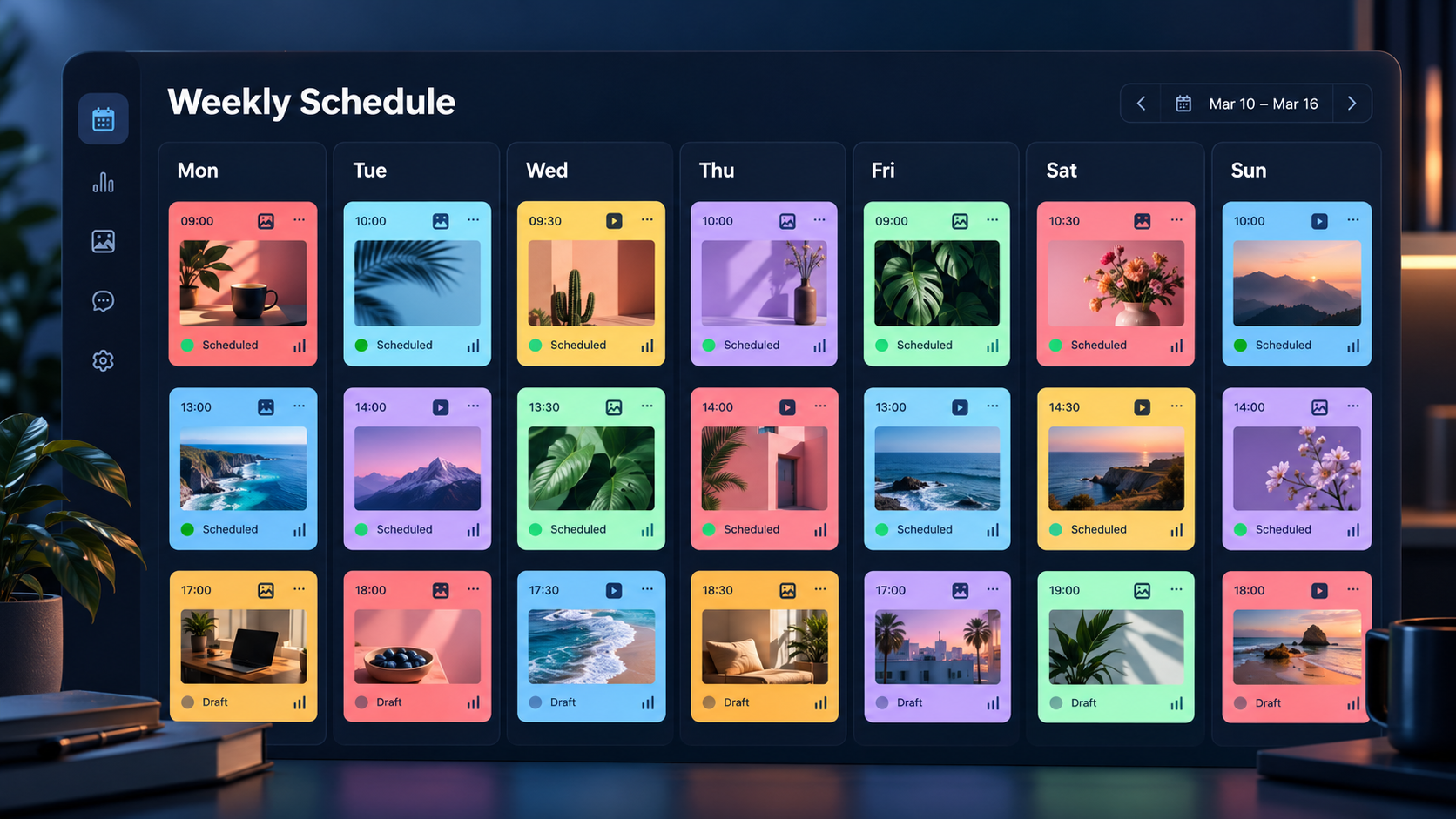
The core Buffer social media scheduling workflow combines a composer, channel-specific queues, posting schedules, and a calendar. After connecting a social account, you can establish recurring time slots—for example, LinkedIn at 9:00 a.m. on Tuesdays and Thursdays or Instagram every weekday at 6:00 p.m. Posts added to the queue then fill those slots in order.
This queue-based model is one of Buffer’s most useful features. Instead of selecting a date and time for every individual update, a marketer can define a reliable cadence once and concentrate on creating content. You can still set a custom publication time, publish immediately, move an item to the front of the queue, or save it as a draft.
To schedule a post, open the composer, select one or more channels, add the caption and media, and choose the publishing option. When a message is going to several networks, use the customization controls to adapt it for each platform. A short, conversational Threads post should not automatically become a formal LinkedIn update, and a LinkedIn introduction may be too long for another network.
The Buffer scheduler supports several practical content formats, although exact capabilities depend on the social network and its application programming interface. Users can plan combinations of text, links, images, videos, carousels, short-form videos, and stories where supported. Threaded posts are available for networks such as Threads, Bluesky, Mastodon, and X. Paid plans also support scheduling first comments on eligible Instagram, LinkedIn, and Facebook posts.
Buffer can automatically publish many posts, but notification publishing is sometimes required. This commonly occurs when a network restricts third-party publishing or when a post uses native-only elements such as certain music, stickers, effects, or account features. In that workflow, Buffer sends a mobile reminder and provides the prepared content so the user can finish publishing inside the native app.
The calendar gives marketers a broader view of scheduled work. Use it to find crowded days, unexplained gaps, repeated subjects, and an unhealthy concentration on one channel. The All Channels view is especially useful during campaign planning because it shows how a launch unfolds across the entire content mix.
Buffer can also recommend posting times based on engagement patterns for a connected account. Treat these recommendations as informed starting points rather than universal rules. Compare them with your own campaign goals, audience time zones, and conversion data. A time that produces reactions may not be the time that produces qualified leads.
Supported Social Networks and Publishing Capabilities
The Buffer social media planner supports a broad mix of established and emerging channels. Current connection options include Instagram, Facebook, LinkedIn, TikTok, Pinterest, YouTube, X, Threads, Bluesky, Mastodon, Google Business Profile, and Substack. This range makes Buffer useful for teams that combine mainstream distribution with newer community-driven networks.
Support is not identical across channels. A platform may allow direct publishing but provide only limited analytics or engagement features. Account types can also affect what is possible. For instance, professional Instagram accounts generally offer a smoother automatic-publishing workflow than personal accounts, while Facebook support differs among Pages, Groups, and professional profiles.
Review each network’s specifications before building templates. Image counts, video requirements, caption limits, link previews, mentions, hashtags, and available post types vary. A post accepted by LinkedIn may fail on Pinterest or require modification for TikTok. Buffer’s per-network customization helps, but the marketer remains responsible for preparing suitable creative assets.
Accessibility should be part of this process. Buffer supports alternative text for images on numerous networks, including Instagram, Facebook, LinkedIn, X, Threads, Pinterest, Mastodon, and Bluesky. Add a concise description that communicates the image’s purpose rather than merely listing decorative details.
Before an important launch, test every planned format with a low-risk post. Confirm that tags resolve correctly, videos maintain the intended aspect ratio, thumbnails display well, and links carry the right tracking parameters. Social APIs and platform rules change regularly, so a format that worked in an earlier campaign should not be assumed to behave identically forever.
Buffer Pricing and Plan Comparison
Buffer offers Free, Essentials, and Team plans. Pricing and features can change, so confirm the live total on Buffer’s pricing page before purchasing. The platform uses per-channel pricing, with volume discounts as more channels are added.
| Plan | Best for | Key scheduling allowance | Notable capabilities |
|---|---|---|---|
| Free | New creators and very small businesses | Up to 3 channels and 10 queued posts per channel | Ideas, drafts, basic insights, AI assistance, community tools, and API access |
| Essentials | Solo professionals managing an established content program | Unlimited scheduled posts per paid channel, subject to fair-use limits | Advanced analytics, hashtag management, first comments, and expanded organization tools |
| Team | Marketing teams and agencies that need governance | Unlimited scheduled posts per paid channel, subject to fair-use limits | Unlimited team members, approval workflows, access levels, and higher API allowances |
At the time of writing, annual billing starts at $5 per month for one Essentials channel and $10 per month for one Team channel. Monthly billing starts at $6 and $12 per channel respectively for the first ten channels. Higher channel tiers receive volume discounts. Taxes and regional billing conditions may affect the final amount.
The Free plan is genuinely useful for testing the Buffer posting tool. Its ten-post limit is a rolling queue limit per channel: when a scheduled item publishes, that slot becomes available again. It is enough for a modest weekly cadence, but frequent publishers may spend too much time managing the cap.
Essentials is usually the most sensible upgrade for a solo marketer. Unlimited scheduling, advanced analytics, first-comment scheduling, and hashtag tools eliminate several common operational constraints. Buffer describes paid scheduling as unlimited, although a fair-use ceiling of 5,000 queued posts per channel applies.
Choose Team when several people need to prepare, check, and approve content. Unlimited seats can make its economics attractive compared with products that charge for every user. Access levels and approval workflows also reduce the chance that an unfinished draft is published from a client or executive account.
Calculate value based on workflow, not only subscription price. Estimate the monthly time saved by batching content, collecting feedback in one place, and avoiding manual publishing. Then compare that value with the cost of every connected channel. A small team that saves eight hours per month may justify Team immediately, while a creator with two low-volume accounts may get everything required from Free.


Analytics, Engagement, and Content Organization
Scheduling creates consistency, but reporting reveals whether that consistency is useful. Buffer’s analytics features help users review post performance, compare content, and identify publishing patterns. Depending on the plan and network, marketers can evaluate metrics such as reach, impressions, engagement, audience growth, and post-level results.
A practical monthly review should go beyond identifying the post with the most likes. Group posts by objective, format, topic, campaign, and call to action. A high-reach educational carousel and a low-reach product announcement serve different purposes; comparing them without context can produce misleading decisions.
Use tags to organize posts by content pillar or campaign. Examples might include “customer proof,” “product education,” “founder perspective,” and “lead generation.” At the end of the month, compare the results of these categories and ask which themes generate attention, meaningful conversation, site visits, or sales.
Buffer’s Ideas area can function as a lightweight editorial backlog. Capture raw concepts as soon as they arise, then move the strongest ideas into drafts. A useful idea record includes the central message, target audience, intended channel, evidence or source, proposed format, and desired action. This makes it easier for another team member to develop the concept without guessing its purpose.
The Community inbox brings supported comments into a more focused workspace. It can help small teams respond consistently, but it should not be mistaken for full social listening. Continue using native platforms or a dedicated monitoring product for brand mentions, competitor tracking, sentiment analysis, and conversations that do not occur directly on your published posts.
Buffer Integrations and Automation Options
Buffer connects with automation services and content workflows through integrations, its browser extension, and its current API. Supported automation options include Zapier, Make, IFTTT, n8n, and MCP-compatible AI assistants. These connections can turn Buffer from a standalone scheduler into the publishing layer of a larger marketing system.
Useful automations include sending approved database records into Buffer, converting newly published blog posts into drafts, adding selected feed items to an idea backlog, and logging scheduled content in a reporting sheet. The safest automations create drafts for review rather than immediately publishing unverified text.
The Buffer API is available across plans, with usage allowances and the number of API keys varying by tier. It can support custom internal tools, content pipelines, and AI-assisted workflows. Before building an integration, document required fields, channel rules, approval ownership, and failure handling. Automation without governance simply produces mistakes faster.
A reliable workflow should retain human checkpoints for claims, dates, links, brand language, and sensitive announcements. If artificial intelligence generates variations, require an editor to verify accuracy and adapt each version to its destination. Never allow an automation to publish customer data, unapproved promotions, or breaking-news commentary without review.
Expert Workflow: How to Get More Value From Buffer
Begin with a content architecture rather than an empty calendar. Define three to five content pillars, the audience problem addressed by each pillar, and the business outcome each should support. Assign an approximate share of monthly output to every pillar so that urgent promotional requests do not consume the whole schedule.
Next, create platform-specific posting schedules. Base the first version on audience location, operating hours, available production capacity, and Buffer’s timing suggestions. After four to six weeks, use actual results to refine the slots. Avoid changing the schedule after every weak post; one result is not a meaningful trend.
Batch production in stages. Capture ideas continuously, select topics weekly, produce assets in focused sessions, and schedule posts after editorial review. This is usually more efficient than taking each post from concept to publication individually. Leave open calendar space for timely commentary and reactive opportunities.
When distributing one concept across several channels, preserve the idea but rebuild the presentation. A research insight might become a LinkedIn document, a short TikTok explanation, an Instagram carousel, and a concise Threads discussion. Use the “Customize for each network” option so each version has an appropriate hook, length, media format, and call to action.
Adopt a preflight checklist for high-value posts:
- Confirm that the correct channel and account are selected.
- Check the scheduled time and account time zone.
- Preview crops, thumbnails, subtitles, and mobile readability.
- Test destination links and apply consistent campaign parameters.
- Verify names, figures, offers, dates, and legal claims.
- Add alternative text and review caption accessibility.
- Assign an approver when reputational or financial risk is significant.
Finally, maintain a recovery routine. Review failed-post notifications, reconnect channels before authentication expires, keep original assets outside Buffer, and check the next several days of the queue after editing recurring schedules. During major launches, confirm publication in the native network instead of assuming that a scheduled status guarantees the final post appears correctly.
Common Buffer Mistakes to Avoid
The most common mistake is cross-posting identical content everywhere. Efficient distribution does not mean ignoring platform culture. Reusing the underlying message is smart; copying the same caption, dimensions, hashtags, and call to action to every network usually weakens performance.
Another mistake is filling the calendar simply to maintain volume. A Buffer queue can make weak content look organized, but it cannot make it relevant. Build every post around a clear audience need and remove items that no longer support a current objective.
Teams also forget to account for time zones. Check the organization setting as well as each channel’s posting schedule, especially when clients, approvers, and audiences operate in different regions. Record the intended time zone in campaign briefs for live events and limited-time offers.
Do not rely exclusively on aggregate engagement. Track website behavior, leads, registrations, sales, or other downstream outcomes with consistent links and campaign naming. Buffer analytics can inform social decisions, but business systems must provide the rest of the conversion story.
Finally, avoid treating automation as maintenance-free. Connected accounts can expire, platform permissions can change, and native network features may not be available through third-party tools. Assign someone to review the queue, failed posts, and channel connections at least once a week.
Is Buffer the Right Social Media Planner for You?
Buffer is a compelling option if scheduling and editorial clarity are your highest priorities. It offers enough structure for a professional content operation while remaining accessible to a solo creator. The free tier supports a meaningful trial, and the per-channel model allows users to add capacity gradually.
The strongest reasons to choose Buffer are its clean interface, flexible queues, cross-network customization, practical calendar, content-idea workflow, and approachable team controls. Its growing API and automation ecosystem also make it more adaptable than a basic scheduler.
Consider another category of product if you require enterprise social listening, call-center-style support queues, deep competitor intelligence, or highly customized attribution. The best tool is not the one with the longest feature list; it is the one that removes friction from the work your team performs every week.
Run a two-week pilot before committing. Connect representative channels, schedule real content, test an approval, inspect analytics, and deliberately trigger your normal edge cases. Measure preparation time, publishing reliability, and reporting effort. That evidence will tell you more than a feature comparison alone.
Frequently Asked Questions
Can I use Buffer for free?
Yes. Buffer’s Free plan supports up to three channels and allows ten scheduled posts in each channel’s queue at a time. Published posts free up queue slots. It is a practical option for testing the platform or managing a small, low-frequency content program.
Which social networks does the Buffer scheduler support?
Buffer supports major networks including Instagram, Facebook, LinkedIn, TikTok, Pinterest, YouTube, X, Threads, Bluesky, Mastodon, Google Business Profile, and Substack. Available post formats, analytics, engagement tools, and automatic publishing options vary by network and account type.
Can Buffer publish the same post to multiple platforms?
Yes. You can select several channels in the composer and schedule them together. For better results, customize the caption, media, hashtags, mentions, and call to action for each network instead of publishing an identical version everywhere.
Is Buffer suitable for agencies and marketing teams?
Yes, particularly for small and midsize teams that prioritize planning, approvals, and reliable publishing. The Team plan includes unlimited team members, access controls, and approval workflows. Agencies requiring advanced listening, elaborate client reporting, or complex service operations may need complementary tools.