
Using Facebook and Instagram Schedulers for Streamlined Social Posting
Efficiently manage your social media by using Facebook and Instagram schedulers to plan and automate posts, saving time and boosting engagement.


A Facebook and Instagram scheduler helps marketers plan, review, and publish content across both platforms without manually posting every update. The right scheduling workflow combines a visual calendar, platform-specific previews, approval controls, reusable assets, and performance data. Used well, it turns scattered content tasks into a reliable publishing system while preserving the distinct formats, audiences, and creative requirements of Facebook and Instagram.
Why Facebook and Instagram Scheduling Needs a Unified Workflow | Essential Features in a Facebook and Instagram Scheduler | How to Build an Efficient Cross-Platform Content Calendar | Adapt Every Post Instead of Publishing Identical Content | A Step-by-Step Scheduling and Approval Process | Measure Results and Improve the Posting System | Common Scheduling Mistakes to Avoid | Frequently Asked Questions
Why Facebook and Instagram Scheduling Needs a Unified Workflow
Facebook and Instagram share an advertising ecosystem, but organic publishing on the two platforms is not identical. Instagram is highly visual and format-driven, with feed posts, carousels, Reels, and Stories competing for attention. Facebook supports visual content too, but links, longer captions, community discussions, events, and page updates often play a larger role. An effective scheduler must make it easy to coordinate these channels without treating them as interchangeable.
A unified workflow gives your team one place to see what is planned, what is awaiting approval, and what has already been published. Instead of keeping ideas in a document, media files in cloud storage, captions in chat threads, and deadlines in a separate calendar, you can manage each post as a complete content item. This reduces missed dates, duplicate posts, incorrect files, and last-minute caption changes.
Centralization is especially valuable when several people contribute to publishing. A designer can attach finished assets, a copywriter can refine captions, a marketing manager can approve the post, and a community manager can prepare to respond after publication. Everyone works from the same version rather than passing disconnected files between tools.
A good workflow also allows strategic coordination. You might use an Instagram Reel to attract new viewers, an Instagram carousel to explain the topic, and a Facebook post to direct an established community toward a longer resource. When these posts appear together in a social media post organizer, it becomes easier to build a campaign sequence rather than publishing isolated updates.

Essential Features in a Facebook and Instagram Scheduler
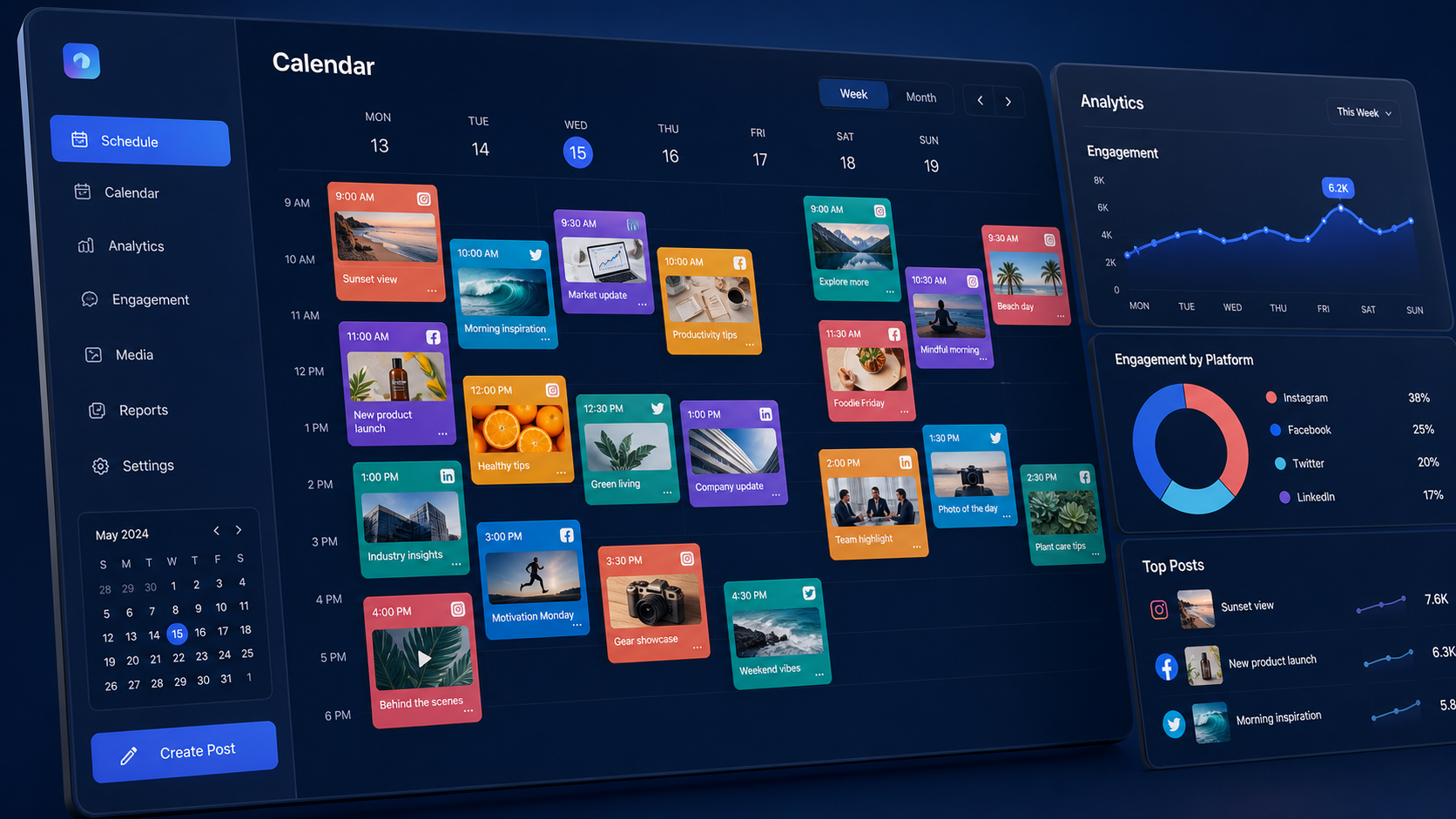
The most important scheduling feature is not simply the ability to choose a publication time. Look for a calendar that provides daily, weekly, and monthly views, supports drag-and-drop rescheduling, and clearly distinguishes networks and content formats. A useful calendar should reveal gaps, crowded days, campaign overlaps, and inconsistent posting patterns at a glance.
Platform-specific previews are equally important. A caption that looks concise on Facebook may be truncated awkwardly on Instagram. A vertical video may work well as a Reel but appear poorly framed in another placement. Your scheduler should show how the creative, caption, link, and other visible elements are likely to appear before publication. Previewing reduces preventable errors and helps creators make decisions based on the final audience experience.
Media support should match your content mix. Confirm that the tool can handle the image ratios, video durations, carousel formats, thumbnails, and publishing destinations your strategy requires. If Instagram Stories or Reels are central to your plan, verify whether they can be published automatically or whether the scheduler sends a mobile reminder for manual completion. Tool capabilities and platform permissions can change, so review current documentation before committing to a workflow.
Collaboration features matter once more than one person touches a post. Look for draft statuses, internal comments, approval stages, user permissions, edit histories, and notifications. A small business may need only “draft,” “review,” and “approved.” An agency may require separate client workspaces, restricted access, and multiple approval rounds.
Other valuable capabilities include a reusable media library, saved caption templates, first-comment support where available, label or campaign tagging, bulk upload, evergreen-content queues, and analytics. Choose features according to recurring work rather than impressive feature lists. The best facebook and instagram scheduler is the one your team can use consistently without creating a second layer of administrative work.
How to Build an Efficient Cross-Platform Content Calendar
Begin with campaign goals, not empty calendar slots. Define what the next month of content should accomplish: increase reach, generate leads, promote a launch, educate customers, or strengthen community participation. Then create several content pillars that support those outcomes. A software company might use product education, customer examples, industry insights, company culture, and promotional offers.
Assign each idea a purpose, audience segment, format, platform, owner, deadline, and call to action. This metadata turns a basic calendar into a practical social feed planner. It also helps you identify imbalances. If every scheduled post is promotional, or every Instagram asset is a static image, the issue becomes visible before the content goes live.
Plan campaign anchors first. Add launches, events, seasonal moments, webinars, sales periods, and important company announcements. Next, schedule the supporting content that prepares the audience, explains the offer, addresses objections, and extends the campaign after its main date. Finally, fill remaining space with evergreen education, community content, behind-the-scenes material, and timely responses to relevant trends.
Use recurring slots as flexible guardrails. For example, Tuesday might usually feature an educational carousel, Thursday a short-form video, and Saturday a community prompt. Recurring categories reduce decision fatigue, but they should not become a rigid formula. Leave room for news, audience conversations, user-generated content, and performance-driven changes.
Color coding can make the plan easier to scan. You could assign colors by campaign, content pillar, format, or production status. Keep the system simple enough that contributors can understand it without consulting a guide. Three to six labels are often more useful than an elaborate taxonomy nobody maintains.
Finally, separate the planning deadline from the publishing deadline. A post scheduled for Friday should not first enter production on Friday morning. Establish internal cutoffs for copy, creative, review, and approval. Building this buffer makes the schedule resilient when an asset needs revision or a stakeholder responds late.


Adapt Every Post Instead of Publishing Identical Content
Cross-posting can save time, but copying every element unchanged often weakens performance. The efficient approach is to reuse the central idea while adapting its execution. One campaign message can become an Instagram Reel, a carousel, a Story sequence, and a Facebook discussion post. The core research and creative direction remain consistent, while each version fits the behavior of its platform.
On Instagram, prioritize immediate visual clarity. The first frame, cover image, or opening seconds should communicate why someone should stop scrolling. Captions can add context, but the creative should not depend on a long explanation to become meaningful. Use deliberate line breaks, a focused call to action, and relevant tags or location information when they genuinely improve discovery or context.
On Facebook, consider whether the audience would respond better to a link, question, native video, album, event reminder, or longer narrative. A Facebook post planner should help you see link placement, media selection, and caption structure before the post is approved. If your page serves an active community, write prompts that invite specific experiences or opinions rather than generic requests for engagement.
Timing may also differ. Your Instagram audience might be active during lunch and evening browsing, while Facebook followers respond more reliably at another time. Start with analytics from your own accounts, not universal “best time to post” claims. Schedule a reasonable test across several weeks, then compare results by platform, weekday, hour, and format.
Adapt calls to action as well. “Save this checklist” may suit an educational Instagram carousel, while “Read the full guide” can be appropriate for a Facebook link post. Relevance is more important than forced consistency. A coordinated campaign should feel related across channels without making followers who use both platforms feel that they are seeing duplicates.
A Step-by-Step Scheduling and Approval Process
Start each production cycle with a short planning session. Review upcoming campaigns, recent results, customer questions, sales priorities, and available creative resources. Select ideas that connect business goals with genuine audience needs. Place those ideas into the calendar as briefs rather than vague working titles.
Each brief should define the message, intended audience, platform, format, hook, proof point, call to action, and required assets. It should also name an owner and reviewer. A clear brief prevents the designer, writer, and approver from developing different interpretations of the same post.
Next, produce content in batches where practical. Record several short videos in one session, design related carousel posts together, or draft a week of captions in one focused block. Batching reduces setup time and makes campaign assets more visually consistent. However, avoid scheduling an entire month so rigidly that you cannot respond to changing conditions.
Upload the assets, customize the Facebook and Instagram versions, and inspect each preview. Check spelling, account tags, dates, prices, links, cropping, subtitles, thumbnail selection, and call-to-action language. Watch videos with the sound off to confirm that captions or on-screen text communicate the message clearly.
Move finished posts into approval at least several business days before publication. Reviewers should leave specific comments inside the scheduling record rather than sending revisions through unrelated channels. Once a post is approved, lock or clearly label the final version so that accidental edits do not bypass review.
Scheduling is not the final step. Assign someone to verify that the post published correctly and monitor early audience responses. Reply to relevant comments, answer questions, escalate support issues, and record useful feedback. Social publishing is most effective when distribution and community management operate as one process.
Measure Results and Improve the Posting System
A scheduler creates operational efficiency, but results still depend on what you learn from published content. Track metrics that match each post’s objective. Reach and video views may be useful for awareness, while saves, shares, link clicks, qualified messages, leads, and purchases can indicate deeper value. Engagement rate is informative, but it should not be treated as the only measure of quality.
Compare similar content with similar content. A promotional Facebook link post and an entertaining Instagram Reel serve different purposes, so a direct engagement comparison may be misleading. Group results by platform, format, content pillar, campaign, and objective. This makes it easier to determine whether a specific approach consistently contributes to the intended outcome.
Use your social feed planner labels to support analysis. If every post is tagged by campaign and content type, monthly reporting becomes faster and more accurate. You can identify which pillars generate saves, which video hooks improve retention, which calls to action produce clicks, and which posting windows deserve further testing.
Run controlled experiments whenever possible. Change one important variable at a time, such as the opening hook, cover style, caption length, publication time, or call to action. Testing several variables simultaneously may produce a better post, but it will not tell you why performance changed.
Hold a brief monthly review to decide what to continue, modify, stop, and test next. Also examine workflow health: approval delays, rushed production, failed publications, unused assets, and recurring corrections. A streamlined system should improve both audience performance and the team’s ability to produce high-quality work without unnecessary pressure.
Common Scheduling Mistakes to Avoid
The first mistake is over-automation. Scheduling should remove repetitive publishing tasks, not make the brand appear absent. If nobody monitors responses, an apparently efficient content operation can leave questions unanswered and sensitive comments unmanaged. Maintain a clear engagement rota and escalation process.
Another mistake is scheduling sensitive content too far in advance without review checkpoints. Promotions, jokes, celebratory posts, and automated evergreen updates can become inappropriate when circumstances change. Review the near-term queue regularly and pause scheduled content when necessary.
Teams also create problems by ignoring platform requirements until the last moment. Unsupported formats, incorrect aspect ratios, expired account permissions, missing media, and publishing limitations can interrupt a campaign. Test new post types before an important launch, and keep the scheduler’s account connections current.
A crowded calendar is not necessarily a strong calendar. Publishing more frequently can lower quality, strain community management, and make campaign messages compete with one another. Choose a sustainable cadence based on available resources and audience response. Consistency means maintaining a useful standard, not filling every available slot.
Finally, avoid treating the tool as the strategy. A social media post organizer can improve visibility and execution, but it cannot determine what your audience values. Research, positioning, creative judgment, and active community listening remain essential. The scheduler should support those decisions and make them easier to execute.
Frequently Asked Questions
Can I schedule Facebook and Instagram posts at the same time?
Yes. Many scheduling tools let you select both platforms, prepare a shared base post, and set one or separate publication times. Customize the caption, creative format, link treatment, tags, and call to action for each platform before scheduling. Simultaneous publishing is convenient, but it should be used only when the timing and content make sense for both audiences.
What is the difference between a scheduler and a social feed planner?
A scheduler primarily controls when content is published. A social feed planner usually adds visual arrangement, campaign organization, previews, production statuses, and collaborative planning. Many modern tools combine both functions, allowing teams to manage the creative workflow and automatic distribution in one system.
How far in advance should social posts be scheduled?
For most brands, planning two to four weeks ahead provides useful structure while preserving flexibility. Final scheduling may happen several days to two weeks before publication, depending on the approval process. Time-sensitive posts should remain adaptable, while evergreen content can be prepared further in advance and reviewed before it goes live.
Should small businesses use a dedicated Facebook post planner?
A small business can benefit from a dedicated Facebook post planner when publishing is inconsistent, approvals are confusing, or content is managed across multiple locations. A simple tool may be sufficient for one page and one contributor. Businesses managing both Facebook and Instagram should prioritize an integrated calendar, reliable previews, easy rescheduling, and clear performance reporting over complex enterprise features.