
Using Hootsuite for Instagram: Features and Scheduling Tips
Manage your Instagram efficiently with Hootsuite by using its key features and scheduling tips to optimize your social media presence and save time.


Hootsuite helps marketers plan, schedule, publish, monitor and analyze Instagram content from one workspace. After connecting an Instagram account, you can build posts in advance, organize them in a visual calendar, collaborate on approvals and review performance data. This guide explains how to use Hootsuite for Instagram effectively, from account setup and post scheduling to engagement optimization and campaign reporting.
What Hootsuite Can Do for Instagram Marketing | How to Connect Instagram to Hootsuite | How to Schedule Instagram Posts with Hootsuite | Planning Reels, Carousels and Stories | Building a Practical Instagram Content Calendar | Scheduling Tips for Better Reach and Engagement | Using Hootsuite Analytics to Improve Future Posts | Team Workflows, Approvals and Integrations | Common Hootsuite Instagram Scheduling Mistakes | Frequently Asked Questions
What Hootsuite Can Do for Instagram Marketing
Hootsuite is a social media management platform designed to centralize work that would otherwise happen across Instagram, spreadsheets, messaging apps and reporting tools. Its Instagram features are especially useful for brands and creators publishing frequently, managing multiple accounts or working with clients and approval teams.
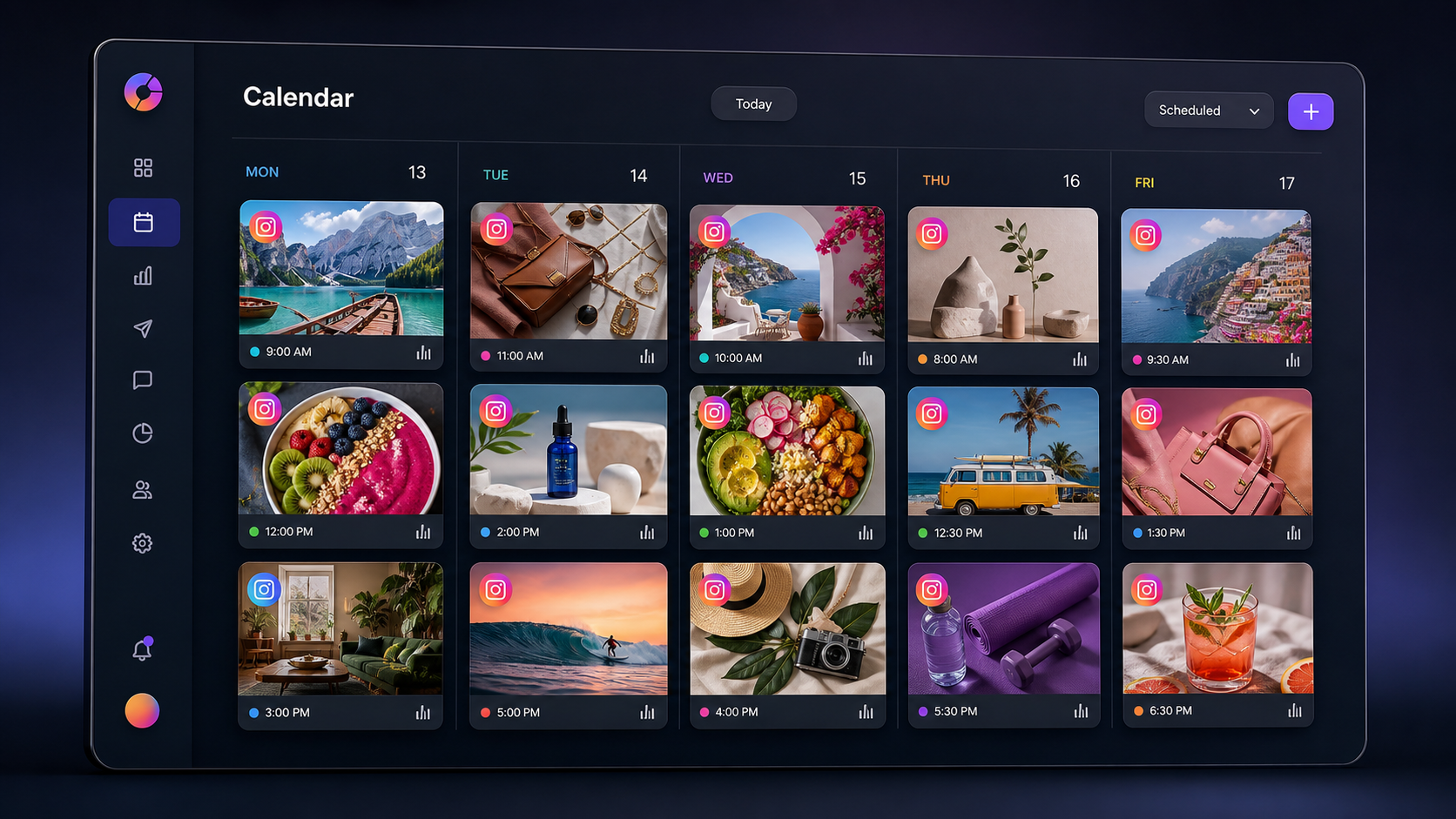
The Hootsuite Instagram scheduler lets you prepare captions, upload media, select publishing times and manage upcoming content through a calendar. Depending on the Instagram account type, content format, platform permissions and current integration capabilities, a post may publish automatically or require completion through a mobile notification. Because Instagram and third-party publishing permissions evolve, check the publishing options displayed in your Hootsuite composer before building a format-specific workflow.
Beyond publishing, Hootsuite can support several important marketing activities:
- Content planning: View scheduled posts across days, weeks or campaigns.
- Team collaboration: Assign work, collect feedback and use approval processes.
- Engagement management: Monitor relevant conversations and respond from a shared workspace where supported.
- Performance measurement: Compare posts, track account results and create reports.
- Cross-channel coordination: Plan Instagram alongside Facebook, LinkedIn, TikTok and other connected networks.
Hootsuite is not a substitute for a clear Instagram strategy. It is an operational layer that makes a strategy easier to execute consistently. The strongest results come when scheduling is combined with original creative work, active community management and regular analysis.
How to Connect Instagram to Hootsuite
Before scheduling content, connect the correct Instagram account and confirm that the people using Hootsuite have the necessary permissions. A professional Instagram account—Business or Creator—typically provides the most complete publishing, analytics and management functionality. Personal accounts may have more limited integration options.
Instagram professional accounts are commonly linked to a Facebook Page through Meta’s account infrastructure. If you manage a brand or client account, verify that your Meta permissions are active before beginning. An expired login, missing Page role or incomplete account connection can prevent publishing even when the Instagram profile appears inside the dashboard.
- Sign in to Hootsuite and open the area for adding or managing social accounts.
- Select Instagram from the available networks.
- Sign in through the authorization flow using the account that has access to the relevant Instagram profile and connected Meta assets.
- Choose the Instagram account you want to add.
- Review the requested permissions and complete the connection.
- Create a test post or inspect the composer to confirm that the account is available as a publishing destination.
For an agency, assign access only to team members who need it. Use named user accounts rather than sharing one password. This improves security and creates a clearer record of who drafted, approved or modified each post.
It is also worth creating a simple connection-maintenance routine. Check account health after password changes, staff departures, Meta security alerts or permission updates. If a scheduled post fails, investigate authorization and account status before recreating the content.

How to Schedule Instagram Posts with Hootsuite
The basic scheduling workflow is straightforward, but details matter. A technically successful post can still underperform if the crop is awkward, the opening line is weak or the call to action is buried. Treat the composer as both a publishing tool and a final quality-control checkpoint.
- Open the post composer. Start a new social post and select the intended Instagram account. Avoid selecting multiple networks automatically unless the creative and copy genuinely suit each one.
- Add the media. Upload the image, video or supported carousel assets. Confirm that the dimensions, duration, file size and format meet the requirements shown in the platform.
- Write the caption. Lead with a useful hook because users see only the beginning before tapping to read more. Add context, value and a specific next action.
- Add relevant publishing details. Depending on the supported format, these may include location information, alt text, tags or other Instagram-specific options.
- Preview the post. Inspect the crop, sequence, line breaks and caption. Pay special attention to text placed near the edges of vertical creative, where interface elements may obscure it.
- Select a publishing time. Use a recommended time when it aligns with your campaign, or choose a custom date and time based on audience behavior.
- Schedule or submit for approval. Confirm the post immediately if you are the publisher, or route it to the appropriate reviewer.
- Verify its calendar status. Make sure the item appears on the correct date, for the correct account and in the expected approval or publishing state.
This process answers the practical question of how to schedule Instagram posts with Hootsuite, but a dependable workflow includes one more step: checking the live post. Review important campaign content shortly after publication to confirm that the media, caption and tags appear as intended.
For content that requires mobile completion, install the relevant mobile app, enable notifications and make sure the assigned publisher is available. Open the reminder promptly, follow the transfer instructions and finish publishing inside Instagram. Do not assign notification-based posts to an unattended device or a team member outside working hours.
Planning Reels, Carousels and Stories
Different Instagram formats serve different purposes, so they should not be treated as interchangeable calendar slots. Reels are well suited to discovery, demonstrations and concise storytelling. Carousels can explain a process, compare options or build a swipe-based narrative. Stories are effective for timely updates, informal interaction and directing attention to current content.
For Reels, make the first seconds visually clear. The viewer should quickly understand the subject, tension or promised outcome. Use readable on-screen text, intentional framing and a cover that remains understandable when displayed in a profile grid. Before scheduling, listen with sound and watch without it; the creative should make sense in both conditions whenever possible.
For carousels, give every slide a job. The first slide earns the swipe, the middle slides deliver the substance and the final slide reinforces the takeaway or call to action. Check the complete sequence in the Hootsuite composer so an upload-order mistake does not disrupt the narrative.
Stories often depend on native stickers, music, polls or other interactive features. If a required element cannot be fully configured through the scheduler, use a mobile-notification workflow and complete the post in Instagram. Build this handoff into the production plan instead of discovering the limitation at publishing time.
Maintain reusable checklists for each format. A Reel checklist might include hook, subtitles, cover, safe zones and audio rights. A carousel checklist could include slide order, consistent typography, source verification and final-slide action. Format-specific checks reduce avoidable errors while keeping production efficient.

Building a Practical Instagram Content Calendar
A content calendar should show more than publication dates. It should reveal whether the account is delivering a balanced mix of education, proof, personality, promotion and community participation. Use labels, naming conventions or campaign identifiers to make that mix visible inside your planning process.
Begin with campaign priorities and audience needs. Define the result you want—such as product awareness, qualified website visits, saves or direct-message conversations—and then choose content formats that support it. Scheduling should follow strategy, not become the strategy.
A sustainable weekly calendar might combine one educational carousel, two short-form videos, one proof-oriented post and several timely Stories. The right frequency depends on production capacity and audience response. Publishing three excellent posts consistently is more useful than scheduling seven weak posts simply to fill the grid.
Batching improves both quality and speed. Plan several topics together, film related videos during one session and prepare captions in groups. Then upload the finished assets to Hootsuite and distribute them across the calendar. Leave intentional gaps for reactive content, industry developments and community-led ideas.
Use the calendar to prevent collisions. Two posts may be individually strong but compete if they contain different calls to action on the same day. Similarly, a promotional post can feel insensitive if it publishes during an unexpected event affecting your audience. Review the upcoming queue regularly and pause or move content when context changes.
Scheduling Tips for Better Reach and Engagement
The best publishing time is the time when your particular audience is available and ready to engage. Generic “best time to post” studies can provide a starting point, but your account data should guide ongoing decisions. Compare performance across time blocks while controlling for major differences in topic and format.
Use recommended-time features as decision support rather than an automatic rule. A suggested slot may be based on historical engagement patterns, but campaign timing also matters. A product announcement, live-event reminder or limited offer must reach people when the information is useful.
Schedule community management alongside publishing. Reserve time immediately after important posts for responding to comments, answering questions and continuing worthwhile conversations. Fast, thoughtful replies can turn passive viewers into participants and give the team qualitative feedback about what resonates.
Improve Instagram post scheduling in Hootsuite with these operating habits:
- Keep at least several approved evergreen posts available for unexpected gaps.
- Avoid placing every post at the same hour without testing alternatives.
- Use campaign-specific links and consistent tracking parameters where appropriate.
- Write descriptive alt text for accessibility when the available workflow supports it.
- Review scheduled posts after major brand, pricing or product changes.
- Check time zones carefully when managing regional or international accounts.
- Assign a clear owner for notification-based publishing and post-publication monitoring.
Hashtags should be relevant, specific and readable rather than inserted as an oversized generic block. Test groups associated with the subject, community, location or use case. Measure whether they contribute to discovery, but do not let hashtag research distract from the factors with greater creative impact: the idea, hook, visual execution and audience relevance.
Using Hootsuite Analytics to Improve Future Posts
Scheduling creates consistency; analysis creates improvement. Hootsuite analytics can help teams examine account and content performance without manually assembling every result. The exact metrics available depend on the plan, account type and current network permissions.
Choose metrics based on the post’s objective. Reach and video views may be appropriate for awareness, while saves and shares often indicate lasting usefulness. Website clicks, leads or purchases matter more for conversion-oriented campaigns. Comments can signal interest, but they should also be evaluated for quality and relevance.
Review performance at three levels. First, assess individual posts to identify strong hooks, topics and creative structures. Second, compare content categories over several weeks to detect repeatable patterns. Third, evaluate campaigns against their original business goals. A high-reach post is not necessarily successful if it attracts the wrong audience or produces no meaningful next action.
Create a lightweight monthly review. Identify the top and bottom performers, record plausible reasons for the results and choose two or three tests for the next cycle. For example, test a more direct first frame, a shorter caption or a carousel that reveals the key takeaway earlier. Change one major variable at a time when possible so the lesson is easier to interpret.
Do not judge every post within its first hour. Some content accumulates views, saves and search discovery over a longer period. Use consistent reporting windows, and annotate unusual events such as paid promotion, influencer amplification or a major account mention.
Team Workflows, Approvals and Integrations
Hootsuite becomes more valuable when several people contribute to one Instagram presence. A structured workflow can separate drafting, design review, legal or brand approval and final publishing. This reduces last-minute messages and makes responsibilities visible.
Define roles before increasing output. The strategist owns campaign direction, the creator prepares assets, the copywriter develops captions, the reviewer checks accuracy and the publisher verifies delivery. In a small team, one person may fill several roles, but the checkpoints should remain clear.
Use a consistent naming system for assets and scheduled items. Include the campaign, format, intended date and version where practical. Store final creative in a shared asset location, and avoid uploading files named “final-final-2” without context. Clean version control prevents outdated prices, claims or designs from reaching the scheduler.
Hootsuite’s broader integrations and connected workflows can help teams coordinate assets, customer conversations, reporting and other social channels. Available integrations vary, so select them based on a real operational need. Adding more tools does not automatically produce a better process; each connection should remove a manual step, improve visibility or reduce errors.
Protect the account with individual logins, appropriate permission levels and prompt removal of former team members. Review scheduled content and user access whenever an agency relationship ends or internal responsibilities change.
Common Hootsuite Instagram Scheduling Mistakes
One common mistake is assuming that scheduling means the work is finished. Posts can fail because of expired permissions, unsupported settings or account changes. Monitor publishing notifications and create a response procedure for failures.
Another mistake is cross-posting identical creative everywhere. Instagram captions, aspect ratios and audience expectations may differ from those on LinkedIn or Facebook. Reuse the core idea when appropriate, but adapt the opening, visual treatment and call to action for each network.
Teams also overfill calendars. Scheduling several weeks ahead is efficient, yet it can make an account sound disconnected from current conversations. Combine planned evergreen content with room for relevant, timely publishing.
Finally, avoid optimizing only for frequency. A full calendar can hide weak positioning, repetitive concepts or poor creative execution. Use the Hootsuite Instagram scheduler to support a thoughtful system, then judge that system by audience value and business outcomes.
Frequently Asked Questions
Can Hootsuite automatically post to Instagram?
Hootsuite can automatically publish supported Instagram content for eligible connected accounts. Some formats, features or account configurations may require a mobile notification and final completion in Instagram. Review the composer’s publishing method for each post.
Do I need an Instagram Business account to use Hootsuite?
A professional Business or Creator account generally offers the most complete scheduling, analytics and management features. Personal accounts may have more limited functionality because of Instagram’s integration permissions.
Can I schedule Reels, Stories and carousel posts in Hootsuite?
Hootsuite supports scheduling for major Instagram formats, but the available publishing options can vary by format, account setup and current Instagram API capabilities. Posts that depend on native-only elements may require mobile completion.
What should I do if a scheduled Instagram post fails?
Check the failure notification, account connection, Meta permissions, media specifications and publishing status. Reauthorize the account if necessary, correct the identified issue and reschedule the post. For high-priority campaigns, assign someone to verify publication shortly after the scheduled time.