
Using Later for Social Media Scheduling: Features and Benefits
Later offers powerful social media scheduling tools that streamline content planning and boost engagement across multiple platforms efficiently.


Later is a social media management platform that helps marketers, creators, and small teams plan, schedule, publish, and analyze content from one workspace. The Later social media tool is especially useful for visual planning, maintaining a consistent publishing calendar, adapting posts for multiple networks, and reducing repetitive manual work. Its combination of a visual calendar, post builder, media library, analytics, collaboration features, and Link in Bio makes it a practical choice for brands that want a more organized content operation.
What Is Later and Who Is It Best For? | Core Features of the Later Social Media Planner | How to Use the Later Post Scheduler Effectively | Building a Better Workflow with the Visual Planner | Benefits of Using Later for Social Media Scheduling | Limitations and Considerations Before Choosing Later | How Later Compares with the Best Social Media Scheduling Tools | Frequently Asked Questions
What Is Later and Who Is It Best For?
Later began with a strong focus on Instagram planning, but it has developed into a broader social media management platform. It currently supports scheduling for Instagram, Facebook, TikTok, Pinterest, LinkedIn, Threads, YouTube Shorts, and Snapchat, although the available post types and publishing methods vary by network. This coverage allows a marketer to manage much of a multi-channel publishing schedule without switching between native apps throughout the day.
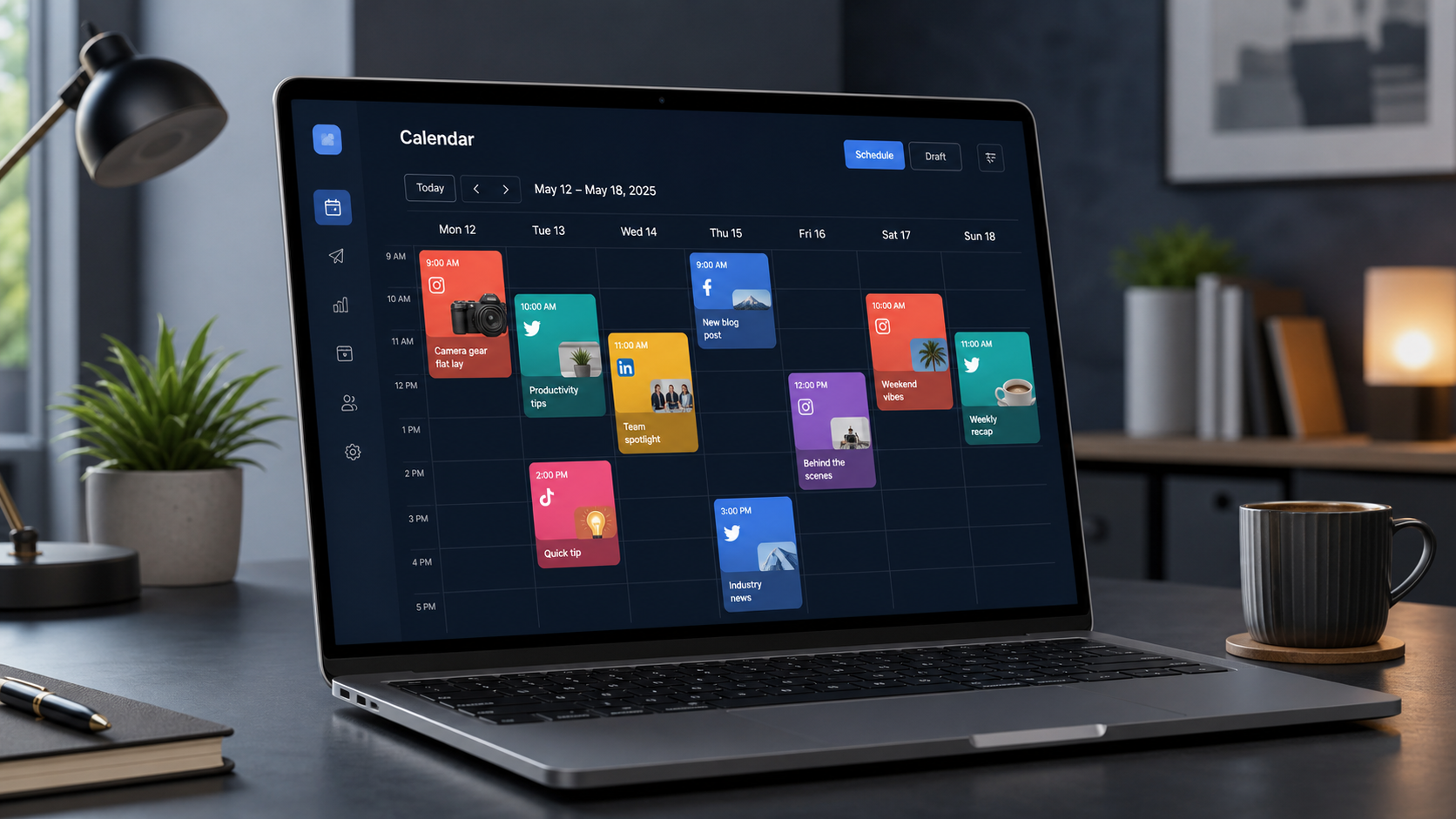
The platform is best suited to creators, ecommerce brands, agencies, freelancers, and marketing teams whose strategies depend heavily on images, short-form video, and consistent posting. Its calendar-first interface makes it easier to see whether a campaign has the right content mix. For example, a team can quickly identify a week overloaded with promotional posts, move an educational carousel to another date, and add a community-focused video to restore balance.
Later is also approachable for people who do not want to build a complicated enterprise workflow. The core process—upload media, create a post, choose a profile, and place it on the calendar—is relatively intuitive. At the same time, features such as access groups, approval workflows, analytics, and multi-profile scheduling give growing teams room to develop more structured processes.
It is not automatically the best fit for every organization. Businesses that need deep customer-service routing, extensive employee advocacy, or advanced reporting across dozens of brands may require a more enterprise-oriented product. Later is strongest when content planning, visual consistency, publishing efficiency, and creator-friendly workflows are the priorities.

Core Features of the Later Social Media Planner
The heart of the Later social media planner is its visual calendar. Scheduled posts appear in a daily, weekly, or monthly workflow, helping users understand both timing and content distribution. Posts can be moved when priorities change, while drafts can hold ideas that are not yet ready for approval. This is more useful than a simple list of publishing dates because it turns the calendar into an operational overview of the brand’s content strategy.
The Media Library provides a central place to upload and organize photos and videos before they are assigned to posts. This supports batch production: a creator can shoot several videos in one session, upload the files together, and distribute them across the upcoming month. Teams can add organizational context and distinguish between available and previously used assets, reducing accidental duplication.
Later’s Post Builder brings media, captions, profile selection, timing, and network-specific settings into one workflow. Users can create a post for several profiles and then customize each version. That customization step matters. A short TikTok caption, a professionally framed LinkedIn introduction, and an Instagram caption with a direct engagement prompt should not be identical, even when they promote the same asset.
The platform also offers features such as suggested publishing times, recurring Quick Schedule slots, an Instagram feed preview, and tools for drafting captions. Availability can depend on the selected plan and connected network. Rather than treating these features as shortcuts to guaranteed reach, marketers should use them as decision support. Recommended times are a starting point; results from the brand’s own audience and content should ultimately determine the schedule.
Link in Bio extends the workflow beyond publishing. It lets creators and businesses direct profile visitors toward products, articles, campaign pages, or other destinations. This can be valuable on platforms where individual post links are limited. Analytics then help connect publishing activity with measurable performance, allowing teams to identify content themes and formats worth repeating.
How to Use the Later Post Scheduler Effectively
Begin by connecting the social profiles the team is authorized to manage. Later uses Social Sets to organize profiles, typically grouping one profile from each supported network around a brand or identity. Agencies and multi-brand businesses should establish a clear naming and access structure before uploading media. Good organization at this stage prevents users from selecting the wrong account when schedules become busy.
Next, create a content framework before filling the calendar. Define three to five recurring pillars, such as education, product value, customer stories, industry commentary, and community engagement. Assign a target frequency to each pillar. This gives the Later post scheduler a strategic structure instead of turning it into a queue of unrelated assets.
Upload approved media in batches and use consistent file names. A practical format might include the campaign, content pillar, asset type, and publication month. Draft the primary version in Post Builder, select the relevant profiles, and customize the caption, dimensions, hashtags, calls to action, and publishing time for each network. Later can schedule one piece of content to multiple profiles, but effective cross-posting still requires human judgment.
Use the calendar to check pacing before confirming the schedule. Avoid placing several posts with the same objective next to one another. Separate major announcements from evergreen education, and leave room for timely content. If every calendar slot is filled weeks in advance, the brand may struggle to respond naturally to news, trends, or customer conversations.
Finally, confirm whether each post can use automatic publishing or requires notification-based publishing. Platform APIs do not support every native feature. Trending audio, interactive stickers, polls, effects, and some other creative elements may need to be added inside the social network’s own app. Build these handoff steps into the workflow so that a notification-based post does not remain unfinished.


Building a Better Workflow with the Visual Planner
A useful planning workflow separates strategy, production, approval, and publishing. Start with a monthly campaign map that records launches, seasonal moments, events, and business priorities. Translate those priorities into weekly content briefs, then create the required assets in batches. Only approved or nearly approved content should receive firm publishing times.
For Instagram-focused brands, the Visual Instagram Planner can help preview how scheduled posts will appear together in the feed. This is valuable when brand recognition depends on a consistent visual identity, but visual harmony should not become the only goal. A beautiful grid cannot compensate for vague messaging, repetitive topics, or content that fails to address audience needs.
Use visual planning to manage contrast and variety. Alternate close-up product shots with people, graphics, demonstrations, testimonials, and behind-the-scenes material. Review the calendar for changes in color, composition, format, and purpose. A visually varied schedule is more likely to hold attention than a sequence of nearly identical templates.
Teams should also maintain a small reserve of evergreen posts. These assets can fill unexpected gaps when an approval is delayed or a campaign date moves. Keep the reserve clearly labeled in the Media Library and review it regularly so that pricing, product details, or cultural references do not become outdated.
A weekly 20-minute calendar review is usually enough to keep the system healthy. Confirm that assets are final, captions match the correct media, profile connections are active, stakeholders have approved sensitive claims, and notification-based posts have an assigned owner. This routine catches small operational errors before they become public mistakes.
Benefits of Using Later for Social Media Scheduling
The clearest benefit is time efficiency. Batch uploading, calendar planning, reusable time slots, and multi-profile scheduling reduce the need to publish manually throughout the week. That does not eliminate the need for active community management, but it allows marketers to spend more time responding thoughtfully instead of repeatedly preparing routine posts.
Later also improves consistency. A visible schedule makes gaps obvious and gives the team a shared source of truth. Consistency is not simply about posting every day; it means maintaining an appropriate rhythm, recognizable themes, and dependable quality. The calendar helps users coordinate those elements across campaigns and platforms.
Another advantage is better collaboration. Drafts and approval workflows can replace scattered caption documents, chat messages, and email attachments. Access controls are useful when freelancers, clients, or separate brand teams should see only certain profiles and media. The exact collaboration capabilities vary by plan, so organizations should map their real review process before subscribing.
Analytics create a feedback loop between publishing and planning. Instead of evaluating success by intuition alone, marketers can compare formats, topics, posting times, reach, impressions, engagement, and other available metrics. A monthly review can reveal that short tutorials drive saves, customer stories generate comments, or certain promotional formats consistently underperform.
The result is a more repeatable system. Content ideas enter a pipeline, assets are produced and reviewed, posts are scheduled, and performance informs the next cycle. For small teams, that operational clarity can be as valuable as any individual feature.
Limitations and Considerations Before Choosing Later
Later’s capabilities are shaped by the APIs and publishing rules of each social network. Supported post types differ, and certain native editing tools cannot be applied inside a third-party scheduler. For example, posts that depend on trending sounds, interactive Story elements, or network-specific effects may still require a manual step. Marketers should review the current supported platforms and post types before designing a workflow around the product.
Plan limits also matter. Later offers different tiers for individual creators, small businesses, growing teams, and larger operations. Scheduling allowances, analytics history, user seats, Social Sets, approval features, and advanced tools vary by tier. Estimate the number of profiles, users, and monthly posts required before comparing costs. A low entry price has little value if the team immediately needs several add-ons or a higher tier.
Analytics should be assessed against the organization’s reporting expectations. Later can provide useful content and profile insights, but supported metrics may differ between networks. Teams that need highly customized attribution, executive dashboards, or combined paid-and-organic reporting may need to export data or supplement Later with another analytics platform.
Finally, automation can create a false sense of completion. Scheduling a post does not ensure that it is relevant, well timed, or supported by community interaction. Assign responsibility for monitoring comments, checking live posts, responding to customers, and pausing content during sensitive events.
How Later Compares with the Best Social Media Scheduling Tools
When comparing the best social media scheduling tools, evaluate workflow fit rather than searching for a universally superior platform. Later stands out for visual planning, creator-oriented usability, Instagram workflows, media organization, and the connection between scheduled content and Link in Bio. These strengths make it appealing to lifestyle, retail, hospitality, personal-brand, and ecommerce accounts.
Other schedulers may be stronger in areas such as social listening, enterprise permissions, unified customer care, employee advocacy, or extensive custom reporting. The right comparison therefore begins with operational questions: How many brands are involved? Which networks produce meaningful results? How many people approve content? Does the team need an inbox? Are reports created for clients or executives?
Run a realistic trial using one complete campaign. Connect the required profiles, upload actual media, create network-specific versions, route posts for approval, publish them, and produce a performance report. This exposes friction more reliably than comparing feature tables. Include the people who will use the system every day, not only the person approving the purchase.
Choose Later when its visual calendar and production workflow reduce genuine complexity. If the team can plan faster, make fewer publishing errors, preserve platform-specific quality, and learn more consistently from results, the Later social media scheduler is delivering meaningful value.
Frequently Asked Questions
Is Later a good social media scheduling tool for beginners?
Yes. Later’s visual calendar, Media Library, and straightforward Post Builder make it accessible to beginners. New users should start with one brand and a small number of profiles, establish content pillars, and schedule one week at a time before building a larger workflow.
Can Later automatically publish every type of social media post?
No. Automatic publishing depends on the network, profile type, post format, plan, and API restrictions. Some posts can publish automatically, while others require a mobile notification and final editing in the native app. Always verify the publishing method when scheduling content that uses music, stickers, effects, or interactive elements.
Can I use Later to schedule one post across several platforms?
Yes. Multi-profile scheduling allows users to prepare content for multiple connected profiles and customize individual versions. For better results, adjust the caption, opening hook, media format, hashtags, links, and call to action instead of publishing an identical post everywhere.
Is the Later social media tool worth paying for?
It can be worth the cost when regular publishing, visual planning, approvals, analytics, or multi-profile management save the team measurable time. Compare the required users, profiles, monthly post volume, and reporting features with the current plan limits. The best choice is the tier that supports the real workflow without unnecessary capacity.